
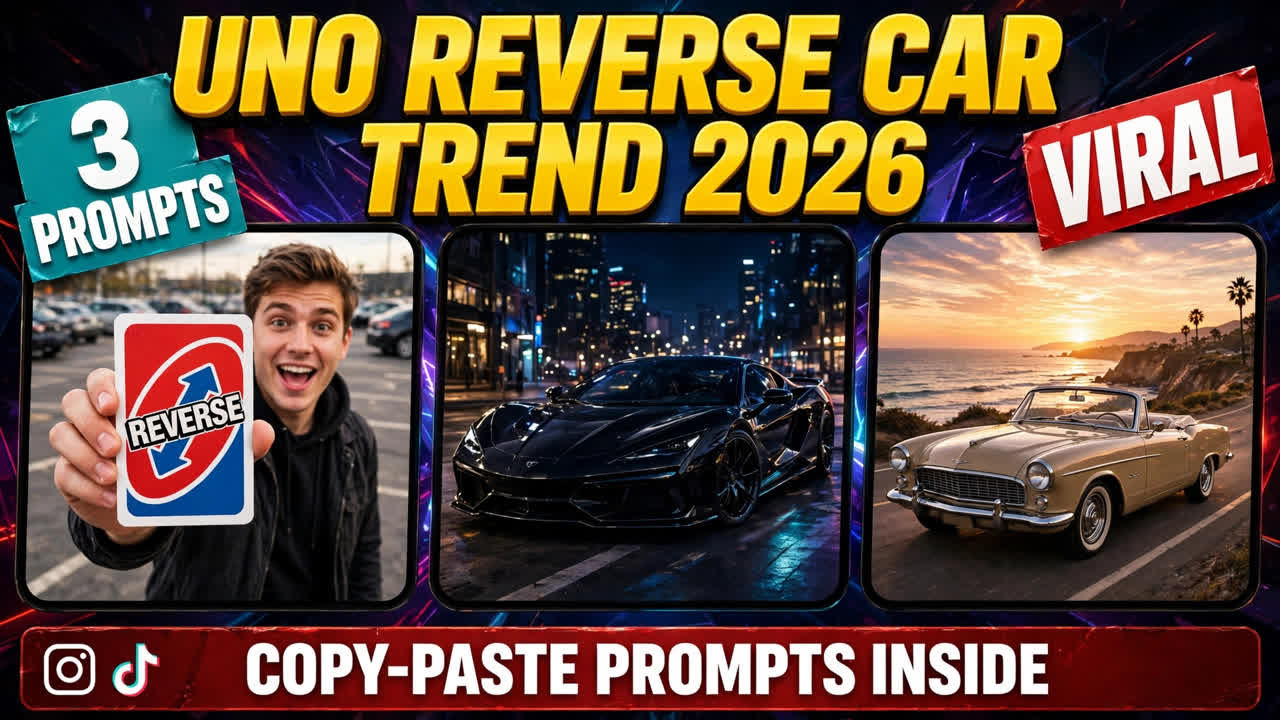
A young man stands in a parking lot — holding a UNO reverse card toward the camera. He flips the card into the air… and in the very next frame, there is no man there — a gleaming luxury sports car stands in his place. Same spot, same angle — only the person has changed into a car.
At first glance, it looks like a magic trick. On second viewing, you realise — it is AI. By the third viewing, you are trying it yourself.
This is the UNO reverse car trend — a viral AI video format where you flip a card and AI morphs you into a car. The original Hindi tutorial reel received 13K likes, and the comments section is full of “give us the prompt, brother!”
Below are 3 original copy-paste prompts for this trend — the viral sports car version, the night superbike version, and the vintage convertible version — each shown with its demo video first, so you can see exactly what each prompt creates.
One honest note: before this, I wrote a fan-cam AI trend post — that was a video-to-video format that puts your face into someone else’s clip. This post is completely different: it is a person-to-car morph transition — you flip a card and become a car. And my older car driving AI video post was different too — in that one you appeared to be driving a car; here you yourself become the car.
What Is the UNO Reverse Car Trend?
The format is simple, which is why it went viral. You put a reference video or your photo into an AI video tool (Google Flow is this trend’s favourite), and paste a detailed prompt that says: keep the scene exactly the same — parking lot, lighting, camera angle — only, when the card flips, the person should be replaced by a car. AI handles the morph in between.
In the viral version, the young man wears a white tank top, flips the card, and a luxury sports car appears in his place — his face and outfit stay consistent through the transition, which is why the illusion looks so clean. The card is not just a prop here — the card is the trigger for the transition. The moment of the flip = the moment of the morph.
The Meme Behind the Trend (Why This Works So Well)
This trend is not just a cool transition — behind it is a years-old internet joke. The UNO reverse card is the symbol of “no u” in meme culture — if someone attacks you, you show the card and say “no, you.” This card has been in the hands of comeback jokes, argument memes and reply guys for years.
Now think: the same card that was always used to mean “your words bounce back onto you” — now literally turns you around and makes you into a car. The punchline of the joke has become visual. That is why this trend is running not only among car lovers, but also on meme pages — people who understand the meme laugh, people who came for the car are impressed. Both audiences in one video.
And one more thing — rewatch value. People watch the morph frame again and again because the brain cannot work out where the transition happened. Every rewatch = a signal to the algorithm that the video is engaging. This loop is what is making this trend so big.
How to Use These UNO Reverse Car Prompts
Step 1: Choose a clear photo of yourself — front-facing, full upper body visible, good lighting. This photo will become the “person” who transforms into a car. A mirror selfie will also work, but a photo taken standing straight is best because body proportions matter in the morph.
Step 2: Open any AI video tool that supports image-to-video or video-to-video (Google Flow, Runway, Kling, Luma, Pika or similar). If you have the original viral clip, use video-to-video mode — the result will look more real. If not, image-to-video will also work; the prompts are written for both.
Step 3: Upload the photo and copy-paste one of the prompts below. Each prompt scripts the card-flip moment, the morph transition, and the final car scene in detail — setup, flip and morph on separate lines so AI understands the sequence.
Step 4: Generate the video and add a punchy transition sound — a whoosh or bass drop on the card flip. Sound makes the morph 10x more satisfying. Without sound, this trend feels half-finished — remember that.
Prompt 1: The UNO Reverse Sports Car
The original viral shot of this trend. Parking lot, white tank top, UNO reverse card flip — and a luxury sports car in your place. This is the format that brought 13K likes. Perfect for a profile reel.
Using AI video generation, create a hyper-realistic vertical video (9:16) of a “UNO reverse card to car” morph transition.
The setup (0-2s): a young man in a white tank top stands in an outdoor parking lot in daylight, holding up a red-and-blue UNO Reverse card toward the camera with a confident grin.
The flip (2-3s): he flips the card into the air with a flourish — the card spins toward the camera, growing larger in frame.
The morph (3-5s): as the spinning card fills the frame, the man seamlessly morphs and transforms into a sleek generic luxury sports car (no brand badges, no logos) parked in the exact same spot. The car gleams in the daylight, same camera angle, same parking lot.
Style: photorealistic, smooth AI morph transition, cinematic daylight, ultra-detailed. Vertical 9:16. Funny, cool, satisfying. No text overlays, no watermarks.
My tip: Card-flip timing is everything — writing “the card spins toward the camera, growing larger in frame” in the prompt makes the morph hide perfectly behind the card. This trick is what makes the transition seamless.
Prompt 2: The UNO Reverse Superbike
The night version. Neon-lit street, reflections on a wet road, card flip — and a stunning superbike in your place, headlights on. This one looks the most cinematic — bike lovers are going crazy for it.
Using AI video generation, create a hyper-realistic vertical video (9:16) of a “UNO reverse card to superbike” morph transition.
The setup (0-2s): a young man in a dark jacket stands on a neon-lit city street at night, wet asphalt reflecting colorful signs, holding up a red-and-blue UNO Reverse card toward the camera.
The flip (2-3s): he flips the card toward the camera — in a flash of neon light, the card spins and fills the frame.
The morph (3-5s): as the card spins, the man transforms into a powerful generic superbike motorcycle (no brand logos) standing in the same spot — headlights glowing bright, neon reflections shimmering on the wet road around it.
Style: photorealistic, cinematic night lighting, dramatic neon glow, smooth morph transition, ultra-detailed. Vertical 9:16. Moody, powerful, electric. No text overlays, no watermarks.
My tip: In night scenes, a “flash of light” transition looks the cleanest — darkness hides small imperfections. If the morph looks a little off, try the night version; it is always more forgiving than the day version.
Prompt 3: The UNO Reverse Vintage Ride
The classy version. Sunset coastal road, summer dress, card flip — and a classic vintage convertible in your place, top down, in front of the sea. Wanderlust vibes; this format is being saved the most on travel pages.
Using AI video generation, create a hyper-realistic vertical video (9:16) of a “UNO reverse card to vintage car” morph transition.
The setup (0-2s): a young woman in a summer dress stands on a scenic coastal road at golden sunset, sea waves glistening behind her, holding up a red-and-blue UNO Reverse card toward the camera with a bright smile.
The flip (2-3s): she flips the card gracefully toward the camera — it spins in the warm sunlight, catching the golden light.
The morph (3-5s): as the card spins, she transforms into a classic vintage convertible car with the top down (generic, no brand badges), parked by the sea in the same spot — golden sunlight gleaming off its chrome, waves in the background.
Style: photorealistic, warm golden-hour cinematography, smooth morph transition, ultra-detailed. Vertical 9:16. Elegant, dreamy, wanderlust. No text overlays, no watermarks.
My tip: Golden-hour light makes the morph naturally soft — better than harsh daylight. Writing “Catching the golden light” makes the card flip itself a beautiful frame.
3 Mistakes That Ruin the Morph (Avoid These)
Mistake 1: Card too small or blurry. This is the most common mistake. The card is the hero of this trend — if it is far from the camera or out of focus, neither the joke will be understood, nor will the transition look clean. Bring the card close to the camera; the red-blue design should be perfectly clear. In the first 2 seconds, the viewer should have read the card.
Mistake 2: Morph at the wrong moment. Many people’s morph happens while the card is still small or too early — then the illusion breaks. Remember the golden rule: the morph should happen in the frame where the card looks biggest, covering the camera completely. This timing is written explicitly in the prompt — do not remove it by editing.
Mistake 3: Real car brand name or badge. If you write “turn me into a Lamborghini”, two problems arise — first, AI cannot reproduce the brand accurately (weird logos appear), second, there can be trademark issues in monetised content. Just write “Generic luxury sports car” — the look will be premium, the risk zero.
5 Tips to Get the Best From This Trend
1. Show the card big and clear. The card is the hero of this trend — if you show a small or blurry card, the joke will not be understood. Bring it close to the camera, the red-blue design should be clear. The meme only works when everyone can see the card.
2. Hide the morph behind the flip. Golden rule of the transition: the morph should happen in the frame where the card looks biggest. Write this timing explicitly in the prompt — “as the spinning card fills the frame” — otherwise AI will morph at the wrong moment. The same timing precision also helps in my fan-cam trend post.
3. Keep the car generic. The prompts say “no brand badges” so the video looks clean and there are no trademark issues. The overall luxury look of the car is enough — nobody needs a close-up of a badge.
4. Sync the sound to the flip. Whoosh on the card flip, bass drop on the morph — these two sounds make the video 10x better. Without sound, the morph feels half-finished. Try trending transition audios. One trick: watch the video on mute — if the morph is still clear without sound, the transition is perfect; then sound is just a bonus.
5. Choose your fantasy car. Sports car, superbike, vintage — or write your dream car in the prompt. “One format, infinite rides” — that is the beauty of this trend. People will tell you their favourite car in the comments, engagement will come on its own. And one idea: make all three versions and post them as a “part 1, 2, 3” series — series accounts grow fast.
FAQs About This Trend
What is this trend?
It is a viral AI video format where you hold up an UNO Reverse card, flip it toward the camera — and morph into a luxury car, superbike, or vintage ride. The prompts in this post give you the exact card-flip-to-car transition instructions.
Which AI tool makes the card-to-car morph?
Google Flow is what the viral tutorial creators used, but any AI video tool with image-to-video or video-to-video support works — Runway, Kling, Luma, Pika, and similar tools. The prompts above are tool-agnostic. You can start on the free tier — make a test video first, and only consider a paid plan if you like it.
Do I need to film the card flip myself?
No — you only need one clear photo. The AI generates the card, the flip, the morph, and the final car scene. That is what makes this trend so easy to join. Yes, if you want to film a real card flip and use it, the result will look even more real — but it is not necessary.
Why does my morph look glitchy?
Usually the timing is off — the morph happens before or after the card fills the frame. Make sure your prompt says the transformation happens “as the spinning card fills the frame.” Also try the night version; darkness hides small glitches. And one more thing — getting a perfect morph on the first try is rare; generate 2–3 and choose the best one.
Is this the same as the fan-cam trend?
No — the fan-cam trend swaps your face into an existing clip (character replacement). This trend is a morph transition: you transform into a car. Different mechanic, different result.
What audio works best?
Whoosh + bass drop synced to the flip is the classic combo. The video already has a built-in beat — the flip — so any trending transition audio that hits on that moment works perfectly. In Reels’ audio browser, search “transition” and pick one from the top trending ones.
How long does it take to generate one video?
It depends on the tool — generally 2 to 10 minutes. Google Flow’s free tier can be a little slow at peak hours. Keep the prompt ready, keep the photo ready — apart from generation time, your actual work is only 5 minutes.
Final Words: Flip the Card, Become the Car
The formula of this trend is simple — one card + one flip + one prompt = your dream ride. Meme too, aspiration too, and rewatch value too.
So why wait? Pick one prompt above, add your photo, and create your card-to-car video today. And for more viral transition formats like this, also see my fan-cam AI trend, Hotel Lobby AI trend and Gas Station Dance trend — the trending collection gets a new format every week. To read more about AI video tools, this Google Flow guide is useful.
About Pinky Chouhan
Hey, my name is Pinky Chouhan, and I live in India. I am passionate about discovering new AI trends, AI video tools, and social media content ideas. I also have experience in video and photo editing using tools like CapCut, Adobe, InShot, and VN. Over time, I have worked on many editing projects and enjoy experimenting with new creative techniques and AI-powered tools. I regularly share the latest AI trends, video prompts, and creative ideas on The Prompt Master. My goal is to provide simple and practical prompts that anyone can use to create engaging AI videos. Most of the prompts published on this website are designed to be easy to use. You can simply copy a prompt, paste it into Google Flow or a compatible AI video tool, and start creating your video. I will continue sharing new AI trends, useful prompts, editing tips, and creative ideas to help creators make better content and stay updated with the fast-changing world of AI.