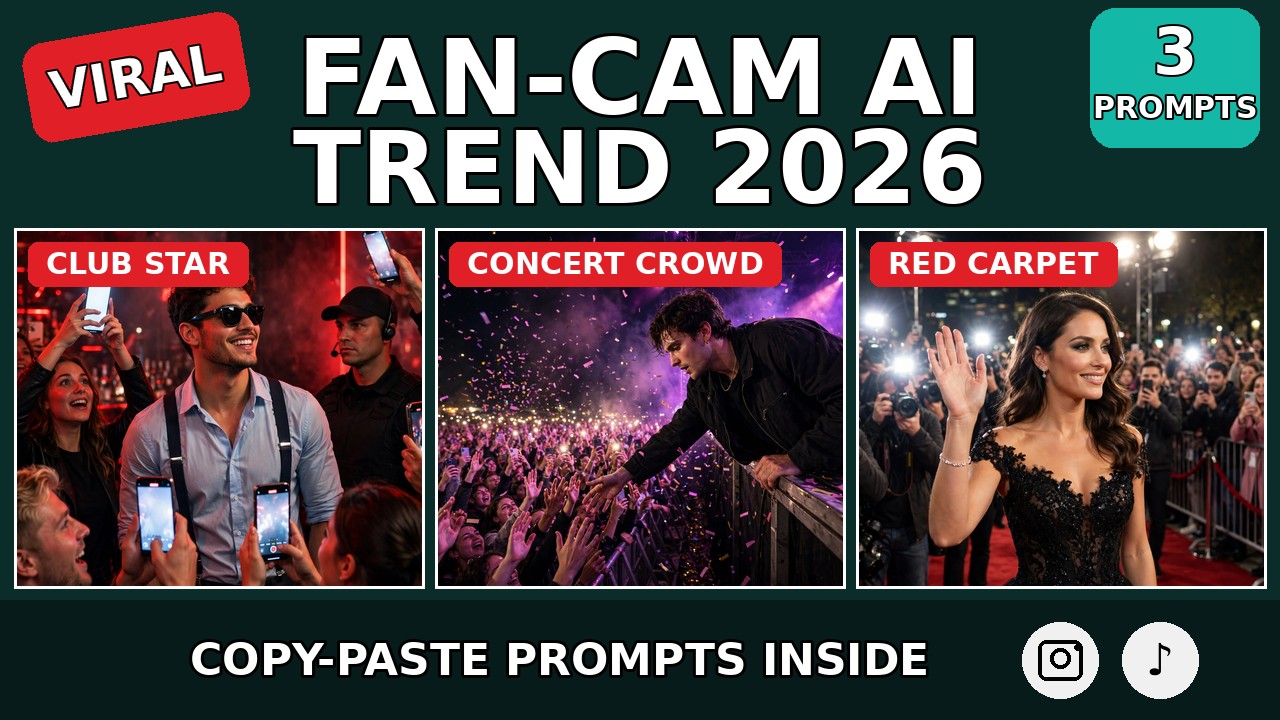
Picture this: a red-lit nightclub, music thumping, and right in the middle of it a guy in sunglasses and suspenders — fans swarming around him, dozens of phones in the air, everyone filming him like he’s the biggest star in the room. Security standing close. Pure main-character moment.
Now imagine that guy is you.
That’s the fan-cam AI trend — the viral format where you take a real viral fan-cam clip and, with one AI video-to-video prompt, swap the star of the clip with yourself. Same club, same crowd, same electric energy — bas chehra tumhara. Creators are posting these and their comment sections are exploding with “ye tum kaise kiya?!”
Below are 3 original copy-paste prompts for the fan-cam AI trend — the viral club fan-cam, the concert crowd moment, and the red carpet arrival — each with a demo video first so you see exactly what the prompt creates.
What Is the Fan-Cam AI Trend?
The original clip that started it all shows a gray-haired man in sunglasses, a light-blue shirt with suspenders, standing in a red-lit club surrounded by fans filming him on their phones — security guards nearby, the whole scene screaming “somebody important just walked in.” The clip went massively viral, and then creators figured out the real trick.
Instead of filming something new, they used video-to-video character replacement: upload the original viral clip into an AI video tool like Google Flow, upload your own photo, and paste a prompt that says “keep everything exactly the same — the club, the lights, the crowd, the camera moves — just replace the central man with the person in my photo.” The AI does the rest. The result looks like you are the star that the whole club is filming.
Why is it exploding right now? The fantasy is instant and the proof is visual. Everyone has imagined what it feels like to walk into a room and have every phone turn toward them. This trend hands you that exact video — no fame required, no filming required, just one photo and one prompt. Tutorial reels explaining the trick pulled 12K likes and 2.6K comments in a single day, and the comment sections are full of people asking for the prompt.
How Video-to-Video Character Replacement Works
Step 1: Pick your base clip. Either save the viral fan-cam clip that’s trending, or use one of the scenes below as your target — the prompts are written so they work both ways.
Step 2: Choose a clear, front-facing photo of yourself with good lighting. This is the face the AI will put on the star — always use your own photo, never someone else’s. That’s the line between a fun trend and a deepfake problem.
Step 3: Open an AI video tool that supports video-to-video or character reference (Google Flow, Runway, Kling, Luma, Pika, or similar). Upload the base clip (or generate the scene) plus your photo.
Step 4: Paste one of the prompts below. Each one tells the AI exactly what to keep identical and what to replace — that “keep everything, change only the person” instruction is the whole magic of this trend.
Step 5: Post it with a trending audio. The classic move: act surprised in your caption like “POV: you walk into the club and everyone already knows you.”
Prompt 1: The Club Fan-Cam Star
The trend’s original viral shot. Red-lit club, sunglasses, suspenders, a wall of phones filming you — ye wohi clip hai jisne trend start kiya. Tumhara chehra, uski stardom. The more animated your “star” acts, the more real it looks.
Using AI video-to-video generation, take the viral fan-cam clip (or recreate this exact scene) and replace the central person with the person from the uploaded photo.

Scene to preserve exactly: a red-lit nightclub — a charismatic man in sunglasses, light-blue shirt and suspenders standing in the middle of the crowd, excited fans all around holding up smartphones filming him, security guards standing nearby, glowing phone screens everywhere, red neon and VIP signs in the background.

The replacement: remove the original central man and insert the person from the uploaded photo in his place — keep their face, hairstyle, and appearance exactly as in the photo, wearing the same light-blue shirt and suspenders. He waves and interacts animatedly with the cheering crowd, confident star energy.

The crowd (keep identical): fans keep filming on their phones, cheering, reaching toward the star. Same positions, same excitement, same red-lit atmosphere.

Camera: handheld fan-cam style, slight natural shake, slow push-in toward the star. Vertical 9:16. Dramatic red club lighting, photorealistic. Electric, funny, main-character energy. No text overlays, no watermarks.
My tip: The “keep identical” instruction is doing 90% of the work here — the more specific you are about what NOT to change (lights, crowd, camera), the less the AI hallucinates and the more seamless the swap looks.
Prompt 2: The Concert Crowd Fan-Cam
The goosebumps version. Stage edge, thousands of phone flashlights, confetti falling — and tum crowd ki taraf jhuk ke wave kar rahe ho like it’s your sold-out show. Ye wala sabse zyada “kaise kiya?!” comments laata hai.
Using AI video-to-video generation, take a concert fan-cam clip (or recreate this exact scene) and replace the central performer with the person from the uploaded photo.

Scene to preserve exactly: a night concert stage edge — a performer leaning toward a massive cheering crowd, thousands of fans holding up smartphones with flashlights on, hands in the air, confetti falling through the frame, purple and pink stage lights cutting through the dark.

The replacement: remove the original performer and insert the person from the uploaded photo — same face and appearance as in the photo, wearing a black stage jacket. They lean toward the crowd, smiling and reaching out a hand as the fans scream.

The crowd (keep identical): the crowd keeps cheering, phone flashlights keep glowing, confetti keeps falling. Same scale, same energy, same stage lighting.

Camera: handheld fan-cam style shot from the crowd’s angle, slight natural shake, confetti drifting through frame. Vertical 9:16. Dramatic concert lighting, photorealistic. Electric, goosebumps, main-stage energy. No text overlays, no watermarks.
My tip: Confetti and flashlights are your realism cheat codes — busy frames hide small AI imperfections. Agar swap thoda off lage, to aise hi high-energy scene choose karo jahan details me nazar na jaaye.
Prompt 3: The Red Carpet Fan-Cam
The glamorous one. Paparazzi flashes popping, fans behind barriers screaming your name, and tum red carpet pe walk karte hue wave kar rahe ho. Award-night energy, zero award needed. Ye version couple/friends ke saath bhi zabardast lagta hai.
Using AI video-to-video generation, take a red carpet fan-cam clip (or recreate this exact scene) and replace the arriving star with the person from the uploaded photo.

Scene to preserve exactly: a glamorous night-event red carpet — bright paparazzi camera flashes popping from the left, cheering fans behind metal barriers on the right filming on smartphones, event spotlights overhead, a glowing step-and-repeat backdrop.

The replacement: remove the original star and insert the person from the uploaded photo walking the carpet — same face and appearance as in the photo, wearing an elegant black outfit. They walk mid-stride, waving and smiling at the fans and cameras with confident celebrity ease.

The crowd (keep identical): paparazzi flashes keep popping, fans keep cheering and filming, barriers and spotlights unchanged. Same glamorous chaos.

Camera: handheld fan-cam style, slight natural shake, slow tracking shot moving alongside the star. Vertical 9:16. Bright event lighting with flash pops, photorealistic. Glamorous, confident, celebrity-arrival energy. No text overlays, no watermarks.
My tip: The wave is everything — “waving and smiling with confident ease” padhke AI natural celebrity body language deta hai. Agar star awkward lage to prompt me “relaxed, practiced red-carpet wave” add karo.
5 Tips to Win the Fan-Cam AI Trend
1. Your photo quality decides everything. Front-facing, sharp, good lighting — AI ko chehra jitna clear milega, swap utna seamless hoga. Blurry ya side-angle photo se result hamesha off lagega.
2. Only ever swap yourself in. Ye trend apni photo ke liye hai. Kisi celebrity, dost, ya stranger ka chehra daalna deepfake territory hai — aur platforms aise videos ko remove bhi karte hain. Apna face, apna fun. Mere October 2026 reels trends post me aur bhi self-insert formats milenge.
3. “Keep identical” ko specific likho. Generic “keep the background same” se kaam nahi chalega — lights, crowd positions, camera movement, sab kuch naam leke lock karo. Specificity = seamlessness.
4. Pick clips with motion, not stillness. Waving, walking, leaning — moving star static star se 10x zyada real lagta hai. Still frame me AI ke chhote flaws pakde jaate hain; motion me sab chhup jaata hai.
5. Caption sells the fantasy. Video aadha kaam karta hai, caption baaki. “POV: the club already knew my name” ya “When the concert is actually yours” — aise captions pe comments aur shares dono aate hain. Same caption psychology mere aura farming trend post me bhi kaam karti hai.
FAQs About the Fan-Cam AI Trend
What is the fan-cam AI trend?
It’s a viral AI video format where you take a trending fan-cam clip — a star surrounded by filming fans — and use video-to-video AI to replace the star with yourself. Everything stays identical (the venue, lights, crowd, camera) except the central person becomes you. The fan-cam AI trend prompts in this post give you the exact “keep everything, change only the person” instructions.
Which AI tool does the face swap in videos?
Google Flow is what the viral tutorial creators used, but any AI video tool with video-to-video or character-reference support works — Runway, Kling, Luma, Pika, and similar tools. The prompts above are written tool-agnostic.
Do I need the original viral clip, or can the AI make the scene?
Both work. Uploading the actual viral clip gives the most authentic result since the crowd and lighting are real footage. But the prompts are also written so the AI can recreate the scene from scratch if you don’t have the clip.
Why does my swapped face look fake?
Three usual reasons: your photo was blurry or side-angled, the lighting in your photo doesn’t match the scene (bright daylight photo into a red-lit club), or the prompt didn’t lock the scene details. Fix the photo first — that’s the cause 80% of the time.
Is this the same as a deepfake?
Not when you use your own face — that’s just creative editing, like a filter. It becomes a deepfake problem only if you put someone else’s face (a celebrity, a friend, a stranger) into the clip without their permission. Keep it to yourself and you’re fine.
What audio should I use?
Trending club or concert audios work best — the video already looks like a real fan recording, so a real crowd-cheering or bass-heavy trending sound completes the illusion. Check what’s trending this week and match the energy.
Final Words: Tonight, You’re the Main Character
The fan-cam AI trend is pure fantasy fulfillment — ek viral clip, ek photo, ek prompt, aur tum woh star jise poora club film kar raha hai. Club ho, concert ho, ya red carpet — formula same hai: sab kuch identical rakho, bas chehra badlo.
Apna fan-cam moment aaj hi banao aur dekho comments me kitne “kaise kiya?!” aate hain. Aur aise hi self-insert viral formats ke liye mera Hotel Lobby AI trend aur Gas Station Dance AI trend bhi dekho — aur trending collection me har week naya format milta rahega. Video-to-video tools ke baare me aur padhna ho to ye Google Flow guide kaam ka hai.
About Pinky Chouhan
Hey, my name is Pinky Chouhan, and I live in India. I am passionate about discovering new AI trends, AI video tools, and social media content ideas. I also have experience in video and photo editing using tools like CapCut, Adobe, InShot, and VN. Over time, I have worked on many editing projects and enjoy experimenting with new creative techniques and AI-powered tools. I regularly share the latest AI trends, video prompts, and creative ideas on The Prompt Master. My goal is to provide simple and practical prompts that anyone can use to create engaging AI videos. Most of the prompts published on this website are designed to be easy to use. You can simply copy a prompt, paste it into Google Flow or a compatible AI video tool, and start creating your video. I will continue sharing new AI trends, useful prompts, editing tips, and creative ideas to help creators make better content and stay updated with the fast-changing world of AI.