
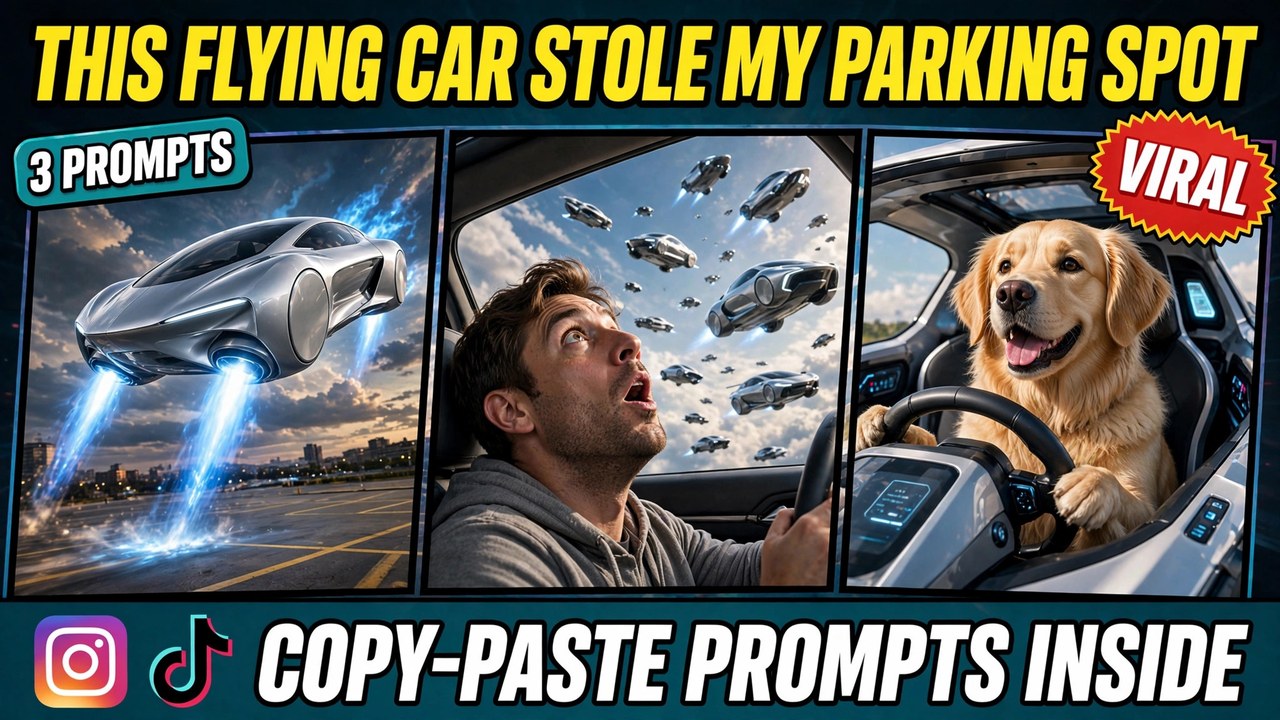
Picture this: you have been circling a packed parking lot for ten minutes. Finally, an empty space appears. You signal, you start to turn in — and then a car drops out of the sky on glowing blue rocket thrusters, slides into your spot, and parks perfectly. You sigh. You get out. And then, completely calm, you climb back into your car as if this were the most normal thing in the world.
That single clip is what people now call the flying car ai trend, and the original reel behind it pulled in around 673K likes. The joke works because it is impossible. Nobody can film a car landing in a parking space on rocket thrusters for real — so the only way to make this video is AI. Below are three original prompts that recreate the effect from scratch — the parking-spot steal, a sky traffic jam, and a pet-pilot version. Each one comes with a demo video first, so you can see exactly what the prompt produces before you use it.
A quick note so this doesn’t get confused with older posts: my Car Driving post was about realistic driving — you behind the wheel on a real road. This one is the opposite: a surreal comedy scene where a car flies. And my UNO Reverse post was a card-to-car morph, not a scene at all. This format is a full little story — setup, surprise, reaction — built around one impossible moment.
What Is This Format?
The idea behind the flying car ai format is simple. You start with a normal, relatable moment — hunting for parking — and then something impossible happens. A futuristic car descends from the sky on thrusters and takes the spot you wanted. The comedy comes from the contrast: an absurd event, and a completely calm reaction to it. The calmer the reaction, the funnier the video.
In the version going viral, the clip is shot from inside the car. You see the driver find the spot, start to pull in, and then watch the flying car descend and park. The driver sighs, gets out, and climbs back in with a deadpan shrug, as if to say: of course. That understated reaction is the whole trick. The prompts below recreate that effect from scratch, in your own words, with your own photo.
So why is this format spreading so fast? Two reasons. First, it is a joke everyone understands — everyone has fought for a parking spot. Second, it is pure AI spectacle. A car landing on rocket thrusters is the kind of shot no phone camera can ever capture, so viewers know they are watching something made, not filmed — and that makes them share it.
How to Make Your Own
Start with a clear photo of yourself in a car. Sitting in the driver’s seat, hands on the wheel, looking ahead. This photo becomes the main character. The cleaner the photo, the more consistent the result.
Open any image-to-video AI tool. Google Flow, Runway, Kling, Luma, Pika, or a similar tool — the prompts below work with all of them. Upload your photo before pasting the prompt, or the face will not stay consistent.
Copy one of the prompts below and paste it in. Each one spells out the scene, the car, the thrusters, and the reaction, so the AI does not have to guess anything. The words “no logos” matter — keep them in, so the car stays generic instead of turning into a real brand’s vehicle.
Generate two or three versions and pick the best. The first try sometimes makes the car look like a plane or the thrusters look like fireworks. Once you have a version you like, add a short, deadpan sound effect — a sigh, a soft “of course” — since sound sells the joke.
Prompt 1: The Parking Spot Steal
The original viral shot. You in your car in a packed lot, an empty space ahead — and then a futuristic car descends on blue rocket thrusters and takes it. You sigh, get out, and climb back in calmly. This is the version that racked up the likes, and it is the one people will recognize instantly.
Using AI video generation, create a photorealistic cinematic vertical video (9:16) of a surreal parking-lot comedy scene, based on the uploaded reference photo.

The scene: the person from the reference photo sits in the driver’s seat of their car in a crowded parking lot, looking relieved as an empty parking space appears ahead. Keep their face, facial features, and hairstyle exactly as in the reference photo.

The surprise: a sleek silver futuristic car with NO logos descends from the sky on glowing blue rocket thrusters and slides perfectly into the empty space, parking neatly. The thrusters glow bright blue and kick up a little dust as it lands.

The reaction: the driver sighs, gets out of the car, pauses for a beat, then climbs calmly back in with a deadpan shrug, as if this were completely normal.

Style: photorealistic, natural daylight, smooth camera work, comedic timing, ultra-detailed. Vertical 9:16. Playful and deadpan. No text overlays, no watermarks, no logos.
The reaction is the joke. If the driver screams or panics, the clip turns into an action scene and the comedy dies. The calmer the sigh and the slower the shrug, the funnier the video. If your first attempt feels too dramatic, regenerate and ask for a calmer, more deadpan reaction.
Prompt 2: The Sky Traffic Jam
The bigger version. You look up from your car and the sky is full of flying cars, all stuck in an aerial traffic jam — one hovering right above you, thrusters glowing, going nowhere. It is the same joke, scaled up to a whole sky.
Using AI video generation, create a photorealistic cinematic vertical video (9:16) of a sky traffic jam, based on the uploaded reference photo.

The scene: the person from the reference photo sits in the driver’s seat of their car in a parking lot and looks up through the windshield. Keep their face, facial features, and hairstyle exactly as in the reference photo.

The sky: dozens of sleek futuristic cars with NO logos hover above in a dense aerial traffic jam, stacked in layers, thrusters glowing blue and orange. One car hovers directly above, barely moving. A few drivers lean out of their windows, just as stuck as everyone on the ground.

The reaction: the driver watches for a moment, then gives a small, knowing nod, as if to say: of course the sky has traffic too.

Style: photorealistic, dusk light, cinematic wide framing, comedic timing, ultra-detailed. Vertical 9:16. Playful and deadpan. No text overlays, no watermarks, no logos.
Layers sell the scale. A single row of flying cars looks like a parking lot in the air. Stacked layers — near, mid, far — make the sky feel genuinely jammed. If your result looks sparse, ask for more cars and more depth before you change anything else.
Prompt 3: The Pet Pilot
The funny variant. A golden retriever sits in the driver’s seat of a small flying car, paws on the wheel, hovering above the parking lot like it owns the sky. No human needed — the dog is the whole joke, and it is the version most likely to end up on a pet page.
Using AI video generation, create a photorealistic cinematic vertical video (9:16) of a pet pilot scene.

The scene: a happy golden retriever sits upright in the driver’s seat of a small futuristic flying car with NO logos, front paws resting on the steering wheel, tongue out, ears flopping gently in the wind. The car hovers a few feet above a parking lot.

The moment: the dog glances around confidently, as if it has done this a thousand times, while the little car bobs gently in place. Below, a few parked cars sit completely still, which makes the hovering even funnier.

Style: photorealistic, bright daylight, playful and charming, ultra-detailed. Vertical 9:16. Lighthearted and cute. No text overlays, no watermarks, no logos.
The dog’s confidence is the joke. A worried dog is just a dog in a car. A dog that looks completely at ease — tongue out, ears flopping, totally unbothered — is a pilot. If your first attempt looks anxious, regenerate and ask for a relaxed, happy expression.
3 Mistakes That Ruin the Scene
Letting the car become a real brand. The moment the flying car shows a real manufacturer’s badge or a recognizable model shape, the video stops being a joke and starts looking like an ad — and it can get flagged. The prompts above say “no logos” for a reason. Keep that direction in.
Overacting the reaction. Screaming, jumping, or wild gestures kill the comedy. This format runs on deadpan: the more impossible the event, the calmer the reaction should be. A sigh and a shrug beat a scream every time.
Making the thrusters look like fireworks. If the thruster glow is messy or explosive, the car looks like it is crashing, not landing. Clean, steady blue glow from the thrusters reads as controlled flight. If your first attempt looks like an explosion, regenerate and ask for a smooth, steady glow.
A Few Tips That Actually Help
Shoot it from inside the car. The driver’s point of view is what makes the audience feel the steal. A wide outside shot turns it into a spectacle; the inside shot turns it into your story. Keep the camera in the car for the first prompt.
Keep the parking lot crowded. A packed lot is what makes the stolen spot matter. An empty lot makes the whole joke pointless — there are ten other spots. Crowd the lot in the prompt, and the steal lands.
Let the sound do half the work. A soft thruster hum, a sigh, a car door closing — small sounds sell the scene more than music does. If your tool supports audio, keep it minimal and let the joke breathe.
Post the three as a series. Parking-spot steal, sky traffic jam, pet pilot — three videos, three days, one series. Series accounts tend to grow faster because people follow to catch the next part. Drop a hint about the next part in each caption.
Use your own photo only. Putting someone else’s face into a video without permission is a deepfake problem, and platforms remove such content. Your face, your parking spot.
Frequently Asked Questions
What is this format, exactly?
It is a surreal comedy video: a normal parking moment interrupted by an impossible event — a futuristic car descending on rocket thrusters to steal a parking spot — followed by a deadpan reaction. The prompts in this post give you the exact scene, car, and reaction instructions.
Which AI tool makes these videos?
Any image-to-video tool works — Google Flow, Runway, Kling, Luma, Pika, and similar tools. The prompts above are tool-agnostic. Start on a free tier, make a test video, and only think about a paid plan if you like the results.
Do I need a video or a photo to start?
A photo is enough. Upload one clear photo of yourself in a car, paste the prompt, and the tool generates the whole scene. A short starting video can work too, but a sharp photo gives the most consistent results.
Why does my car look like a real brand’s car?
Usually the “no logos” direction was dropped, or the tool defaulted to a familiar design. Paste the full prompt as written — the no-logos line is what keeps the car generic. If a result still shows a badge, regenerate rather than posting it.
Is this the same as the Car Driving post?
No. That post was about realistic driving — you behind the wheel on a real road. This is a surreal comedy scene where a car flies and steals a parking spot. Different idea, different result.
Is it okay to use someone else’s photo?
No — always use your own photo. Putting someone else’s face into a video without permission is a deepfake problem, and platforms remove such content.
How long does it take to generate one video?
It depends on the tool — usually 2 to 10 minutes. Keep your prompt and photo ready, so apart from generation time your actual work is about five minutes. For the best result, generate two or three versions and post the strongest one.
Final Words
The formula is simple: one parking spot, one car from the sky, one very calm reaction. If you want to try the flying car ai trend yourself, pick a prompt above, upload your photo, and make your video today.
And if you like car formats, check out my Car Driving and UNO Reverse posts too — the trending collection gets a new format every week. If you want to read more about AI video tools, this Google Flow guide is useful.
About Pinky Chouhan
Hey, my name is Pinky Chouhan, and I live in India. I am passionate about discovering new AI trends, AI video tools, and social media content ideas. I also have experience in video and photo editing using tools like CapCut, Adobe, InShot, and VN. Over time, I have worked on many editing projects and enjoy experimenting with new creative techniques and AI-powered tools. I regularly share the latest AI trends, video prompts, and creative ideas on The Prompt Master. My goal is to provide simple and practical prompts that anyone can use to create engaging AI videos. Most of the prompts published on this website are designed to be easy to use. You can simply copy a prompt, paste it into Google Flow or a compatible AI video tool, and start creating your video. I will continue sharing new AI trends, useful prompts, editing tips, and creative ideas to help creators make better content and stay updated with the fast-changing world of AI.