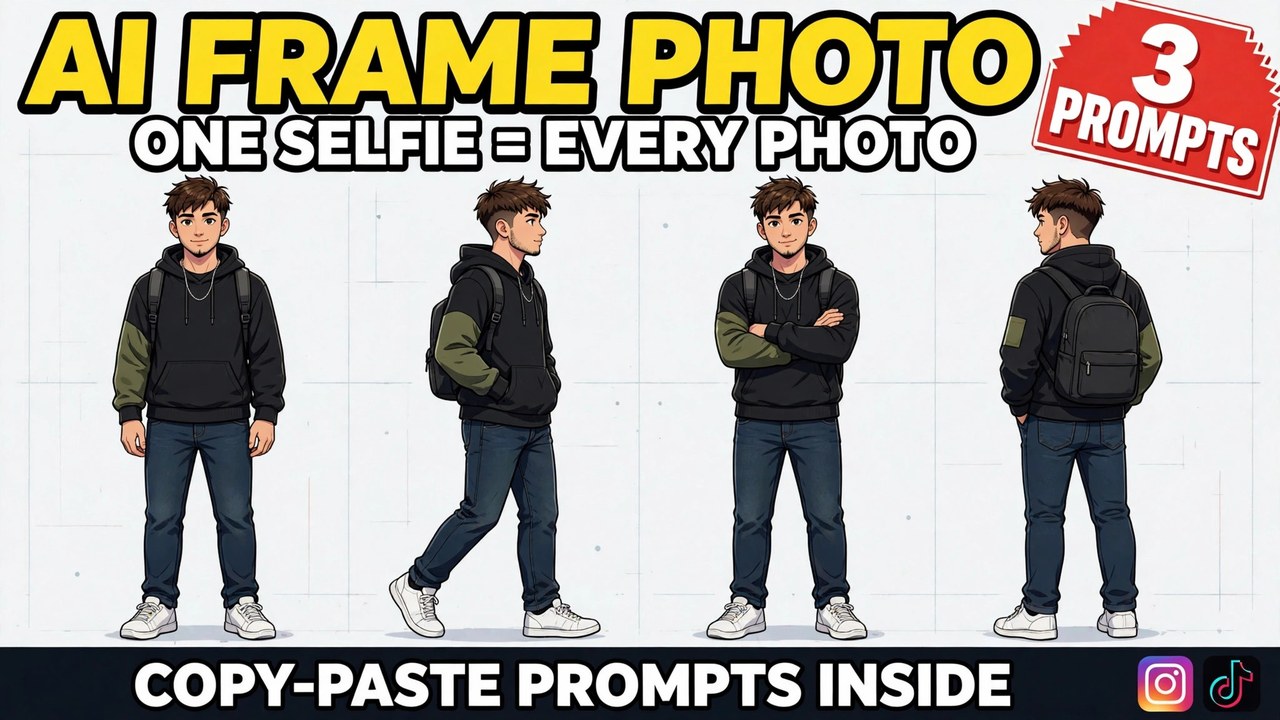
Every AI photo format has the same hidden problem: the person changes. You generate a great portrait on Monday, a completely different face shows up on Tuesday, and by Friday your own feed looks like it belongs to four cousins. The format spreading through Instagram tutorials right now exists to fix exactly that. One tutorial walking through it pulled in around 12K likes and more than 6,300 comments — and most of those comments were people asking the same question: how do I make one for myself?
The idea is borrowed from animation studios. Before a character appears in a single scene, the studio draws a character sheet — the same character from the front, the side, the back, in a row of poses and expressions — so every artist draws the same person every time. The ai frame photo format does the same thing with your selfie. You generate the sheet once, and from then on the sheet becomes your reference: upload it with any new prompt, and the tool has your face, your hair and your build pinned down before it draws anything.
A quick note so this doesn’t get confused with older posts: my AI Multiverse Persona post turned one selfie into a grid of different identities — and the grid itself was the finished post. This sheet is not a finished post. It is a tool you make once and keep using. And my AI Cartoon Pose post was an illustrated six-panel story. This one is realistic, not illustrated, and it tells no story — it is a reference file, closer to a passport photo session than a comic.
What Is This Format?
An ai frame photo is a single image that works like an identity card for AI tools. On one clean sheet, the same person appears again and again — full-body poses from several angles, or a row of close-up expressions — always with the same face, the same hairstyle and the same outfit. Nothing about it is decorative. Every panel exists so that a future generation can copy it.
That is what separates this format from every poses collage that came before it. A collage is made to be posted. A character sheet is made to be used. You will rarely post the sheet itself. You will post the café portrait, the travel photo, the festival picture — all generated later, all recognisably you, because every one of them started from the sheet.
How to Make Your Own
Start with one honest selfie. Front-facing, face fully visible, plain clothes, no sunglasses, no heavy filter. The sheet can only lock in what it can see, and a busy patterned outfit is the first thing that drifts between poses. A plain t-shirt is not a style failure here — it is the correct equipment.
Open any AI image tool that accepts a reference photo. Gemini, ChatGPT and similar tools all work. Upload the selfie first, then paste one of the prompts below.
Generate the whole sheet as one image. This rule matters here even more than usual. Eight poses generated separately are eight slightly different people, and a reference sheet with eight different people on it references nobody. One image, one character, every time.
Then use the sheet as a reference — this is the whole point. When you want a new photo, upload two things: your original selfie and the finished sheet. Then describe only the new scene — the place, the light, the mood — and tell the tool to keep the identity from the references. The sheet does the remembering, so your prompt does not have to. Prompt 3 below shows this two-step workflow in full.
Prompt 1: The Full Character Sheet
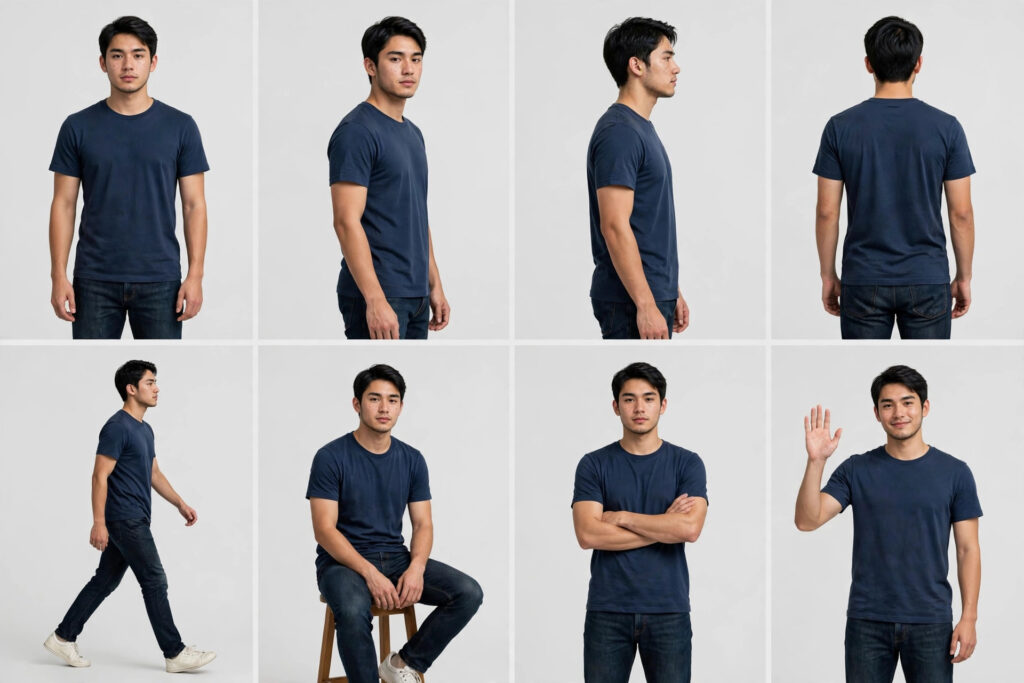
The main sheet, and the one to make first. Eight full-body poses — front, three-quarter, side and back views, plus walking, sitting, arms crossed and a wave — on a plain background, in one locked outfit. This is the sheet that anchors full-body scenes: street photos, travel shots, outfit posts, anything where more than your face is in the frame.
Using AI image generation, create a single character reference sheet from the uploaded selfie.

The person: redraw the person from the uploaded selfie exactly — same face, facial features, hairstyle, skin tone and body build. Keep ONE outfit for the whole sheet: a plain navy-blue t-shirt, dark jeans and white sneakers, unchanged in every pose.

The sheet: show the same person full-body in exactly 8 poses on a plain light-grey background, arranged in two rows of four:
1. Standing front view, arms relaxed
2. Three-quarter view
3. Side profile
4. Back view
5. Walking mid-stride
6. Sitting on a stool
7. Arms crossed, confident
8. Waving hello

Style: photorealistic, even studio lighting, consistent scale across all poses, clean character-sheet layout. No text, no labels, no watermarks.
The back view earns its place. It looks like the least useful panel on the sheet, and it is the one creators end up grateful for — any scene shot from behind, walking away, looking at a view, falls apart without it. Keep all eight poses even if two of them feel like filler today.
Prompt 2: The Expression Sheet
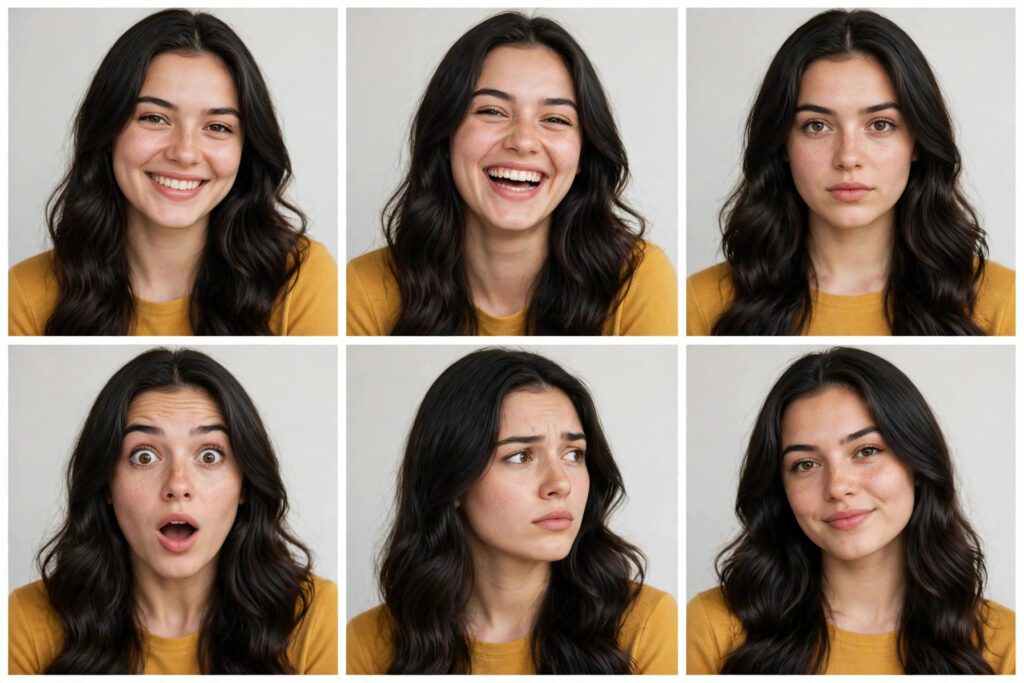
The close-up companion. Six expressions of the same face — smile, laugh, serious, surprised, thoughtful, confident — with the hairstyle and lighting held steady across every panel. Where the full sheet anchors scenes, this one anchors faces: thumbnails, reaction-style photos, profile pictures, anywhere your expression is the whole image.
Using AI image generation, create a single expression reference sheet from the uploaded selfie.

The person: redraw the person from the uploaded selfie exactly — same face, facial features, hairstyle and skin tone. Head-and-shoulders framing in every panel, the same top, and the same soft studio lighting throughout.

The sheet: show the same face in exactly 6 expressions, arranged in two rows of three:
1. Warm smile
2. Laughing
3. Serious and calm
4. Surprised, eyebrows raised
5. Thoughtful, looking slightly to the side
6. Confident, small assured smile

Style: photorealistic, plain light background, consistent framing and lighting in every panel, clean expression-sheet layout. No text, no labels, no watermarks.
Thumbnails are where this sheet pays rent. A surprised face that is actually your face, a laugh that matches your other photos — creators usually fake these with stock reactions or skip them entirely. Six expressions on one sheet means the right one is always in the drawer, already on-model.
Prompt 3: The Scene-Ready Sheet + First Scene
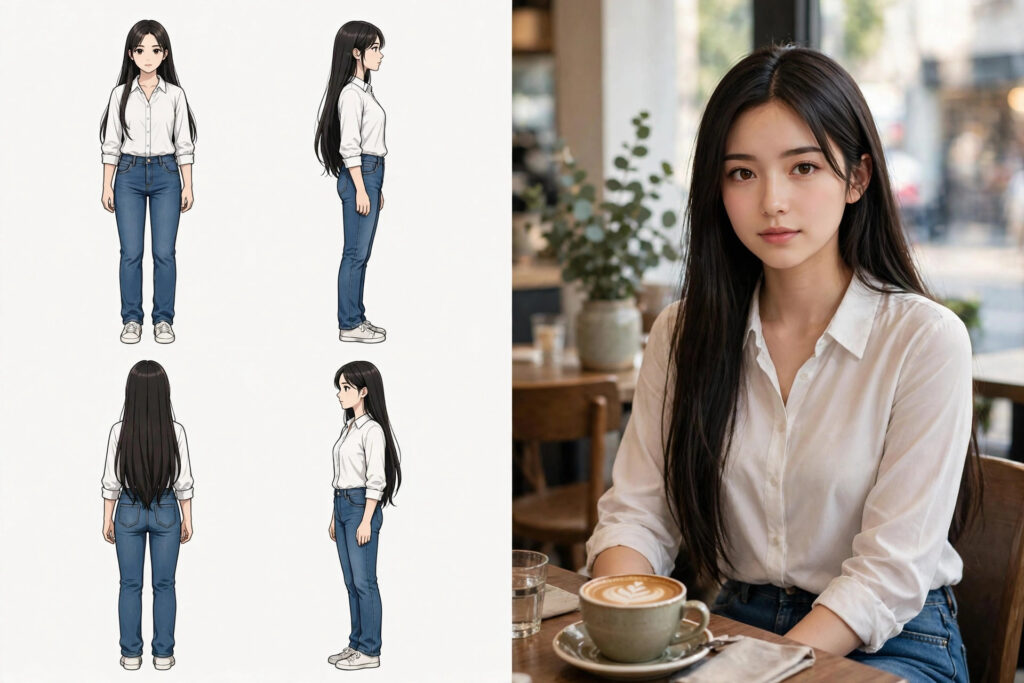
The workflow sheet — smaller, simpler, and built for one job: going straight into a scene. It pairs a compact four-pose sheet with the exact second-step prompt that places you into your first photograph, a café portrait. In the example above, the left half is the sheet and the right half is the scene built from it. Make this one and you have not just made a sheet — you have used it.
Step 1 — make the sheet. Using AI image generation, create a simple character reference sheet from the uploaded selfie: the same person — same face, facial features, hairstyle, skin tone and body build — in exactly 4 neutral full-body poses (front view, three-quarter view, side view, back view), wearing a plain white shirt and blue jeans, on a plain light background. Photorealistic, even studio lighting, consistent scale. No text, no labels, no watermarks.

Step 2 — use the sheet. Upload BOTH the original selfie and the finished sheet as reference images, then paste this: “Using the attached character sheet and selfie as the identity reference, place this exact person — same face, same hairstyle, same white shirt and blue jeans — sitting at a small cafe table with a cup of coffee, soft window light, photorealistic cafe portrait. Keep the identity locked: do not change the face, the hair or the outfit.”
Read step 2 again — that sentence is the format. “Using the attached sheet as the identity reference” is the line that turns a picture of poses into a working tool. Once it works for a café, it works for anything: swap the café sentence for a beach at sunset, a mountain road, a festival crowd, and keep everything else identical.
3 Mistakes That Ruin the Sheet
Wearing a busy outfit in the selfie. Prints, logos and layered accessories are the first things to drift from panel to panel — the front view has your shirt, the side view has a similar shirt, and the sheet quietly stops matching itself. Plain clothes feel boring and work perfectly. The sheet is equipment, not a fashion post.
Building the sheet pose by pose. It feels easier to generate one pose at a time and assemble them, and it produces a sheet of strangers — same brief, slightly different person in every frame. A reference that disagrees with itself is worse than no reference. One generation, one image, even if it takes two or three attempts to get a consistent one.
Skipping the plain background. A sheet generated against a park, a room or a street scene bakes that scenery into every panel, and the tool then drags pieces of it into your future photos. The light, empty background is what makes the sheet portable. Boring background, useful sheet.
A Few Tips That Actually Help
Save the sheet like a master file. Full resolution, uncompressed, somewhere you will not lose it. Every future photo you generate from it inherits its quality, so a small, re-saved, screenshot-of-a-screenshot version quietly taxes everything downstream.
Make both sheets in one sitting. The full-body sheet and the expression sheet take minutes each, and together they cover almost every photo you will ever ask for — scenes from the first, faces from the second. Doing them on the same day, from the same selfie, keeps the two sheets in perfect agreement.
One sheet per person for group photos. Group scenes drift fastest of all, because the tool is juggling several identities at once. A sheet for each person — uploaded together, named clearly in the prompt — is the difference between a group photo of your actual friends and a group photo of their approximate relatives.
Refresh the sheet when you change. New haircut, lost the beard, different glasses — the sheet describes who you were, and your new photos will keep pulling the old look back until you remake it. A fresh sheet takes five minutes and saves an argument with every generation after.
Frequently Asked Questions
What is a character sheet, exactly?
It is one image showing the same person in several poses or expressions on a clean background, made to be used as a reference. Animators have used them for decades to keep a character consistent. The AI version does the same job for your own photos: generate the sheet once, then attach it whenever you generate a new picture of yourself.
Which AI tool makes these sheets?
Any AI image tool that accepts a reference photo — Gemini, ChatGPT and similar tools. The prompts in this post are tool-agnostic. Start on a free tier, make one sheet, and test it in a scene before you think about any paid plan.
Why does my sheet show slightly different people?
Almost always one of three causes: the poses were generated separately instead of as one image, the selfie was filtered or side-angled, or the outfit was busy enough to drift. The fix is a sharp front-facing selfie, plain clothes, and the full prompt pasted back in — character-lock lines included.
How do I actually use the sheet in a new photo?
Upload two references — your original selfie and the sheet — then describe only the new scene, and state plainly that the references lock the identity. Prompt 3 above contains the exact wording. The sheet shows the tool your angles and expressions; the selfie anchors the fine facial detail.
Can I change my outfit in the later scenes?
Yes. The sheet locks your face, hair and build — the outfit in a new scene is yours to describe. Just say the new outfit clearly in the scene prompt, and keep the identity lines untouched. Many people keep one everyday sheet and describe festive or formal outfits scene by scene.
Is it okay to use someone else’s photo?
No — not without their clear permission. A character sheet is a reusable copy of someone’s identity, which makes permission more important here, not less. Use your own selfie, or a friend’s photo they gave you for exactly this purpose. Never build a sheet from a stranger’s or a celebrity’s photos.
Do I need the full-body sheet or the expression sheet?
Both do different work. The full-body sheet anchors scenes — travel, street, outfit photos. The expression sheet anchors faces — thumbnails, reactions, portraits. If you only make one, start with the full-body sheet; it is the one new scenes reach for most. Making both takes one sitting and covers nearly everything.
Final Words
Most AI photo trends give you one picture. This one gives you the thing every picture after it will be built from: a single ai frame photo sheet with your identity pinned down, ready to walk into any scene you can describe. Make it once, keep it safe, and let it do the remembering.
If you enjoy formats built from one selfie, my AI Multiverse Persona and AI Cartoon Pose posts take the same starting photo in completely different directions — and the trending collection gets a new format every week. If you want to explore AI image tools further, this Google Flow guide is a good place to start.
About Pinky Chouhan
Hey, my name is Pinky Chouhan, and I live in India. I am passionate about discovering new AI trends, AI video tools, and social media content ideas. I also have experience in video and photo editing using tools like CapCut, Adobe, InShot, and VN. Over time, I have worked on many editing projects and enjoy experimenting with new creative techniques and AI-powered tools. I regularly share the latest AI trends, video prompts, and creative ideas on The Prompt Master. My goal is to provide simple and practical prompts that anyone can use to create engaging AI videos. Most of the prompts published on this website are designed to be easy to use. You can simply copy a prompt, paste it into Google Flow or a compatible AI video tool, and start creating your video. I will continue sharing new AI trends, useful prompts, editing tips, and creative ideas to help creators make better content and stay updated with the fast-changing world of AI.