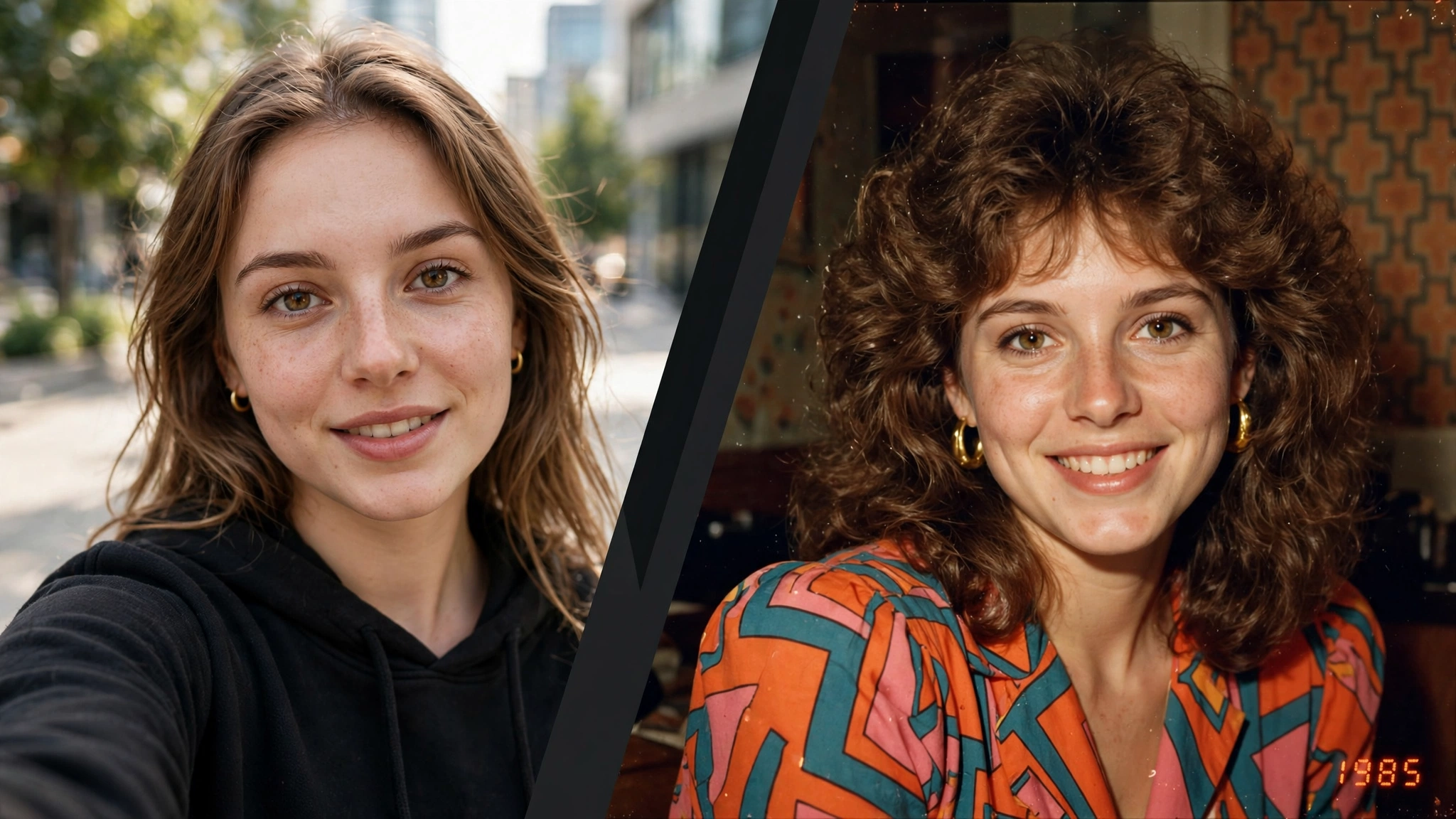
Last week my Instagram feed did something strange. Every second post looked like it was pulled out of an old family album — big hair, warm faded colors, and a little orange date stamp in the corner saying 1985. At first I thought everyone had suddenly discovered their parents’ photo boxes. Then I realized: this is the 80s AI photo trend, and it’s everywhere right now.
I tried it myself the same evening. Uploaded a normal selfie, typed in a prompt, and two minutes later I was staring at a photo that looked exactly like something my mom would have framed in the living room back in the day. My friends genuinely asked which one of my relatives it was. That’s when I knew this trend deserved a proper post.
So here are 3 cinematic prompts I tested myself for the 80s AI photo trend. Each one creates a different retro mood — a warm family-album portrait, a glamorous studio shot, and a candid street photo. Just copy, paste, upload your photo, and watch the magic happen.
What Is the 80s AI Photo Trend?
The idea is beautifully simple. You upload your current photo to an AI image tool like ChatGPT or Gemini, and ask it to reimagine you as if the photo was taken around 1985. The AI keeps your face recognizable but changes everything else — your hairstyle, clothes, the background, even the way the “camera” captured the light.
What makes it different from a regular vintage filter is the detail. A filter just fades the colors. This trend rebuilds the entire photograph: the film grain, the direct flash on the skin, the soft focus, the slightly off colors of old analog film, and that iconic red-orange date stamp in the corner. The result doesn’t look edited — it looks found, like a real memory from forty years ago.
That’s exactly why it’s going viral. People aren’t just posting pretty pictures; they’re posting little time machines. And the comments are always the same: “Wait, is this actually you?!”
The trend has even made mainstream news — India Today recently covered how the 80s AI photo trend is giving the internet a serious retro makeover.
How to Use These 80s AI Photo Trend Prompts (4 Simple Steps)
Step 1: Pick a clear, front-facing photo of yourself with good lighting. A simple selfie works perfectly — avoid sunglasses or heavy shadows on the face.
Step 2: Open ChatGPT, Gemini, or any AI image tool that accepts photo uploads, and upload your picture.
Step 3: Copy one of the 80s AI photo trend prompts below and paste it along with your photo. Don’t change the face-preservation lines — they’re what keep you looking like you.
Step 4: Wait a minute or two, download the result, and share it. If the face looks slightly off, try again with a clearer original photo — that fixes it 9 times out of 10.
Prompt 1: The Classic 1985 Family Album Portrait (80s AI Photo Trend)
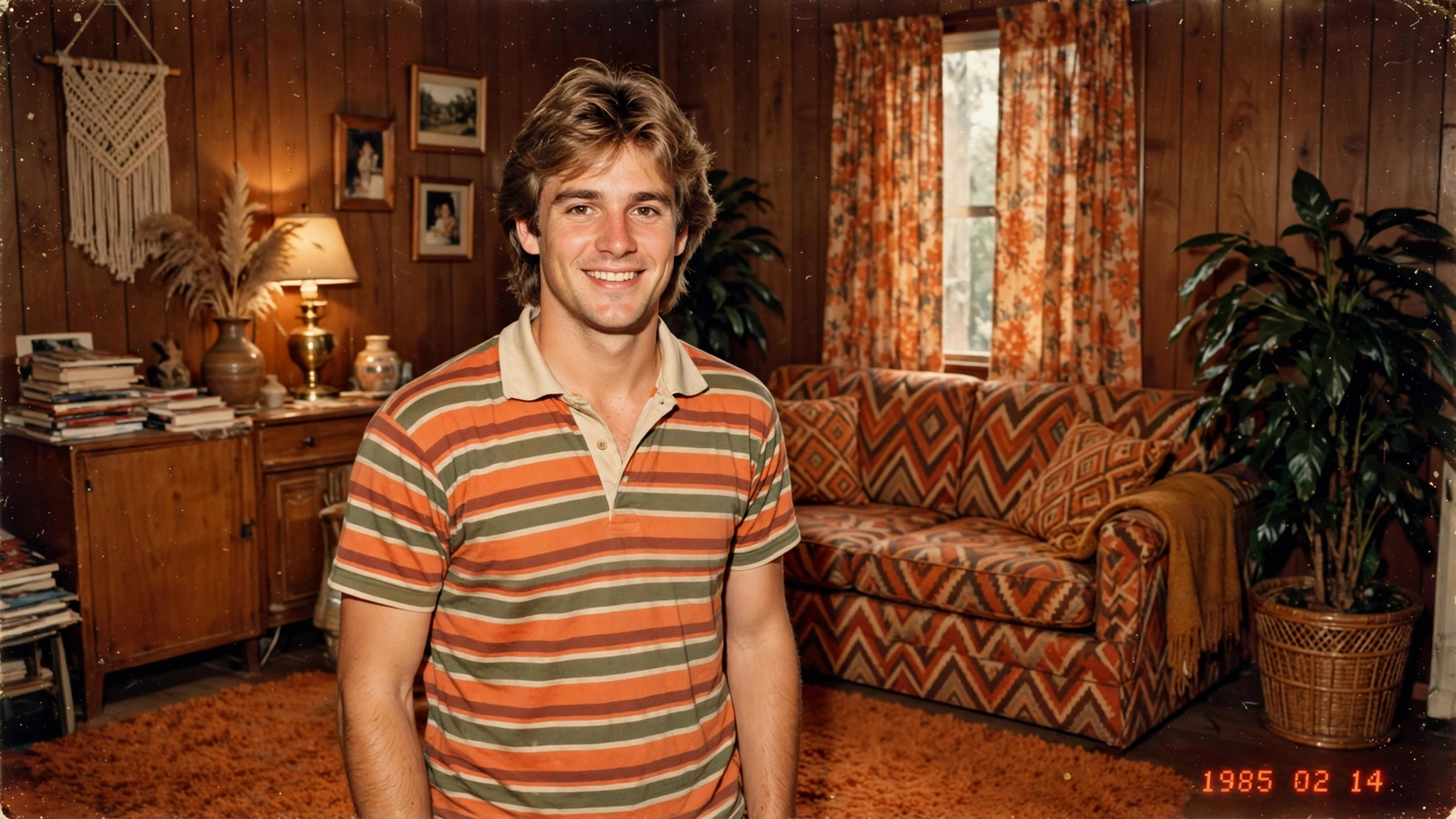
This is the one that started it all for me. It creates that warm, slightly imperfect family photograph — the kind with wood-paneled walls, a patterned sofa, and everyone smiling just a little too hard for the camera. It works beautifully for both men and women because the styling stays natural and believable.
Using my uploaded photo, show me what I would have looked like in a family photograph taken around 1985. Preserve my identity completely — same face, facial features, skin tone, age, and recognizable appearance, no beautification or face changes.
Reimagine my hair with authentic mid-1980s styling (voluminous, feathered, or softly permed as suits the photo), and dress me in period-accurate 1980s casual clothing like a striped polo shirt or a cozy knit sweater. Place me in a warm 1980s living room with wood-paneled walls, a patterned sofa, and soft tungsten lamp light.
Make it feel like a genuine scanned 1985 family photograph: visible analog film grain, slightly faded warm colors, soft direct flash on the face, gentle vignette at the edges, and a small red-orange “1985” date stamp in the lower right corner. No modern objects, no modern text, no watermarks.
My tip: This prompt gives the most “real” results when your original photo has a genuine smile. The AI carries your expression into 1985, and a natural smile sells the whole illusion.
Prompt 2: The 1985 Studio Glamour Portrait
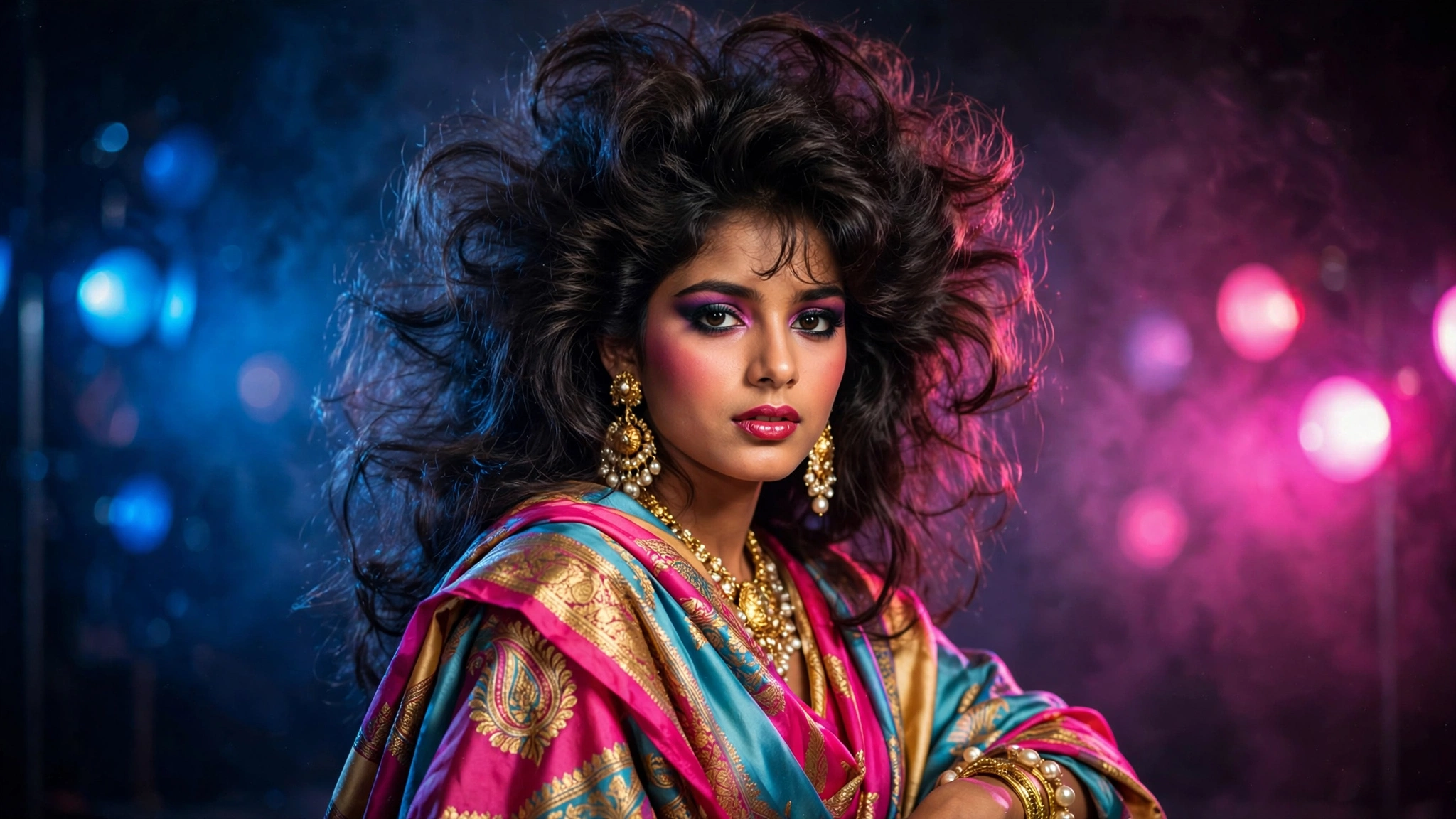
If the family photo is warm and cozy, this one is pure drama. Think vintage magazine cover — big teased hair, bold styling, colored studio lights glowing in the background. I made one of these for my sister and she immediately set it as her profile picture. It has that main-character energy that performs incredibly well as a post or reel cover.
Using my uploaded photo, transform me into a glamorous 1980s studio portrait from around 1985. Preserve my identity completely — same face, facial features, skin tone, and recognizable appearance.
Give me bold, voluminous mid-1980s hair (big, teased, full of body) and striking period styling: expressive silhouette clothing with shoulder emphasis, statement earrings, and confident 80s-era makeup that still looks like me. Set the scene in a professional 1985 photo studio with dramatic blue and magenta gel lighting glowing softly in the dark background.
Render it like an authentic 1985 magazine portrait: cinematic soft-focus glow on the skin, rich saturated colors, subtle analog film grain, gentle halation around the highlights, shallow depth of field. Premium editorial quality, ultra detailed. No modern objects, no text, no watermarks.
My tip: Ask for a second variation with a different background color (deep purple or teal work great). You’ll get two completely different moods from the same prompt, and you can post both as a carousel.
Prompt 3: The Candid 1985 Street Photo
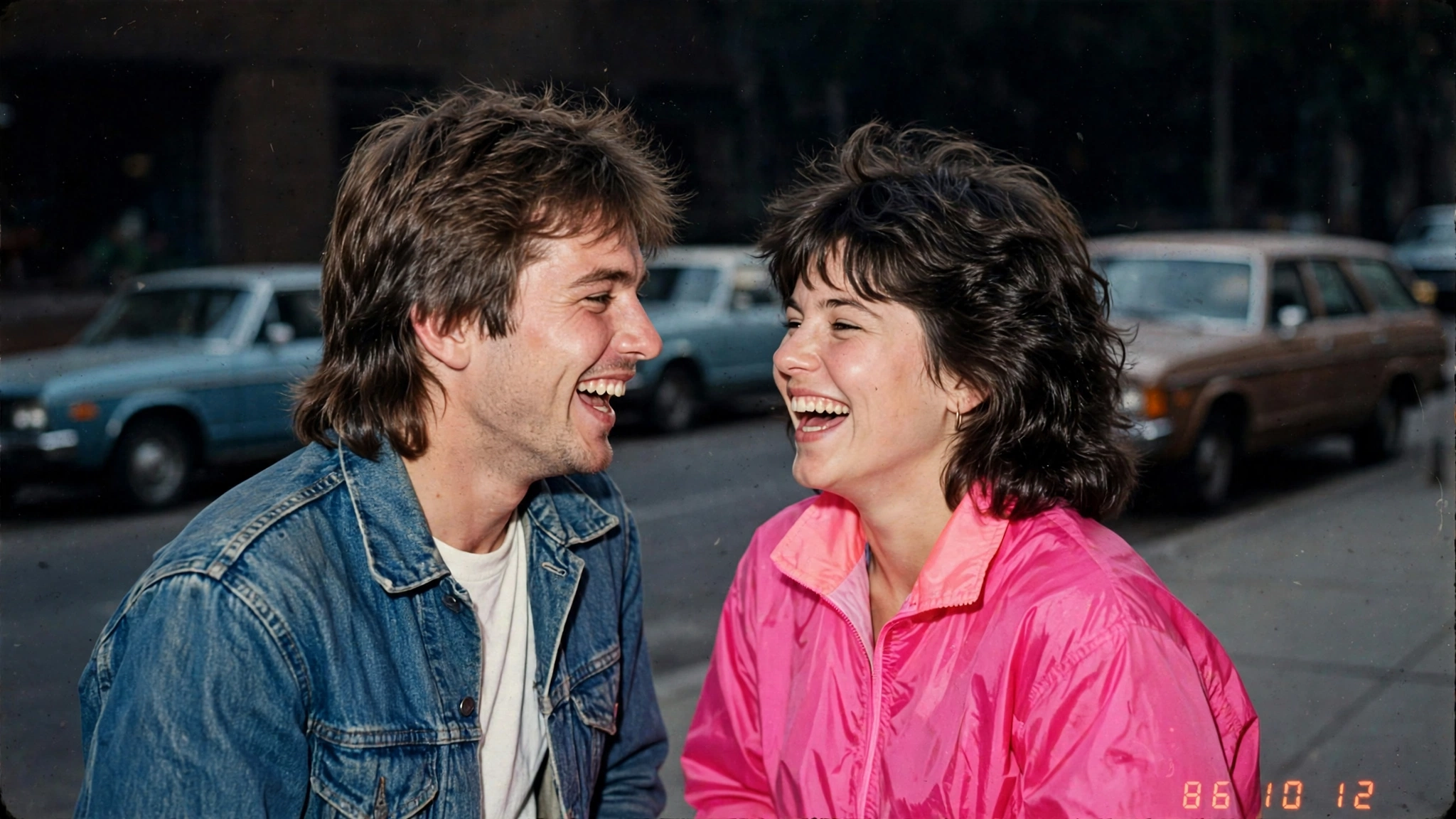
This is my personal favorite, and the one that gets the most “no way this is AI” reactions. Instead of a posed portrait, it creates a candid moment — you laughing on a street, caught mid-conversation, with vintage cars and old storefronts behind you. Candid photos always feel more authentic than posed ones, and that rule holds perfectly for AI retro photos too.
Using my uploaded photo, place me in a candid street photograph taken around 1985, as if a friend snapped it mid-moment. Preserve my identity completely — same face, facial features, skin tone, age, and recognizable appearance.
Style my hair and clothing in authentic mid-1980s street fashion (denim jacket, windbreaker, high-waisted jeans, or a casual 80s outfit that fits the scene). Show me laughing naturally, mid-conversation, relaxed and unposed. Background: a 1980s city street with vintage cars, old storefront signs, and soft daylight.
Make it feel like a real found photograph from 1986: harsh direct on-camera flash look, visible analog film grain, faded slightly-green shadows typical of old color film, imperfect candid framing, and a small red-orange “1986” date stamp in the lower corner. No modern cars, no modern signs, no modern text, no watermarks.
My tip: Candid prompts work best when you describe an emotion, not a pose. “Laughing at a joke” beats “standing and smiling” every single time — the AI renders joy far more convincingly than posture.
5 Tips to Make Your 80s AI Photos Look Truly Real
1. Start with a sharp original. The AI can only preserve what it can see. A blurry or dark selfie gives you a blurry 1985 stranger. Daylight selfies give the best results.
2. Don’t skip the date stamp. That little orange “1985” in the corner does half the psychological work. Without it, people scrutinize the image; with it, their brain files it under “old photo” instantly.
3. Keep one modern detail out — all of them. The fastest way to break the illusion is a smartphone in a pocket or LED lights in the background. My prompts already forbid modern objects, but double-check the result before posting.
4. Generate twice, pick once. AI faces vary slightly between generations. Run the same prompt two or three times and choose the version where your face looks most like you. It takes two extra minutes and the difference is huge.
5. Post it as a carousel. All three styles in one post — family, studio, candid — tells a little story and keeps people swiping. Carousels consistently get more reach than single images for the 80s AI photo trend.
FAQs About the 80s AI Photo Trend
Which app is best for the 80s AI photo trend?
ChatGPT’s image generation and Google Gemini both handle it very well because they accept your photo as a reference and follow detailed styling instructions. Any modern AI image tool with photo upload will work with the prompts above — they’re written to be tool-agnostic.
Is the 80s AI photo trend free?
Mostly yes. Both ChatGPT and Gemini let you generate images on their free plans, though daily limits apply. If you hit a limit, just wait a few hours or try the next day — the trend isn’t going anywhere this month.
Why does my face look different in the result?
This usually happens when the original photo is blurry, side-facing, or heavily shadowed. Use a clear front-facing photo in good light, keep the face-preservation lines in the prompt exactly as written, and generate 2–3 variations to pick the best match.
Can I use these prompts for couple or group photos?
Absolutely. Upload a photo with two people and change “me” to “us” in the prompt. The candid street photo prompt works especially well for couples — it genuinely looks like a scanned memory from your parents’ generation.
Final Words: Try the 80s AI Photo Trend Tonight
Of all the AI trends I’ve covered on this blog, this one feels the most personal. The Flash Light photo trend is fun and the grass photo editing prompts are dreamy, but there’s something about seeing yourself in 1985 that hits differently. It’s nostalgia for a time most of us never lived — and that’s exactly why people can’t stop sharing it.
Start with Prompt 1, the family album portrait. It’s the easiest, the most forgiving, and the one most likely to make your friends do a double-take. Then try the studio glamour shot when you’re feeling bold. And if you make something amazing, I’d genuinely love to see it — that’s the whole reason I run this site.
New here? I turn viral trends into copy-paste prompts every week, so browse the trending collection and never miss the next big one.
About Pinky Chouhan
Hey, my name is Pinky Chouhan, and I live in India. I am passionate about discovering new AI trends, AI video tools, and social media content ideas. I also have experience in video and photo editing using tools like CapCut, Adobe, InShot, and VN. Over time, I have worked on many editing projects and enjoy experimenting with new creative techniques and AI-powered tools. I regularly share the latest AI trends, video prompts, and creative ideas on The Prompt Master. My goal is to provide simple and practical prompts that anyone can use to create engaging AI videos. Most of the prompts published on this website are designed to be easy to use. You can simply copy a prompt, paste it into Google Flow or a compatible AI video tool, and start creating your video. I will continue sharing new AI trends, useful prompts, editing tips, and creative ideas to help creators make better content and stay updated with the fast-changing world of AI.