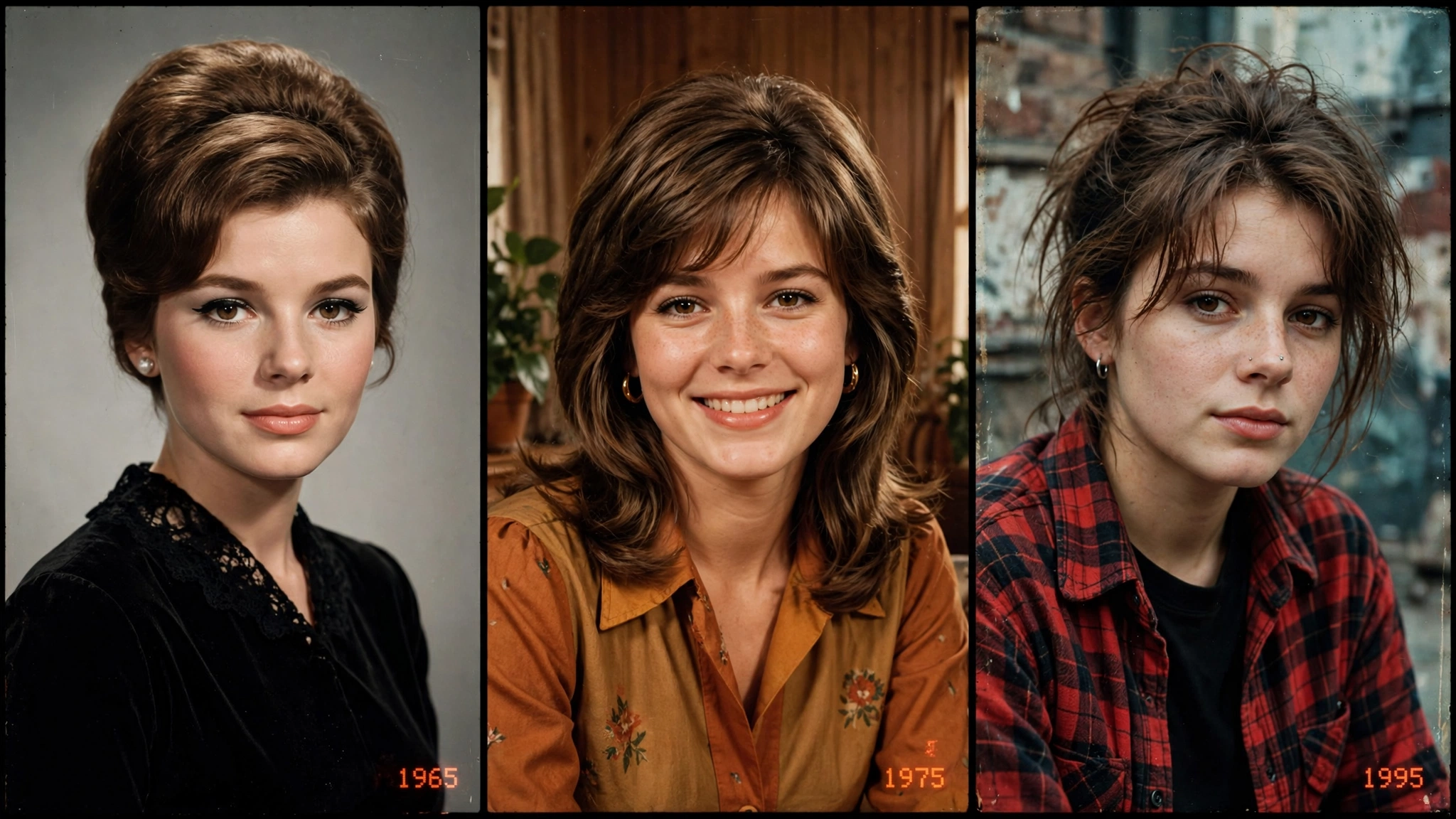
After the 80s AI photo trend took over my feed last week, something interesting happened — people didn’t stop at the eighties. My cousin turned herself into a 1960s film heroine. A friend’s entire family photo now looks like it was taken in 1975. And my For You page is full of 90s grunge portraits that look straight out of an old mixtape cover. Welcome to the retro AI photo trend, where every decade is having its moment.
Honestly? I love this one even more than the 80s trend. The eighties had one look — big hair, bold colors, done. But the retro decades trend gives you three completely different worlds: the elegant black-and-white glamour of the sixties, the warm earthy coziness of the seventies, and the raw faded cool of the nineties. I spent a whole Sunday trying all three, and each one felt like opening a different family album.
Below are the 3 cinematic prompts I personally tested for the retro AI photo trend — one for each decade. Copy, paste, upload your photo, and pick your favorite era.
What Is the Retro Decades AI Photo Trend?
The concept builds on the viral 80s photo trend but goes wider — USA Today even covered how these retro AI photo trends keep flooding everyone’s feeds. Instead of just 1985, you ask AI to reimagine your photo as if it were taken in 1965, 1975, or 1995 — each with its own authentic styling, photography quirks, and film characteristics. The AI preserves your face while rebuilding everything else: hairstyle, clothing, background, lighting, and the unmistakable texture of old analog film from that specific era.
What makes the retro AI photo trend so addictive is how different each decade feels. The sixties give you soft studio elegance. The seventies wrap you in warm tungsten coziness. The nineties hit you with faded, lo-fi rawness. People are posting all three as carousels — “pick your decade” — and those posts are getting shared like crazy because everyone has a favorite era.
How to Use These Retro AI Photo Prompts
Step 1: Choose a clear, front-facing photo in good light. The sharper your original, the more you’ll look like yourself in 1965.
Step 2: Upload it to ChatGPT, Gemini, or any AI image tool that accepts photo uploads — the retro AI photo trend works in all of them.
Step 3: Paste the prompt for the decade you want. Keep the face-preservation lines exactly as written — they’re the difference between “that’s me in the 70s” and “that’s a stranger.”
Step 4: Generate 2–3 variations and pick the one where your face matches best. Then try the next decade — trust me, you won’t stop at one.
Prompt 1: The 1965 Classic Studio Portrait
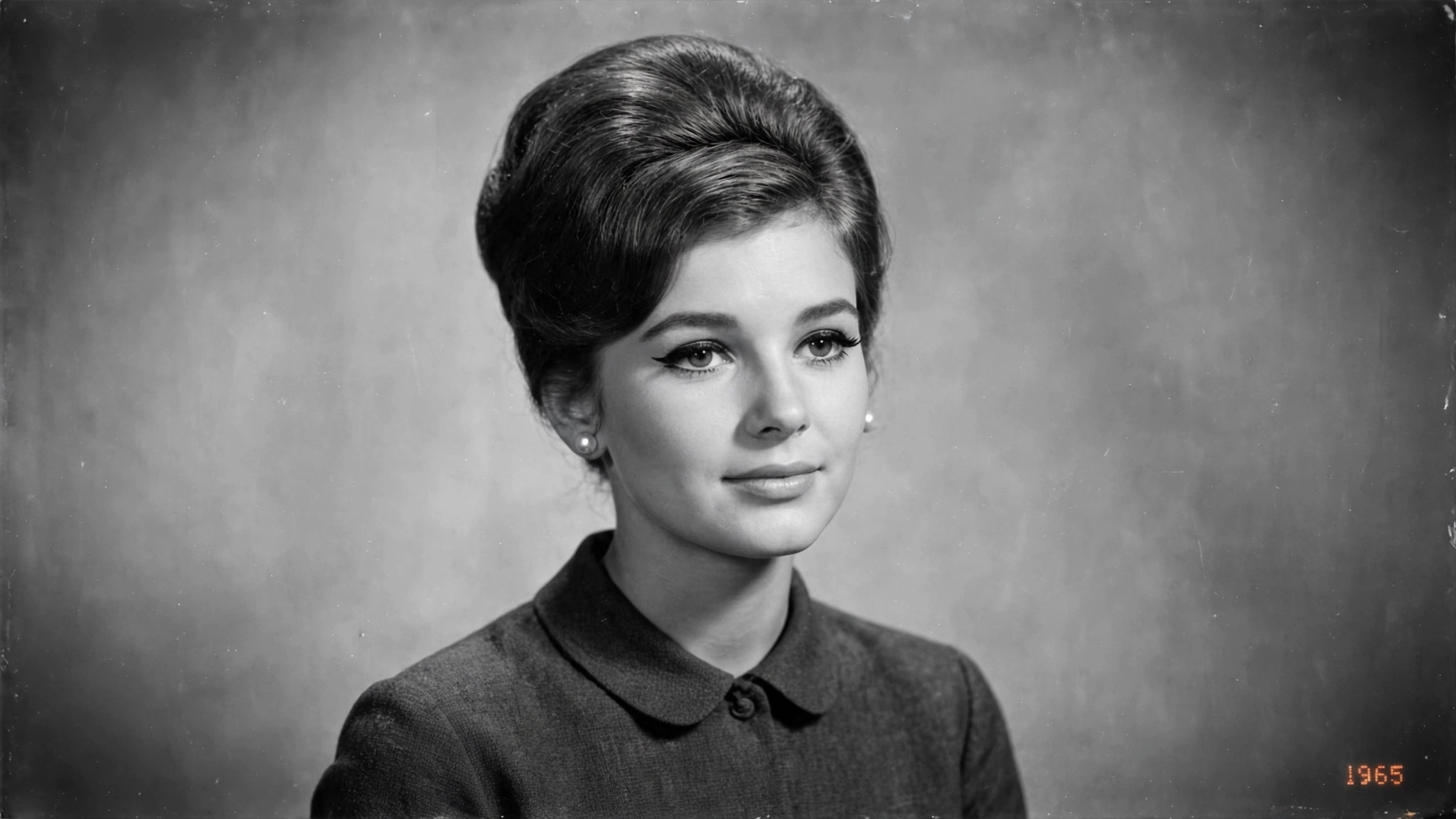
There’s something timeless about sixties portraits. The soft diffused lighting, the elegant poses, the quiet glamour — it makes everyone look like they belong in an old film. I made one of my mom with this prompt and she got emotional; she said it looked exactly like her own mother’s wedding photo. That’s the power of getting the details right.
Using my uploaded photo, transform me into an elegant 1960s studio portrait from around 1965. Preserve my identity completely — same face, facial features, skin tone, age, and recognizable appearance, no beautification or face changes.
Style my hair in an authentic 1960s fashion (classic beehive, soft bouffant, or neat side-parted style as suits the photo) with period-accurate 60s makeup: defined winged eyeliner, soft blush, classic lip color. Dress me in modest elegant 1960s clothing — a tailored dress or classic suit with refined accessories like pearl earrings.
Shoot it like a genuine 1965 studio photograph: soft diffused key lighting, gentle Rembrandt-style shadows, subtle film grain, slightly faded monochrome-warm tones, soft vignette, and a small red-orange “1965” date stamp in the lower corner. Timeless, graceful, museum-quality vintage feel. No modern objects, no modern text, no watermarks.
My tip: The 60s prompt loves black-and-white conversions. After generating, try a simple B&W filter on the result — it instantly doubles the vintage authenticity, especially for profile pictures.
Prompt 2: The 1975 Warm Family Photo
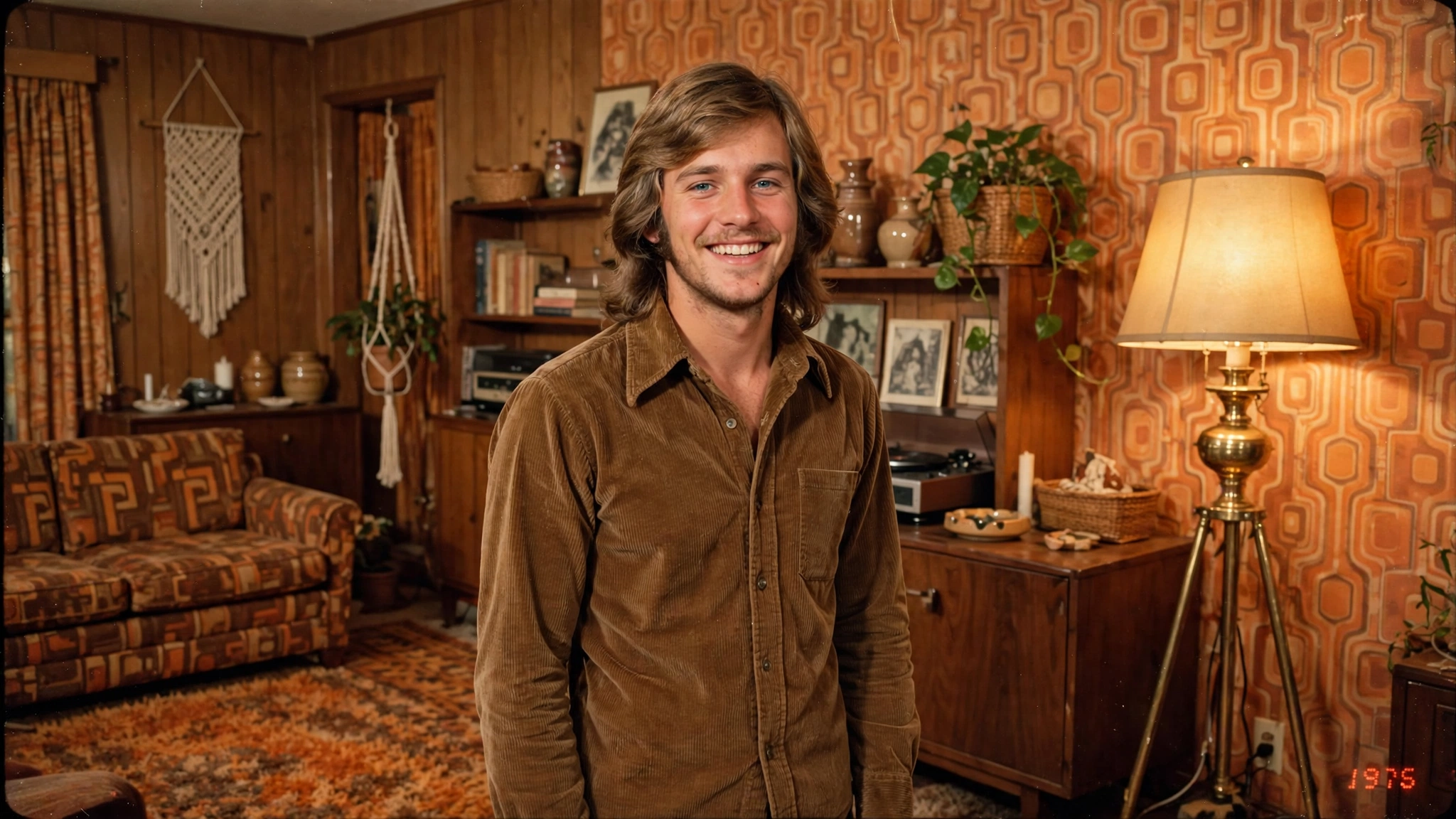
If the sixties are elegant, the seventies are a hug. Everything about 70s photography feels warm — the tungsten lamps, the wood paneling, the earthy oranges and browns, the slightly-too-long hair everyone had. This prompt creates the kind of photo that looks like it lived in a frame on someone’s mantelpiece for forty years. It’s my dad’s favorite; he keeps insisting the AI somehow photographed his actual youth.
Using my uploaded photo, place me in a warm 1970s family photograph taken around 1975. Preserve my identity completely — same face, facial features, skin tone, age, and recognizable appearance.
Give me authentic 1970s styling: long feathered hair or a natural afro-textured style as suits the photo, earth-tone clothing like a corduroy shirt, knit sweater, or floral blouse. Set the scene in a cozy 1970s living room — wood-paneled walls, patterned wallpaper, a vintage floor lamp glowing warm tungsten light.
Render it like a genuine scanned 1975 family photo: heavy warm color cast, visible analog film grain, soft direct flash, faded oranges and browns, gentle light leaks at the edges, and a small red-orange “1975” date stamp in the lower corner. Cozy, nostalgic, deeply human. No modern objects, no modern text, no watermarks.
My tip: This is the best decade prompt for group photos. Upload a family picture, change “me” to “us,” and watch three generations melt — grandparents especially love this one.
Prompt 3: The 1995 Grunge Street Portrait
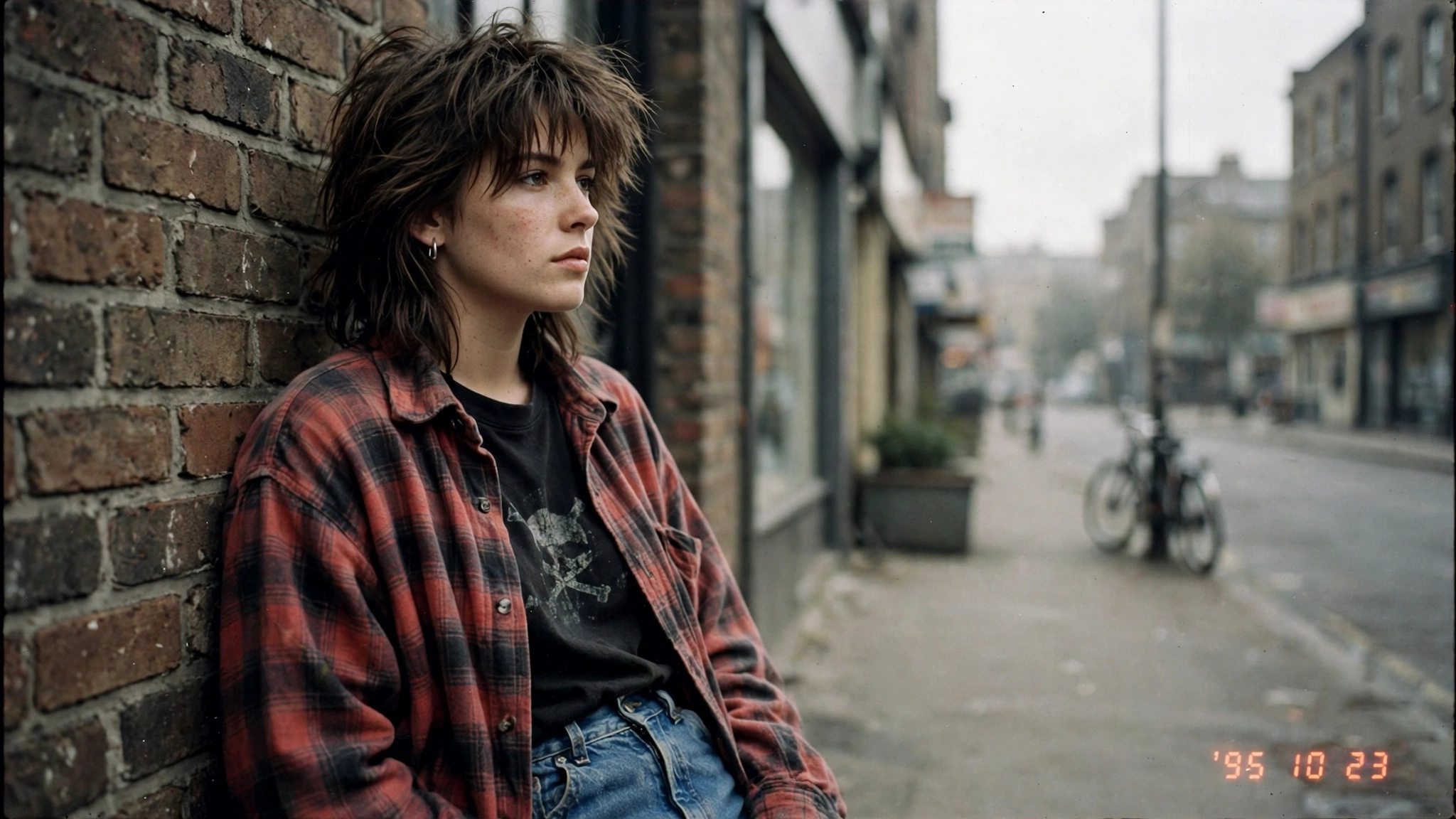
And then there’s the nineties — the decade that refused to pose. The 90s grunge aesthetic is all about rawness: messy hair, oversized flannel, faded colors, and that lo-fi “I didn’t know the photo was being taken” energy. It performs insanely well with younger audiences because, let’s be honest, half of Instagram is already dressing like it’s 1995 again.
Using my uploaded photo, transform me into a raw 1990s grunge-style photograph from around 1995. Preserve my identity completely — same face, facial features, skin tone, age, and recognizable appearance.
Style me in authentic mid-90s street fashion: messy layered hair, oversized flannel shirt over a plain tee, high-waisted jeans, choker or minimal accessories. Pose me leaning casually against a brick wall on an overcast city street — relaxed, slightly moody, effortlessly cool.
Make it feel like a genuine 1995 snapshot: desaturated faded colors, heavy analog film grain, lo-fi quality, flat overcast lighting, imperfect candid framing, and a small red-orange “1995” date stamp in the lower corner. Raw, authentic, straight out of a 90s mixtape cover. No modern objects, no modern text, no watermarks.
My tip: The 90s prompt is the most forgiving of imperfect originals — grain and fade hide a multitude of sins. If your selfie isn’t perfect, start with this decade.
5 Tips for Perfect Retro Decade Photos
1. Match the decade to your vibe. Elegant and composed? Go 60s. Warm and smiley? 70s. Moody and casual? 90s. The prompt works best when the era fits your natural expression.
2. Never skip the date stamp. I said it in my 80s trend post and I’ll say it again — that little orange year in the corner is what makes brains file the image under “real old photo.”
3. Post all three as a carousel. “Which decade suits me best? 60s, 70s, or 90s?” — this caption format gets comments, saves, and shares because people love voting.
4. Try the Bollywood twist for the 60s. Add “1960s Bollywood film heroine styling, dramatic kohl eyes, elegant saree” to Prompt 1 and you get a vintage Indian cinema look that performs beautifully with desi audiences.
5. Keep faces front-lit in originals. Every decade’s film stock struggled with shadows. A well-lit original photo gives the AI clean features to preserve across all three eras.
FAQs About the Retro AI Photo Trend
What’s the difference between the 80s trend and the retro decades trend?
The 80s AI photo trend focuses on one specific year-style (around 1985). The retro decades trend expands it to the 60s, 70s, and 90s — each with completely different fashion, lighting, and film characteristics. Think of the 80s trend as one chapter; this is the whole book.
Which AI tool works best for retro decade photos?
ChatGPT and Gemini both handle era-specific styling very well since the prompts describe each decade in detail. The prompts are tool-agnostic, so any AI image generator with photo upload will work for the retro AI photo trend.
Can I combine decades in one image?
Yes! Ask the AI for “a triptych showing me in 1965, 1975, and 1995 side by side” using any of the prompts as a base. These three-panel comparisons are among the most-shared formats for this trend.
Are these prompts free to use?
Completely. Copy any of these retro AI photo trend prompts, use them in your favorite AI tool’s free tier, and share your results. If you hit a daily generation limit, just continue the next day.
Final Words: Pick Your Decade
The retro AI photo trend works because it’s personal in a way filters never are. A filter changes how you look; these prompts change when you look — and that tiny shift turns a selfie into a story. My camera roll now has me in three different decades, and I genuinely can’t pick a favorite.
If you’re new to retro AI photography, start with the 80s photo trend prompts for the easiest win, then come back here for the full time-travel experience. And if you want a different kind of transformation, my Flash Light photo trend post is pure drama.
So — 60s, 70s, or 90s? Generate all three, post the carousel, and let your followers decide. New here? I turn every viral trend into copy-paste prompts, so follow the trending collection and never miss the next one.
About Pinky Chouhan
Hey, my name is Pinky Chouhan, and I live in India. I am passionate about discovering new AI trends, AI video tools, and social media content ideas. I also have experience in video and photo editing using tools like CapCut, Adobe, InShot, and VN. Over time, I have worked on many editing projects and enjoy experimenting with new creative techniques and AI-powered tools. I regularly share the latest AI trends, video prompts, and creative ideas on The Prompt Master. My goal is to provide simple and practical prompts that anyone can use to create engaging AI videos. Most of the prompts published on this website are designed to be easy to use. You can simply copy a prompt, paste it into Google Flow or a compatible AI video tool, and start creating your video. I will continue sharing new AI trends, useful prompts, editing tips, and creative ideas to help creators make better content and stay updated with the fast-changing world of AI.