
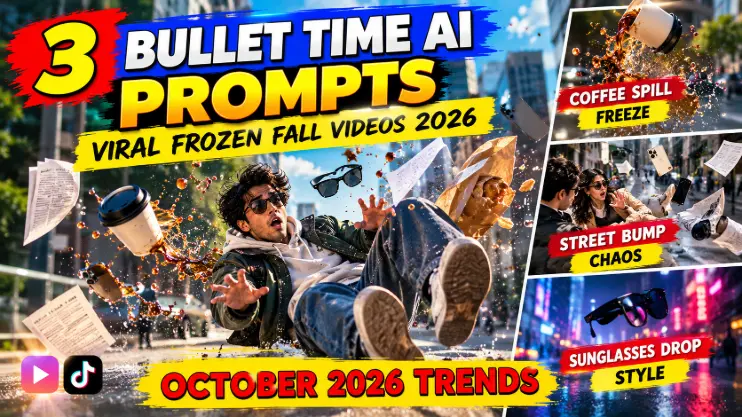
You’re walking down the street, coffee in hand. Someone bumps into you. Your coffee cup flies — and suddenly time freezes. The cup hangs in mid-air, droplets suspended, your sunglasses floating beside your phone, and the camera sweeps around the whole frozen scene in glorious slow motion.
This is the bullet time AI trend — also called the Floating Fall trend — the viral AI video effect where an everyday stumble becomes a Matrix-style frozen moment, with objects flying and time standing still. It looks like a million-dollar action scene. It’s made from a single photo.
Below are 3 original copy-paste prompts for the bullet time AI trend — the coffee spill, the street bump, and the sunglasses drop — each with a demo video first so you see exactly what the prompt creates.
What Is the Bullet Time AI Trend?
The format is pure cinema: a person trips, slips, or gets bumped on a street. Everyday objects — a coffee cup, a phone, sunglasses — fly into the air. And then time freezes in extreme slow motion. Everything hangs suspended while the camera glides around the frozen scene, showing every droplet and detail, before time snaps back and everything crashes down.
Why is it exploding? The spectacle-to-effort ratio is insane. This is the kind of shot that used to need a high-speed camera rig and a stunt team. Now one photo and a prompt produce it. The frozen-moment camera move is inherently loop-worthy — viewers rewatch to catch every floating detail, and rewatches are rocket fuel for the algorithm.
The trend is all over Instagram, Facebook, and Reels right now, with creators competing on the most dramatic freeze: the higher the coffee flies, the better the video does. For a step-by-step visual walkthrough of the effect, these AI video guides covering this trend break the floating-fall shot down frame by frame.
How to Use These Bullet Time AI Trend Prompts
Step 1: Pick a clear full-body photo of yourself walking — a natural stride, holding something (a cup, a phone, a bag). The photo is the “before” frame the AI builds from.
Step 2: Open an AI video tool with strong physics and camera control (Runway, Luma, Pika, Kling, or similar).
Step 3: Upload your photo and paste one of the prompts below. Each prompt scripts the stumble, the freeze, the camera move, and the release.
Step 4: Generate and add a dramatic sound — a deep “time freeze” whoosh or a trending cinematic audio. The sound design sells the freeze.
Prompt 1: The Coffee Spill Freeze
The trend’s signature shot. You’re mid-stride with a coffee cup when the stumble hits — the cup launches, coffee arcs through the air in perfect suspended droplets, and the camera sweeps around the frozen scene before everything crashes down. Simple, relatable, endlessly rewatchable.
Using AI video generation, create a highly realistic vertical video (9:16) of a bullet-time frozen fall scene.
Opening (0-2s): a person walks naturally down a city sidewalk holding a takeaway coffee cup, morning light, realistic stride.
The trip (2-3s): their foot catches on uneven pavement — they stumble forward, the coffee cup flies from their hand, coffee erupting in a beautiful arc.
The freeze (3-7s): time freezes in extreme slow motion — the person hangs mid-stumble, the cup tumbles in mid-air, individual coffee droplets suspended and glistening, a few drops backlit by the sun. The camera sweeps smoothly around the frozen scene in a 180-degree arc, revealing every detail.
The release (7-8s): time snaps back — everything crashes down at normal speed, coffee splashing on the pavement.
Style: high-speed phantom-camera cinematography, natural daylight, realistic physics, shallow depth of field, ultra-detailed. Vertical 9:16. Dramatic, satisfying, loop-worthy. No text overlays, no watermarks.
My tip: The freeze is the star — make sure the prompt keeps the camera moving during it. A static frozen frame is a photo; a moving camera around a frozen scene is bullet time.
Prompt 2: The Street Bump Chaos
The maximalist version. A rushed passerby bumps into you — papers explode everywhere, your phone and sunglasses launch into the air, you fall backward in slow motion while the camera weaves between floating objects for close-ups. More objects, more chaos, more rewatches.
Using AI video generation, create a highly realistic vertical video (9:16) of a bullet-time street collision scene.
Opening (0-2s): a person walks through a busy urban street carrying a phone, sunglasses on their head, a paper bag in hand. A rushed passerby with folders bumps hard into their shoulder.
The chaos (2-3s): papers explode into the air, the phone and sunglasses launch upward, the paper bag bursts, the person loses balance and falls backward.
The freeze (3-7s): time freezes in extreme slow motion — the person suspended mid-fall, papers floating at different heights, phone tumbling screen-up, sunglasses spinning slowly. The camera weaves between the floating objects, grabbing a close-up of the spinning sunglasses, then the phone, then pulls back to reveal the entire frozen tableau.
The release (7-8s): time snaps back — everything drops, papers flutter down, the person lands with a soft thud as pedestrians react.
Style: premium action-film cinematography, natural street lighting, realistic physics and material behavior, shallow depth of field, ultra-detailed. Vertical 9:16. Chaotic, thrilling, spectacular. No text overlays, no watermarks.
My tip: Three to four flying objects is the sweet spot — enough for the camera to tour, not so many it turns into visual noise.
Prompt 3: The Sunglasses Drop
The stylish one. Minimal setup, maximum cool — your sunglasses slip off mid-stride and the freeze catches them tumbling in gorgeous slow motion, sunlight flaring through the lenses, while you reach for them in suspended time. Fewer objects, more elegance. This is the version fashion creators are running with.
Using AI video generation, create a highly realistic vertical video (9:16) of a bullet-time sunglasses drop scene.
Opening (0-2s): a stylish person walks confidently down a sunlit boulevard, sunglasses on, effortless cool.
The slip (2-3s): they turn their head quickly — the sunglasses slip off and tumble through the air, catching the sunlight.
The freeze (3-7s): time freezes in extreme slow motion — the sunglasses hang tumbling mid-air, sun flaring beautifully through the lenses, the person frozen mid-reach toward them, a few dust particles sparkling in the light. The camera orbits slowly around the floating sunglasses, then widens to the full frozen scene.
The release (7-8s): time snaps back — the person catches the sunglasses mid-air with a smooth smirk.
Style: luxury fashion-film cinematography, golden sunlight, lens flares, realistic physics, shallow depth of field, ultra-detailed. Vertical 9:16. Cool, elegant, satisfying. No text overlays, no watermarks.
My tip: End on the catch — the release moment is the payoff. A clean catch turns a cool effect into a complete little story.
5 Tips to Win the Bullet Time AI Trend
1. The input photo matters more than you think. A clear walking pose with visible objects in hand gives the AI the “before” it needs. A stiff passport photo gives you nothing to freeze.
2. Script the timeline. Every prompt above breaks the video into opening, incident, freeze, and release with timestamps. AI video tools follow structured timelines far better than vague descriptions — keep that structure.
3. Keep the camera moving during the freeze. This is the #1 difference between amateur and viral versions. The world freezes; the camera doesn’t. Arc, orbit, or weave — never hold still.
4. Sound design is half the effect. A deep freeze-whoosh into silence during the slow motion, then a crash on release. Even a simple trending cinematic audio layered under it transforms the video.
5. One hero object wins. The most-shared versions have one clear star — the coffee cup, the sunglasses. Give the camera something to fall in love with during the freeze. More AI motion formats are in my October 2026 reels trends post.
FAQs About the Bullet Time AI Trend
What is the bullet time AI trend?
It’s a viral AI video effect where an everyday stumble — a trip, a bump, a dropped object — triggers a Matrix-style time freeze: objects hang suspended in extreme slow motion while the camera moves around the frozen scene, then time snaps back. The bullet time AI trend prompts in this post recreate it from a single photo.
Which AI tool makes bullet time videos?
Any AI video generator with good physics and camera control — Runway, Luma, Pika, Kling, and similar tools. The prompts above are tool-agnostic and include camera directions.
Do I need to film myself falling?
No — that’s the beauty of it. You only need one still photo of yourself walking. The AI generates the stumble, the freeze, and the camera move. No stunt work required.
Why does my freeze look fake?
Usually the physics or a static camera. Make sure your prompt specifies realistic physics AND a moving camera during the freeze. If objects look floaty or weightless, regenerate — the second attempt is often much better.
Final Words: Freeze Time
The bullet time AI trend turns your clumsiest moment into your coolest video — a coffee spill becomes cinema, a stumble becomes a spectacle. And right now, the algorithm can’t get enough of frozen time.
Generate your freeze today and watch the rewatches roll in. More viral AI video formats are waiting in my Hotel Lobby AI trend and Rain Dance AI trend posts — and the trending collection keeps you ahead of whatever blows up next.
About Pinky Chouhan
Hey, my name is Pinky Chouhan, and I live in India. I am passionate about discovering new AI trends, AI video tools, and social media content ideas. I also have experience in video and photo editing using tools like CapCut, Adobe, InShot, and VN. Over time, I have worked on many editing projects and enjoy experimenting with new creative techniques and AI-powered tools. I regularly share the latest AI trends, video prompts, and creative ideas on The Prompt Master. My goal is to provide simple and practical prompts that anyone can use to create engaging AI videos. Most of the prompts published on this website are designed to be easy to use. You can simply copy a prompt, paste it into Google Flow or a compatible AI video tool, and start creating your video. I will continue sharing new AI trends, useful prompts, editing tips, and creative ideas to help creators make better content and stay updated with the fast-changing world of AI.