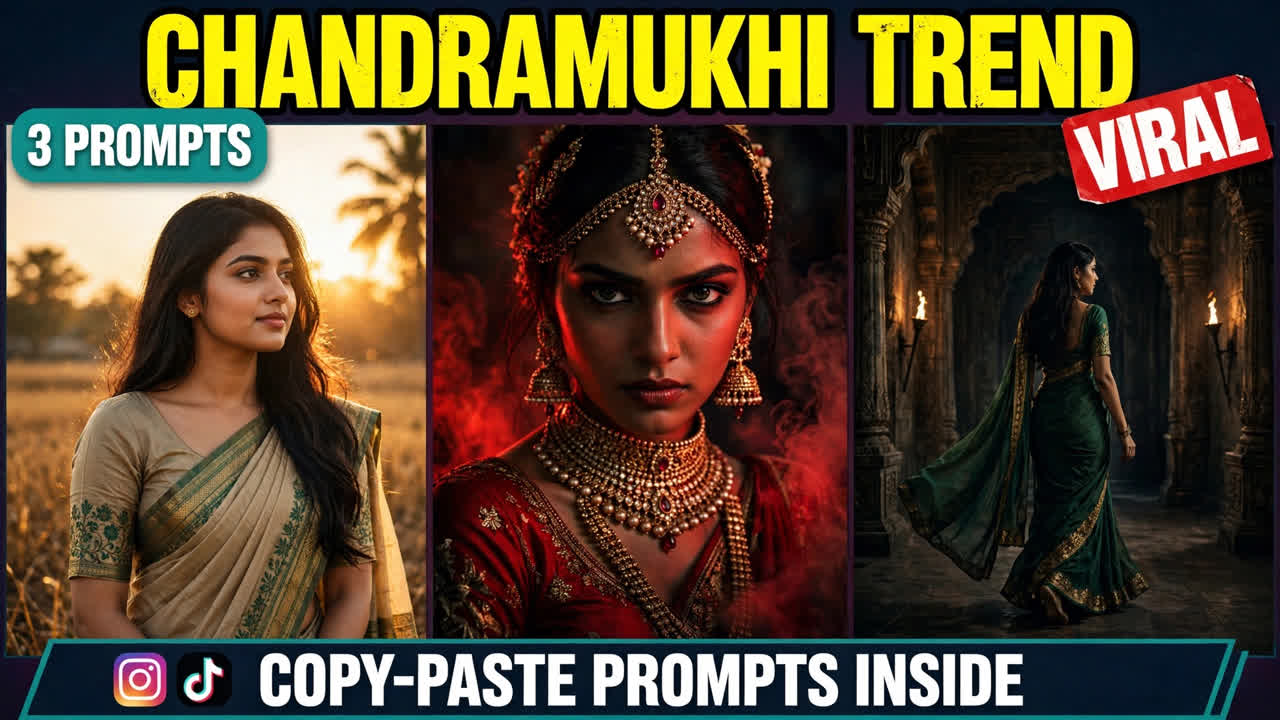
Picture this: a woman in a beige-and-green saree, long hair flowing, standing in warm golden light. She turns toward the camera, and something in her expression shifts — calm one second, intense the next. The lighting deepens. The mood turns cinematic. For a few seconds, she looks like the heroine of a horror film.
That transformation is the chandramukhi trend — a cinematic AI video format that started blowing up on Instagram this week. One tutorial reel explaining the workflow picked up 3.5K likes and 150 comments in days, and most of the comments were asking the same thing: “send me the prompt!”
Below are three original prompts you can copy and paste — the saree transformation, the red-light look, and a slow-motion palace entry. Each one comes with a demo video first, so you can see exactly what the prompt produces before you use it.
A quick note so this doesn’t get confused with an older post: my Ghostface post was a photo trend — a horror mask lurking behind you in a still image. This one is different. Here, you become the dramatic character in a moving video, transformed from your own photo. And my fan-cam post was something else again — swapping your face into an existing clip. Here there is no existing clip. The AI builds the whole scene around you.
What Is This Trend?
The idea is simple, which is why it caught on so fast. You start with a clear photo of yourself. From that photo, the AI creates a short cinematic video of you in traditional Indian attire — a saree, flowing hair, dramatic lighting, and expressions that move from calm to intense. The result looks like a scene from a film, not a filter.
In the version going viral, the workflow has two stages. First, a multi-angle photo collage is generated of the subject in a beige-and-green saree. Then that collage is fed into an AI video tool with a detailed prompt describing the woman, the lighting, and the emotional expressions. The output is a set of photorealistic clips: the same woman in traditional attire, hair flowing, warm dramatic light on her face — including a version bathed in heavy red light with bridal jewelry.
So why is the chandramukhi trend spreading so fast? Two reasons. First, the transformation itself is satisfying to watch — an ordinary photo becoming a film-like scene in seconds. Second, the look is made for spooky season. With Halloween close, a dramatic horror-heroine video is exactly the kind of thing people save and send to friends. The prompts below recreate that effect from scratch, in your own words, with your own photo.
How to Make Your Own
Pick a good reference photo. Front-facing, face clearly visible, decent lighting, hair down if possible. This photo becomes the character. The cleaner the photo, the more consistent the result.
Open any image-to-video AI tool. Google Flow, Runway, Kling, Luma, Pika, or a similar tool — the prompts below work with all of them. Upload your photo before pasting the prompt, or the face will not stay consistent.
Copy one of the prompts below and paste it in. Each one spells out the outfit, the hair, the lighting, and the expressions, so the AI does not have to guess anything. If your tool supports a collage or multi-angle input, use it for the first prompt — it helps the AI keep the outfit consistent across frames.
Generate two or three versions and pick the best. The first try rarely gets the expressions perfect. Once you have a version you like, add a slow, moody background score — sound makes this format far more cinematic.
Prompt 1: The Saree Transformation
The original viral shot. A woman in a beige-and-green saree, long hair flowing, warm golden light, turning toward the camera as her expression shifts from calm to intense. This is the version that started the wave.
Using AI video generation, create a photorealistic cinematic vertical video (9:16) of a dramatic saree transformation, based on the uploaded reference photo.

The scene: a young woman in an elegant beige-and-green saree with long flowing hair stands in a softly lit traditional Indian interior, warm golden light falling across her face. Keep her face, facial features, and hairstyle exactly as in the reference photo.

The transformation: she slowly turns toward the camera. Her hair sweeps gently in the wind. Her expression shifts from calm and soft to intense and piercing, eyes locked on the lens. The warm light deepens as she turns, shadows growing richer around her.

Style: photorealistic, cinematic lighting, smooth slow motion, ultra-detailed, film-like atmosphere. Vertical 9:16. Dramatic, elegant, mysterious. No text overlays, no watermarks.
One thing worth knowing: the expression shift is the heart of this prompt. If the AI gives you a flat, neutral face, regenerate — without that calm-to-intense change, the video loses its magic.
Prompt 2: The Red Light Look
The moody one. Heavy red lighting, ornate bridal jewelry, intense eyes staring straight at the camera. This version is the most shareable of the three, and the most ready for spooky season.
Using AI video generation, create a photorealistic cinematic vertical video (9:16) of a dramatic red-lit portrait, based on the uploaded reference photo.

The scene: a young woman in traditional Indian attire with ornate bridal jewelry — a maang tikka, layered necklaces, and jhumka earrings — stands in a dark room bathed in heavy red light. Her long dark hair flows slowly in the wind. Keep her face, facial features, and hairstyle exactly as in the reference photo.

The mood: she stares directly into the camera with an intense, unblinking gaze. The red light flickers softly, deepening the shadows on her face. A faint haze drifts through the frame. Her expression stays powerful and still, like a portrait that is watching you back.

Style: photorealistic, dramatic red lighting, cinematic haze, ultra-detailed, moody and haunting. Vertical 9:16. No text overlays, no watermarks.
Why this one works: red light hides small AI imperfections the way darkness does, and it makes the jewelry glow. If your first attempt looks too flat, ask for stronger contrast — deep reds and deep shadows are what sell the mood.
Prompt 3: The Flowing Hair Entry
The cinematic one. A slow-motion walk through a dark palace hallway, lantern light on the walls, hair flowing behind her. This is the version that feels most like a film scene.
Using AI video generation, create a photorealistic cinematic vertical video (9:16) of a slow-motion palace entry, based on the uploaded reference photo.

The scene: a young woman in a flowing traditional saree walks slowly toward the camera through a dark old palace hallway. Warm lantern light glows from the walls on either side. Her long hair flows behind her as she moves. Keep her face, facial features, and hairstyle exactly as in the reference photo.

The walk: she moves in slow motion, one step at a time, eyes fixed on the camera with a dramatic, intense expression. The lantern light flickers across her saree as she passes. The hallway stretches dark behind her, arches fading into shadow.

Style: photorealistic, slow-motion cinematography, warm lantern lighting against darkness, ultra-detailed, film-like atmosphere. Vertical 9:16. Grand, dramatic, mysterious. No text overlays, no watermarks.
A small detail that matters: the lantern light is doing quiet work here. It gives the AI a reason to light the face in patches — bright, then shadow, then bright — which is exactly what makes a walk like this feel cinematic instead of flat.
3 Mistakes That Ruin the Video
Using a blurry or side-angle photo. The AI builds the whole character from your reference photo. If the photo is blurry, dark, or shot from the side, the face will drift between frames and the transformation will look off. A sharp, front-facing, well-lit photo fixes most problems before they start.
Skipping the expression direction. A lot of failed versions look like a nice portrait that never goes anywhere — no shift, no intensity, no story. The expression change is what turns a pretty video into a dramatic one. The prompts above spell it out for a reason. Keep that direction in.
Overdoing the horror. This format works because it stays elegant — dramatic, not gory. Blood, distorted faces, or jump-scare effects will get your video flagged, and they break the cinematic mood anyway. Keep it beautiful and intense, not gruesome.
A Few Tips That Actually Help
Let the light do the acting. Warm gold, deep red, flickering lanterns — each prompt uses light to set the mood. If a result feels flat, the lighting is usually the problem, not the face. Regenerate with stronger light direction before you change anything else.
Hair movement sells the realism. Still hair in a moving video is the fastest way to spot AI. Words like “flowing,” “sweeping,” and “moving slowly in the wind” push the AI to animate the hair. If the hair looks frozen, regenerate — it is worth the extra try.
Keep the jewelry consistent. In the red-light version, the maang tikka and necklaces are part of the look. If the AI changes the jewelry halfway through, the illusion breaks. A clean reference photo and a specific jewelry description help the AI hold the design steady.
Do not skip the sound. A slow, moody background score — soft strings, a low drone, distant chimes — turns a good clip into a cinematic one. Without sound, the same video feels unfinished. Search “dark cinematic” or “moody strings” in the Reels audio browser.
Post the three as a series. Saree transformation, red-light look, palace entry — three videos, three days, one series. Series accounts tend to grow faster because people follow to catch the next part. Drop a hint about the next part in each caption.
Frequently Asked Questions
What is this format, exactly?
It is an AI video format where your own photo is transformed into a cinematic clip of you in traditional Indian attire — saree, flowing hair, dramatic lighting, and intense expressions. The prompts in this post give you the exact outfit, lighting, and expression instructions.
Which AI tool makes these videos?
Any image-to-video tool works — Google Flow, Runway, Kling, Luma, Pika, and similar tools. The prompts above are tool-agnostic. Start on a free tier, make a test video, and only think about a paid plan if you like the results.
Do I need a multi-angle collage first?
It helps, but it is not required. The viral tutorial used a collage to keep the outfit consistent, and the first prompt is written to work with one. If your tool does not support collage input, a single clear photo still works — just expect to regenerate once or twice for consistency.
Why does my face look different from my photo?
Usually the reference photo was blurry, dark, or side-angled. Use a sharp, front-facing, well-lit photo with your hair down. If the face still drifts, regenerate — face consistency is the hardest part of this format, and two or three tries are normal.
Is this the same as the Ghostface trend?
No. Ghostface is a photo trend — a horror mask lurking behind you in a still image. This is a video transformation where you become the dramatic character yourself. Different format, different result.
Is it okay to use someone else’s photo?
No — always use your own photo. Putting someone else’s face into a transformation video without permission is a deepfake problem, and platforms remove such content. Your face, your fun.
How long does it take to generate one video?
It depends on the tool — usually 2 to 10 minutes. Keep your prompt and photo ready, so apart from generation time your actual work is about five minutes. For the best result, generate two or three versions and post the strongest one.
Final Words
The formula is simple: one photo, one saree, one shift in expression — and suddenly you are the heroine of your own cinematic scene.
So pick a prompt above, upload your photo, and make your video today. And if you like dramatic formats, check out my Ghostface, fan-cam, and UNO Reverse Car posts too — the trending collection gets a new format every week. If you want to read more about AI video tools, this Google Flow guide is useful.
About Pinky Chouhan
Hey, my name is Pinky Chouhan, and I live in India. I am passionate about discovering new AI trends, AI video tools, and social media content ideas. I also have experience in video and photo editing using tools like CapCut, Adobe, InShot, and VN. Over time, I have worked on many editing projects and enjoy experimenting with new creative techniques and AI-powered tools. I regularly share the latest AI trends, video prompts, and creative ideas on The Prompt Master. My goal is to provide simple and practical prompts that anyone can use to create engaging AI videos. Most of the prompts published on this website are designed to be easy to use. You can simply copy a prompt, paste it into Google Flow or a compatible AI video tool, and start creating your video. I will continue sharing new AI trends, useful prompts, editing tips, and creative ideas to help creators make better content and stay updated with the fast-changing world of AI.