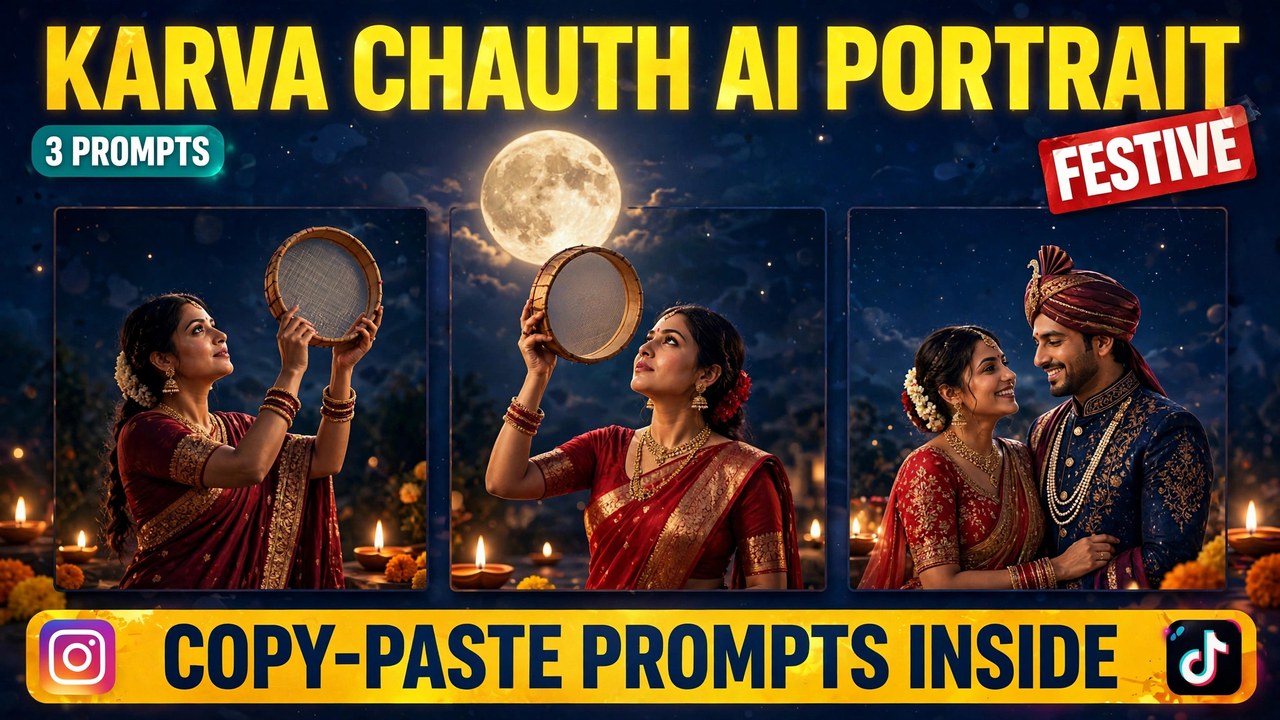
Karva Chauth falls on Thursday, 29 October 2026. It is a day when married women fast from sunrise to moonrise, praying for the long life and well-being of their husbands. In the evening, the fast is broken only after the moon is sighted — traditionally, the woman looks at the moon through a sieve, then at her husband, before taking her first sip of water. It is a quiet, deeply personal ritual, and one of the most photographed moments of the festival.
That moonlit moment is exactly what this karva chauth ai portrait format captures. Below are three original prompts you can copy and paste — the sieve look, the moon gaze, and a couple portrait. Each one comes with a result image first, so you can see exactly what the prompt produces before you use it.
A quick note so this doesn’t get confused with an older post: my Diwali Couple post was about Diwali — diyas, fireworks, and festive lights. This one is a different festival and a different moment. Karva Chauth is about the fast, the sieve, and the moonrise, and these portraits are built around that ritual.
What Is This Portrait Format?
The idea is simple. You upload a clear photo of yourself, and an AI image tool transforms it into a festive portrait in traditional attire — a red or maroon saree, gold jewelry, diyas glowing nearby, and the full moon in the evening sky. The result looks like a frame from a festival film, not a filter.
The version spreading across feeds this October follows the real ritual closely. The sieve is held up toward the moon. The gaze is calm and upward. The light is warm and low, the way an evening terrace actually looks when the diyas are lit. That honesty is why these portraits feel special — they celebrate a real tradition instead of turning it into a costume.
So why is this format spreading so fast? Two reasons. First, the portraits are genuinely beautiful — deep reds, gold jewelry, moonlight, and diya glow photograph well together. Second, the timing is perfect. With the festival on 29 October, couples and families are already planning their photos, and a portrait made ahead of time is ready to share on the day itself. The prompts below recreate that look from scratch, in your own words, with your own photo.
How to Make Your Own
Pick a good reference photo. Front-facing, face clearly visible, decent lighting, hair neat. This photo becomes the portrait. The cleaner the photo, the more the result will actually look like you.
Open any AI image tool. Gemini, ChatGPT, or a similar tool — the prompts below work with all of them. Upload your photo before pasting the prompt, or the face will not stay consistent.
Copy one of the prompts below and paste it in. Each one spells out the outfit, the jewelry, the sieve, the moon, and the lighting, so the AI does not have to guess anything. If your tool supports an aspect ratio setting, choose vertical portrait (3:4 or 9:16) for the best result.
Generate two or three versions and pick the best. The first try rarely gets the jewelry or the sieve exactly right. Once you have a version you like, save it at full size — a portrait shared on the festival day deserves the best quality.
Prompt 1: The Sieve Look
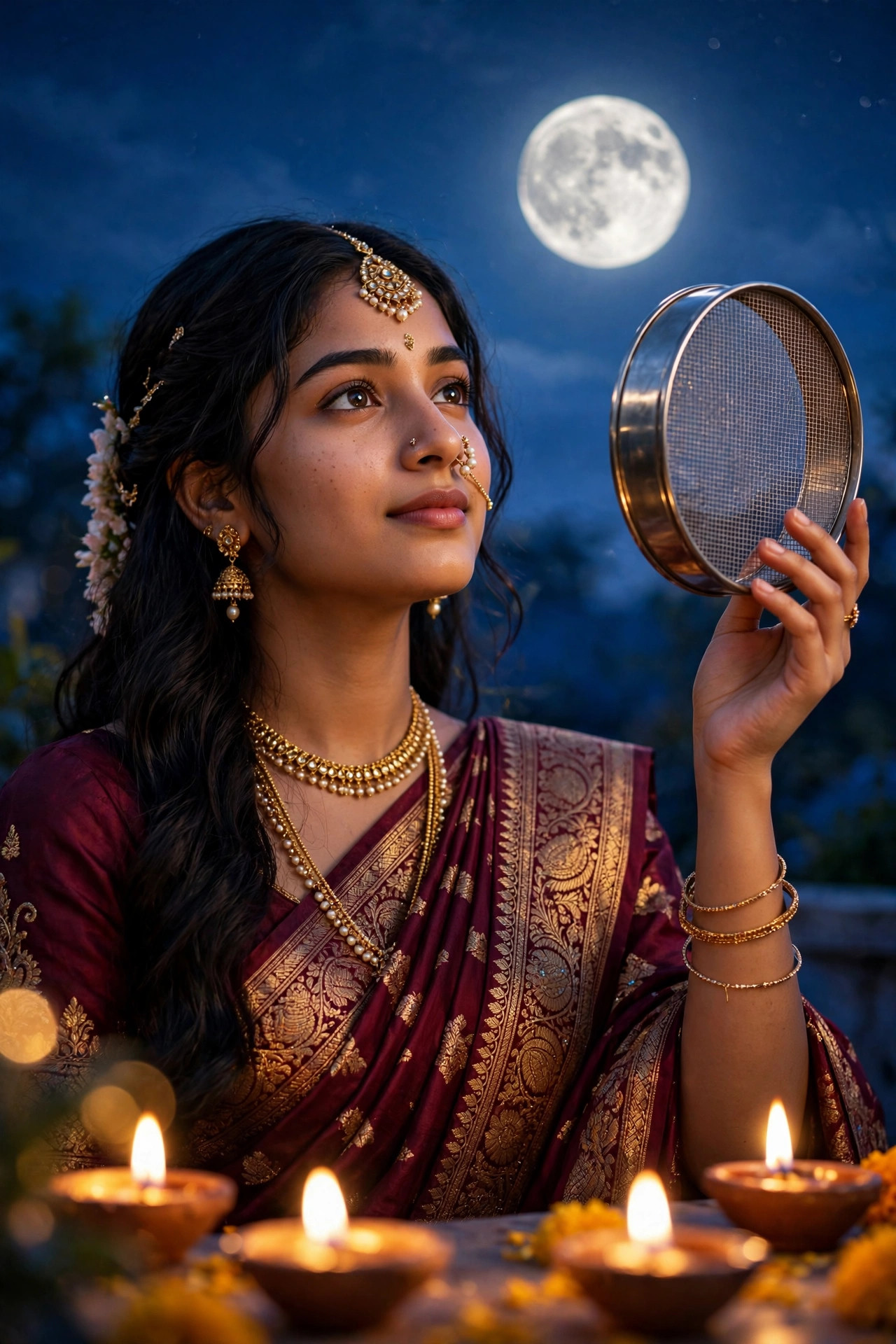
The classic shot. A woman in a maroon saree with gold embroidery, holding the traditional sieve up toward the moon, diyas glowing in the foreground. This is the portrait most people picture when they think of the festival.
Using AI image generation, create a photorealistic vertical portrait (3:4) based on the uploaded reference photo.

The scene: a young woman in an elegant maroon saree with gold embroidery and traditional gold jewelry — a maang tikka, jhumka earrings, layered necklaces, and gold bangles — holds a round traditional metal sieve (chhalni) up in one hand at chest height, toward the evening sky. Keep her face, facial features, and hairstyle exactly as in the reference photo.

The setting: a glowing full moon in a deep-blue evening sky behind her, warm golden light from small clay diya lamps in the foreground, a few marigold flowers scattered nearby. Her expression is calm, gentle, and reverent.

Style: photorealistic, soft cinematic lighting, ultra-detailed, warm and dignified. No text overlays, no watermarks.
Worth knowing: the sieve is the heart of this portrait. If the AI draws it as a flat disc or a mirror, regenerate — a proper mesh sieve with a visible rim is what makes the image read as the real ritual.
Prompt 2: The Moon Gaze
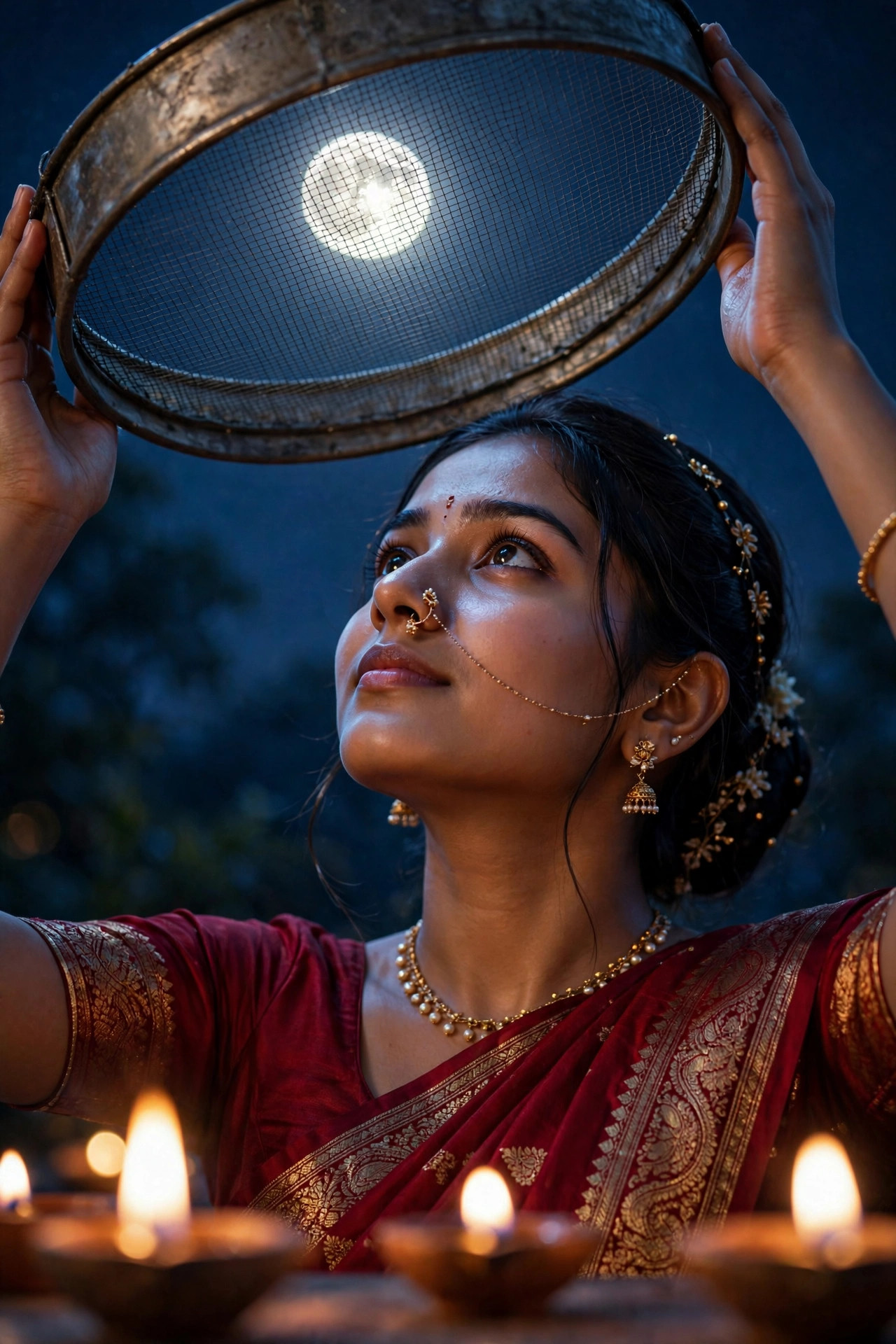
The serene one. The woman looks up at the full moon through the sieve, soft moonlight falling across her face, diyas burning low in front of her. This version is the most peaceful of the three, and the one that best captures the feeling of the evening.
Using AI image generation, create a photorealistic vertical portrait (3:4) based on the uploaded reference photo.

The scene: a young woman in a deep red saree with delicate gold jewelry and a small bindi gazes upward serenely at a bright full moon seen through a traditional metal sieve (chhalni) that she holds above her face with both hands. Keep her face, facial features, and hairstyle exactly as in the reference photo.

The light: soft, cool moonlight falls across her face from above, while warm diya flames glow in the blurred foreground. The night sky behind her is a deep, calm blue. Her expression is peaceful, devoted, and still.

Style: photorealistic, cinematic moonlight, ultra-detailed, reverent and beautiful. No text overlays, no watermarks.
Why this one works: the contrast between cool moonlight on the face and warm diya light below is what gives this portrait its depth. If your first attempt looks too flat, ask for stronger moonlight on the face — that cool glow is what sells the moment.
Prompt 3: The Couple Portrait
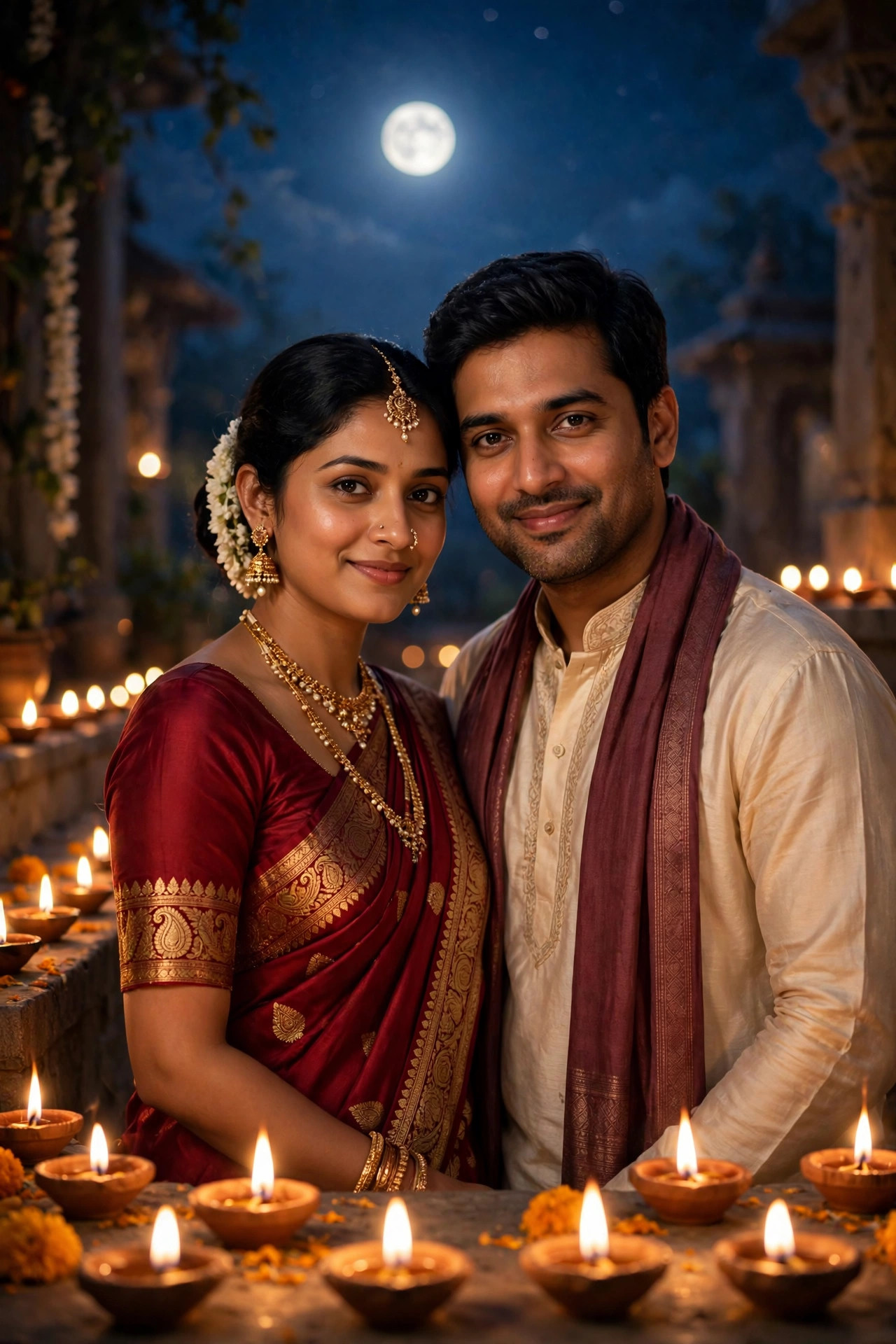
The together one. Both partners in festive attire, standing close under the full moon, diyas glowing all around them. This is the portrait couples share on the day — a keepsake of the festival, made from one photo of each.
Using AI image generation, create a photorealistic vertical portrait (3:4) based on the two uploaded reference photos.

The scene: a married couple stands close together on a festive evening. The woman wears a rich red saree with traditional gold jewelry and her hair neatly tied back with jasmine flowers; the man wears a cream kurta with a subtle maroon stole. Keep both faces, facial features, and hairstyles exactly as in the reference photos.

The setting: a glowing full moon in the deep-blue night sky behind them, rows of small clay diya lamps glowing warmly around them, a few marigold flowers in the foreground. Both smile gently at the camera, standing close, warm and dignified.

Style: photorealistic, soft cinematic lighting, ultra-detailed, celebratory and respectful. No text overlays, no watermarks.
A small detail that matters: upload both photos before generating, and name them clearly if your tool allows it. With two faces to hold consistent, the AI needs clean references — a blurry photo of either partner will show up in the result.
3 Mistakes That Ruin the Portrait
Using a blurry or side-angle photo. The AI builds the whole portrait from your reference photo. If the photo is blurry, dark, or shot from the side, the face will drift and the portrait will not look like you. A sharp, front-facing, well-lit photo fixes most problems before they start.
Losing the sieve. A lot of failed versions drop the sieve entirely, or turn it into something unrecognizable. The sieve is what makes this portrait about this festival. The prompts above spell it out for a reason. Keep that detail in.
Going over the top. This format works because it stays elegant — warm, dignified, and true to the ritual. Heavy glitter, dramatic poses, or fantasy backgrounds will break the mood and make the portrait feel like a costume shoot. Keep it beautiful and real, not theatrical.
A Few Tips That Actually Help
Let the light do the work. Moonlight from above, diya light from below — each prompt uses two light sources to set the mood. If a result feels flat, the lighting is usually the problem, not the face. Regenerate with stronger light direction before you change anything else.
Keep the jewelry consistent. The maang tikka, jhumkas, and bangles are part of the look. If the AI changes the jewelry halfway through, the illusion breaks. A clean reference photo and a specific jewelry description help the AI hold the design steady.
Dress for the portrait, not just the photo. If you are generating the portrait before the festival, wear a red or maroon outfit in your reference photo — the AI holds the color and style better when the reference already points in that direction.
Make it before the day. On the festival day itself, everyone is busy — the fast, the preparations, the evening puja. Generate your portraits a few days early, so on 29 October you can simply share the one you love.
Share it with a simple caption. A short, heartfelt line about the day beats a long caption. The portrait carries the feeling; the words only need to say what the day means to you.
Frequently Asked Questions
What is this portrait format, exactly?
It is an AI image format where your own photo is transformed into a festive portrait in traditional attire — red or maroon saree, gold jewelry, a sieve, the full moon, and glowing diyas. The prompts in this post give you the exact outfit, ritual, and lighting instructions.
Which AI tool makes these portraits?
Any AI image tool works — Gemini, ChatGPT, and similar tools. The prompts above are tool-agnostic. Start on a free tier, make a test portrait, and only think about a paid plan if you like the results.
Can I use my own photo?
Yes — always use your own photo. Putting someone else’s face into a portrait without permission is a deepfake problem, and platforms remove such content. Your face, your portrait. For the couple version, use your own photo and your partner’s photo with their permission.
Why does my face look different from my photo?
Usually the reference photo was blurry, dark, or side-angled. Use a sharp, front-facing, well-lit photo. If the face still drifts, regenerate — face consistency is the hardest part of this format, and two or three tries are normal.
Is this the same as the Diwali couple portrait?
No. Diwali portraits are built around diyas and fireworks and the festival of lights. These portraits are built around a different festival and a different moment — the fast, the sieve, and the moonrise. Different festival, different story.
Do I need to fast to make one of these portraits?
No. The portrait is a way to celebrate and share the festival, whether or not you are observing the fast yourself. Many families make them as keepsakes for the day.
When should I make my portrait?
A few days before 29 October is ideal. That way the portrait is ready to share on the festival day itself, when everyone is busy with the fast and the evening rituals.
Final Words
The formula is simple: one photo, one sieve, one moonrise — and suddenly you have a portrait worthy of the evening.
So pick a prompt above, upload your photo, and make your portrait before the festival. And if you like festive formats, check out my Diwali Couple and Navratri posts too — the trending collection gets a new format every week. If you want to read more about AI image tools, this Google Flow guide is useful.
About Pinky Chouhan
Hey, my name is Pinky Chouhan, and I live in India. I am passionate about discovering new AI trends, AI video tools, and social media content ideas. I also have experience in video and photo editing using tools like CapCut, Adobe, InShot, and VN. Over time, I have worked on many editing projects and enjoy experimenting with new creative techniques and AI-powered tools. I regularly share the latest AI trends, video prompts, and creative ideas on The Prompt Master. My goal is to provide simple and practical prompts that anyone can use to create engaging AI videos. Most of the prompts published on this website are designed to be easy to use. You can simply copy a prompt, paste it into Google Flow or a compatible AI video tool, and start creating your video. I will continue sharing new AI trends, useful prompts, editing tips, and creative ideas to help creators make better content and stay updated with the fast-changing world of AI.