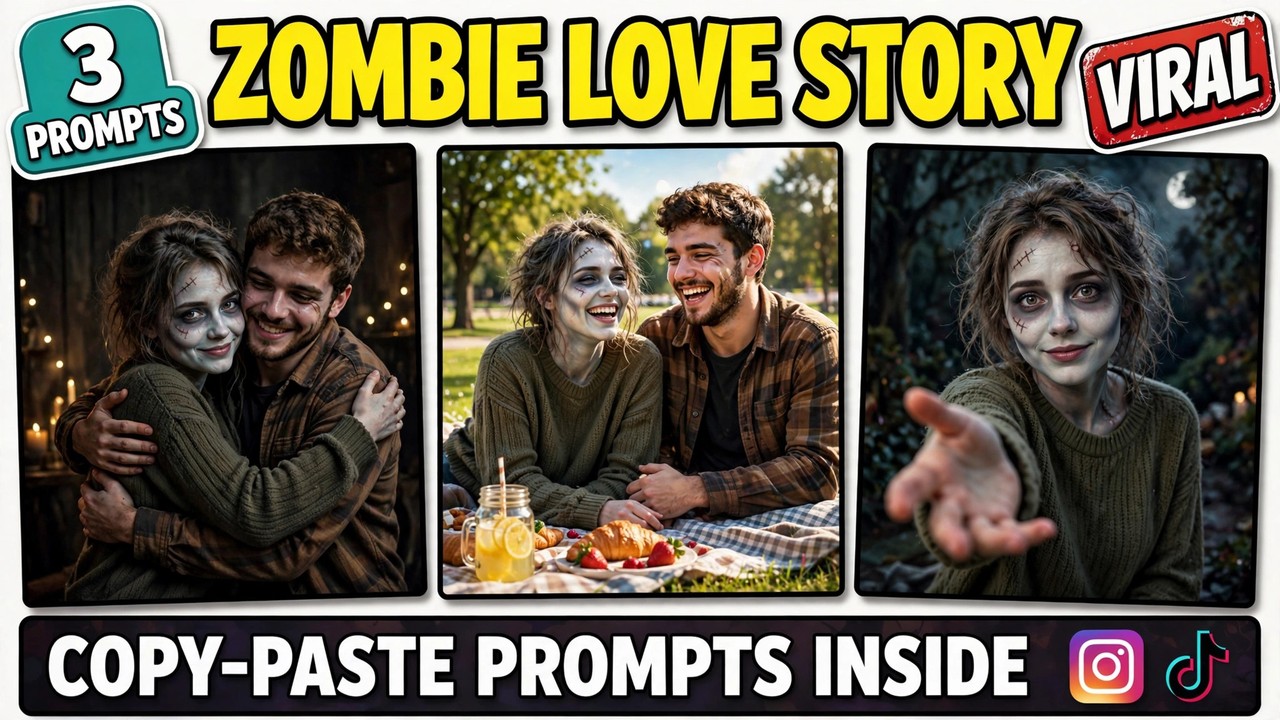
Picture this: a dim living room, warm lamp light, and two people facing each other. One of them looks different — pale makeup, tousled hair, a slightly tattered jacket, the gentle look of someone who has just turned into a zombie. The other one is holding a wooden stick, the way you would hold off something dangerous.
Then, instead of fighting, the second person lowers the stick. Opens their arms. And the zombie steps forward — not to attack, but for a hug.
That hug is the whole idea behind the zombie love story format, a horror-plus-romance video trend that started with a short AI film called “CHOICE” on Instagram in mid-September 2026. In the film, the partner lowers their weapon, opens their arms, and just as the zombie lunges in for the hug, the film hard-cuts to warm memories of the couple’s life together. Tutorials, templates, and remakes followed, and the format became one of the most shared Halloween-season videos of the year.
Below are three original prompts you can copy and paste — the hug, the memory cut, and a solo version that needs no second person. Each one comes with a demo video first, so you can see exactly what the prompt produces before you use it.
One rule before we start: keep it spooky-cute, not gory. There is no blood, no wounds, and no graphic horror in any of these prompts. The zombie look is gentle — pale makeup, tousled hair, tattered clothes — and the hug is the point, not the horror. That restraint is exactly why this format works for everyone, and why platforms leave it alone.
A quick note so this doesn’t get confused with older posts: my Ghostface post was a photo trend — a horror mask lurking behind you in a still image. My Chandramukhi post was a solo transformation into a horror heroine, and my Catrina post was a solo elegant transformation. This one is different. It is a two-person story with a hug and a memory cut — not a solo transformation.
What Is This Format?
The zombie love story format is a tiny short film, usually ten seconds or less, built in two beats. Beat one: the standoff. One partner has turned into a zombie — gently, tastefully — and the other faces them, holding something like a stick or a broom. Beat two: the choice. Instead of fighting, the partner lowers the prop, opens their arms, and they hug. Then comes the twist that makes people share it: a hard cut to a warm, sunny memory of the couple laughing together, before cutting back to the hug.
Why does it spread so fast? Two reasons. First, the hug subverts the whole zombie setup — viewers expect a scare and get something tender instead, and that surprise is what makes people send it to someone they love. Second, the format is personal. It is not a random scary clip; it is your face and your partner’s face, in a story about choosing each other. That is why it lands hardest around Halloween, when everyone is looking for a video that is spooky and sweet at the same time.
How to Make Your Own
Decide which version you are making. The couple version needs two photos — yours and your partner’s, with their permission. The solo version needs just yours. Pick before you generate, because the prompts are written differently.
Pick good reference photos. Front-facing, faces clearly visible, decent lighting. For the couple version, use two clean photos — one of each person. The AI builds both characters from those photos, so blurry or side-angled shots will make the faces drift.
Open any image-to-video AI tool. Google Flow, Runway, Kling, Luma, Pika, or a similar tool — the prompts below work with all of them. Upload your photos before pasting the prompt, or the faces will not stay consistent.
Copy one of the prompts below and paste it in. Each one spells out the scene, the zombie look, the movement, and the mood, so the AI does not have to guess anything. The words “no blood, no wounds, no gore” are in every prompt on purpose. Keep them in.
Generate two or three versions and pick the best. The first try rarely gets the hug timing perfect. Once you have a version you like, add a soft, emotional background track — a gentle piano piece makes the hug land twice as hard.
Prompt 1: The Hug
The heart of the whole format. One partner in a gentle zombie look, the other lowering a prop and opening their arms — and then the hug. This is the clip that makes people stop scrolling, and the one your video is built around.
Using AI video generation, create a photorealistic cinematic vertical video (9:16) of an emotional hug scene, based on the two uploaded reference photos.

The scene: a young couple stands facing each other in a dim, cozy living room with warm lamp light. One partner wears a gentle zombie-style look — pale face makeup, tousled hair, a slightly tattered jacket, a soft hollow-eyed expression. NO blood, NO wounds, NO gore. The other partner holds a plain wooden prop stick in both hands. Keep both faces, facial features, and hairstyles exactly as in the reference photos.

The moment: the partner holding the stick slowly lowers it to the floor, sets it aside, and opens their arms wide. The zombie partner steps forward and they embrace in a warm, emotional hug. The camera holds steady on the hug for the rest of the clip. Both look relieved and tender, like a reunion, not a fight.

Style: photorealistic, warm cinematic lighting, soft shadows, emotional and tender, spooky-cute. Vertical 9:16. No text overlays, no watermarks.
The timing of the hug is everything here. If the embrace comes too fast, the scene feels rushed and the “choice” moment never lands. Let the lowering of the prop breathe for a second — that small pause is what turns a hug into a story.
Prompt 2: The Memory Cut
The twist that makes the format viral. Right after the hug, the video hard-cuts to a warm, sunny memory of the couple laughing together — a picnic, golden light, everything bright. Then it cuts back to the hug. That contrast — dark room, sunny memory, dark room — is what people remember.
Using AI video generation, create a photorealistic cinematic vertical video (9:16) of a warm memory flashback, based on the two uploaded reference photos.

The scene: the same young couple from the reference photos sits together on a picnic blanket in a sunny park, laughing. Golden-hour sunlight, green trees, a few picnic items nearby. Both are in normal everyday clothes, smiling and relaxed, mid-laugh. Keep both faces, facial features, and hairstyles exactly as in the reference photos.

The feel: bright, warm, and nostalgic — the opposite of the dim hug scene. End the clip on the couple mid-laugh, so it can be hard-cut straight after the hug shot with no transition.

Style: photorealistic, warm golden-hour sunlight, joyful and nostalgic. Vertical 9:16. No text overlays, no watermarks.
The hard cut is the whole trick. No fade, no dissolve, no transition effect — just a straight cut from the hug to the memory and back. The abruptness is what makes viewers feel the jump between the two worlds, and it is the part most people get wrong by over-editing it.
Prompt 3: The Solo Turn
The version for anyone without a partner in the video. Just you, alone, in the gentle zombie look — turning slowly toward the camera and reaching a hand out toward the lens, as if asking the viewer for a hug. Simple, a little haunting, and surprisingly effective on its own.
Using AI video generation, create a photorealistic cinematic vertical video (9:16) of a solo scene, based on the uploaded reference photo.

The scene: a young woman alone in a dim, moody room with warm lamp light. She wears a gentle zombie-style look — pale face makeup, tousled hair, a slightly tattered jacket, a soft hollow-eyed expression. NO blood, NO wounds, NO gore. Keep her face, facial features, and hairstyle exactly as in the reference photo.

The movement: she turns slowly toward the camera. Then she reaches one hand out toward the lens with a soft, hopeful smile, as if asking for a hug. The camera holds on her outstretched hand for the rest of the clip.

Style: photorealistic, warm lamplight against darkness, gentle and emotional, spooky-cute. Vertical 9:16. No text overlays, no watermarks.
What sells this one is restraint. No lunging, no jump scare, no sudden movement — just a slow turn and an open hand. The quieter you play it, the more people lean in, and the more the clip gets rewatched.
3 Mistakes That Ruin the Story
Going gory. Blood, wounds, or graphic horror effects break this format completely. The whole appeal is that a zombie story turns tender. The moment it turns gruesome, it stops being shareable, platforms may restrict it, and the hug stops meaning anything. Keep it spooky-cute.
Skipping the memory cut. A hug on its own is sweet but forgettable. The memory cut is what gives the video its structure — dark, bright, dark — and its emotional punch. Without it, viewers watch once and move on. With it, they rewatch to catch the contrast.
Using a blurry or side-angle photo. The AI builds both characters from your reference photos. If a photo is blurry, dark, or shot from the side, the face will drift between frames and the hug will look like two strangers. A sharp, front-facing, well-lit photo fixes most problems before they start.
A Few Tips That Actually Help
Keep the zombie look gentle. Pale makeup, tousled hair, tattered clothes — that is all you need. The softer the look, the stronger the contrast with the hug, and the wider the audience that will share it.
Let the prop do the storytelling. A wooden stick, a broom, a rolled-up magazine — anything ordinary works. The prop tells the viewer “this person was ready to fight,” which makes lowering it the emotional beat of the whole video.
Match the music to the cut. A soft piano track that stays quiet through the hug and swells gently on the memory clip makes the contrast feel intentional. Search “soft piano” or “emotional strings” in the Reels audio browser and time the swell to the cut.
Post the three as a series. Hug, memory cut, solo turn — three videos, three days, one series. Series accounts tend to grow faster because people follow to catch the next part. Drop a hint about the next part in each caption.
Ask permission before using a partner’s photo. This one is not a tip so much as a rule. The couple version only works — and only stays up — when both people agreed to be in it. Generate it together and it becomes a shared memory instead of a surprise.
Frequently Asked Questions
What is this format, exactly?
It is a short AI video story in two beats: one partner, in a gentle zombie look, faces the other — and instead of fighting, the other lowers their prop, opens their arms, and they hug. A hard cut to a warm memory of the couple together is the twist that makes it shareable. The prompts in this post give you the exact scene, look, and movement instructions.
Which AI tool makes these videos?
Any image-to-video tool works — Google Flow, Runway, Kling, Luma, Pika, and similar tools. The prompts above are tool-agnostic. Start on a free tier, make a test video, and only think about a paid plan if you like the results.
Do I need a partner to make one?
No. The couple version needs two people, but the third prompt is a solo version — just you, turning toward the camera and reaching out a hand. It works on its own and it is the easiest of the three to make.
Can I use someone else’s photo?
Use your own photo, always. For the couple version, use your own photo plus your partner’s photo with their permission only. Putting someone else’s face into a video without permission is a deepfake problem, and platforms remove such content.
Is this the same as the Ghostface trend?
No. Ghostface is a photo trend — a horror mask lurking behind you in a still image. This is a two-person video story with a hug and a memory cut. Different format, different result.
Why does my video look gory?
Usually the prompt lost the “no blood, no wounds, no gore” direction, or the tool leaned into horror on its own. Paste the full prompt as written — those three phrases are what keep the look gentle. If a result still comes out graphic, regenerate rather than posting it.
How long does it take to generate one video?
It depends on the tool — usually 2 to 10 minutes. Keep your prompts and photos ready, so apart from generation time your actual work is about five minutes. For the best result, generate two or three versions and post the strongest one.
Final Words
The formula is simple: one standoff, one lowered prop, one hug — and a memory that explains why the hug matters.
So pick a prompt above, upload your photo, and make your video today. And if you like dramatic formats, check out my Ghostface, Chandramukhi, and Catrina posts too — the trending collection gets a new format every week. If you want to read more about AI video tools, this Google Flow guide is useful.

About Pinky Chouhan
Hey, my name is Pinky Chouhan, and I live in India. I am passionate about discovering new AI trends, AI video tools, and social media content ideas. I also have experience in video and photo editing using tools like CapCut, Adobe, InShot, and VN. Over time, I have worked on many editing projects and enjoy experimenting with new creative techniques and AI-powered tools. I regularly share the latest AI trends, video prompts, and creative ideas on The Prompt Master. My goal is to provide simple and practical prompts that anyone can use to create engaging AI videos. Most of the prompts published on this website are designed to be easy to use. You can simply copy a prompt, paste it into Google Flow or a compatible AI video tool, and start creating your video. I will continue sharing new AI trends, useful prompts, editing tips, and creative ideas to help creators make better content and stay updated with the fast-changing world of AI.