There is a specific kind of regret that only a bad haircut can give you. You sit down full of confidence, show the stylist a photo, and then catch your own face in the mirror and realise that the cut you loved on someone else does not look the same on you. Hair grows back, but the weeks in between can feel very long, especially before a festival, a wedding, or a family photo.
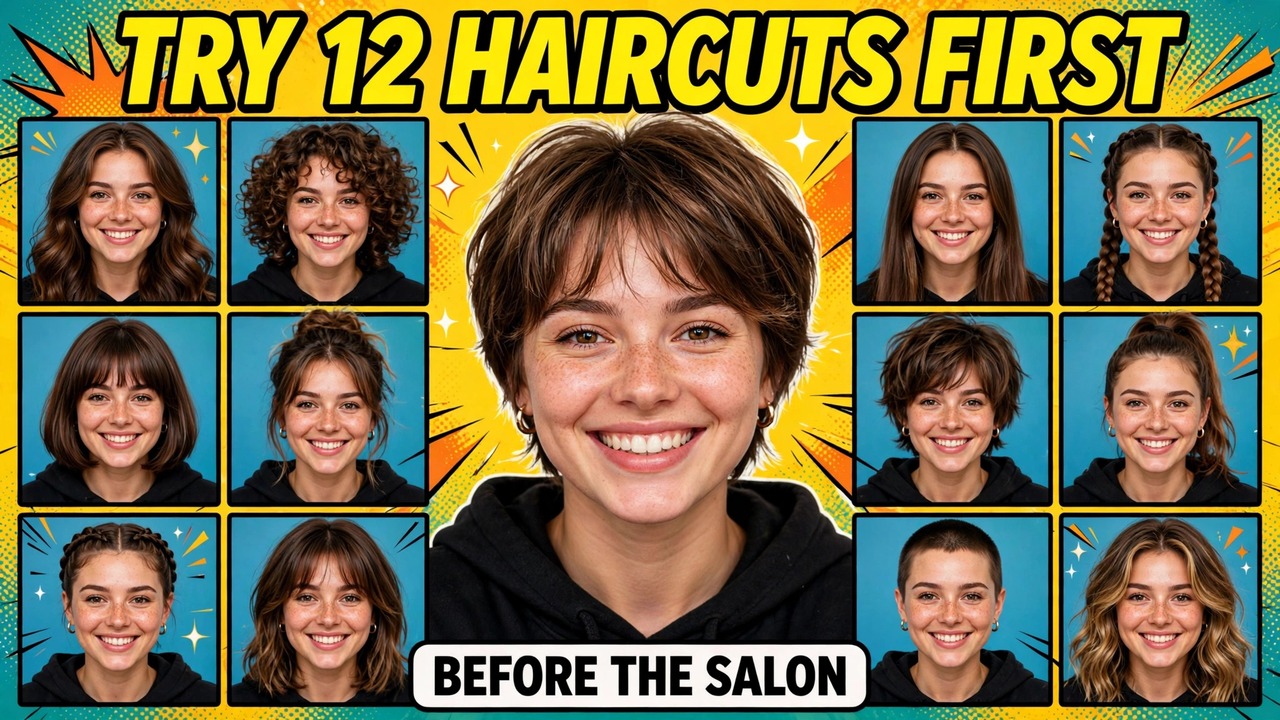
That is the problem behind the trend filling Indian reels in late October 2026. Instead of guessing, people upload one clear photo of themselves and ask an AI image tool to show the same face with many different hairstyles, side by side, in a single grid. You can see a bob, a layered cut, a pixie, and long waves on your own face before anyone picks up a pair of scissors. It is a preview, not a promise, but it turns a blind decision into an informed one. That is why an ai hairstyle grid is so useful right now: it lets you compare first and cut second.
The three prompts below are original and tool-agnostic, written for your own photo only. Each one is shown after a demo image, so you can see what kind of result to expect before you copy anything. The demo images in this post are AI-generated approximations made to show the format. They are not real output from your photo, and they are not a guarantee of how your own result will look. Your result will follow your own face, hair texture, and photo quality.
One rule matters most. Use only a photo of yourself, or one you have clear permission to use. Your face, your preview, your decision.
Why a Grid Works Better Than One Photo at a Time
Most people choose a haircut the slow way: they save screenshots of three different people with different face shapes, lighting, and hair types. None of those photos is them. A grid fixes that by holding everything else still. The face stays the same, the lighting stays similar, and only the hair changes.
A grid also stops a common salon mistake: choosing a cut for its name rather than its shape. A “bob” can mean chin-length and sharp, or soft and wavy. When you see several versions on your own face, you can point to the exact one you mean. Taking that image to your appointment is one of the most practical things you can do with it.
Before You Start: Pick the Right Photo
The quality of your preview depends almost entirely on the photo you upload. Choose a front-facing photo taken in daylight, with your face fully visible and your current hair neatly out of the way if possible. A photo where half your face is in shadow, or where you are turned to the side, will give the tool less to work with, and the results will drift away from your real features.
A plain background helps, and a neutral expression works better than a big smile, because a smile changes the shape of the cheeks and jaw. A clear phone photo taken near a window, at eye level, is usually enough. Avoid heavy filters, beauty modes, and sunglasses. The tool needs your real face shape and hairline to make a preview worth trusting.
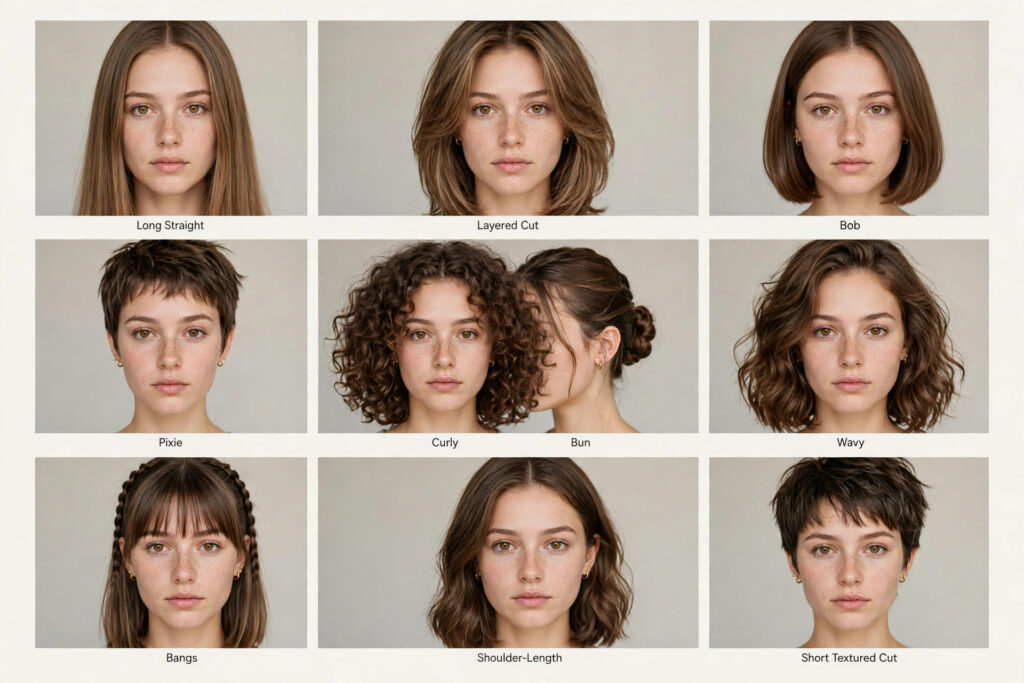
Prompt 1: The 12-Style Grid
This is the main prompt. It asks for one grid image showing the same person in twelve hairstyles: long straight, layered cut, bob, pixie, curly, wavy, braided, bun, ponytail, bangs, shoulder-length, and a short textured cut. It is a good starting point if you are unsure what direction you want.
Using an AI image generation tool, create a photorealistic hairstyle preview grid from the uploaded reference photo of me.
Show the same person, with the same face, facial features, skin tone, and face shape as in the reference photo, in 12 labelled panels arranged in a clean grid on a plain light background. The 12 hairstyles are: long straight hair, layered cut, chin-length bob, pixie cut, curly hair, soft waves, braided hair, low bun, high ponytail, hair with bangs, shoulder-length cut, and short textured cut.
Keep the face identical in every panel. Change only the hairstyle. Use natural daylight, a front-facing head-and-shoulders view in each panel, and small clear labels under each panel. Do not change the person’s age, face shape, or features. Do not use any celebrity’s face, any brand logo, or any watermark. Use only the uploaded photo of me as the reference.
Read the grid like a shortlist, not a final answer. Circle two or three panels you like, and ignore the rest for now. If one panel stands out immediately, note what you like about it: the length, the volume, the way it frames the face. That detail is exactly what your stylist needs to hear.
Prompt 2: The Face-Shape Best-Match Comparison
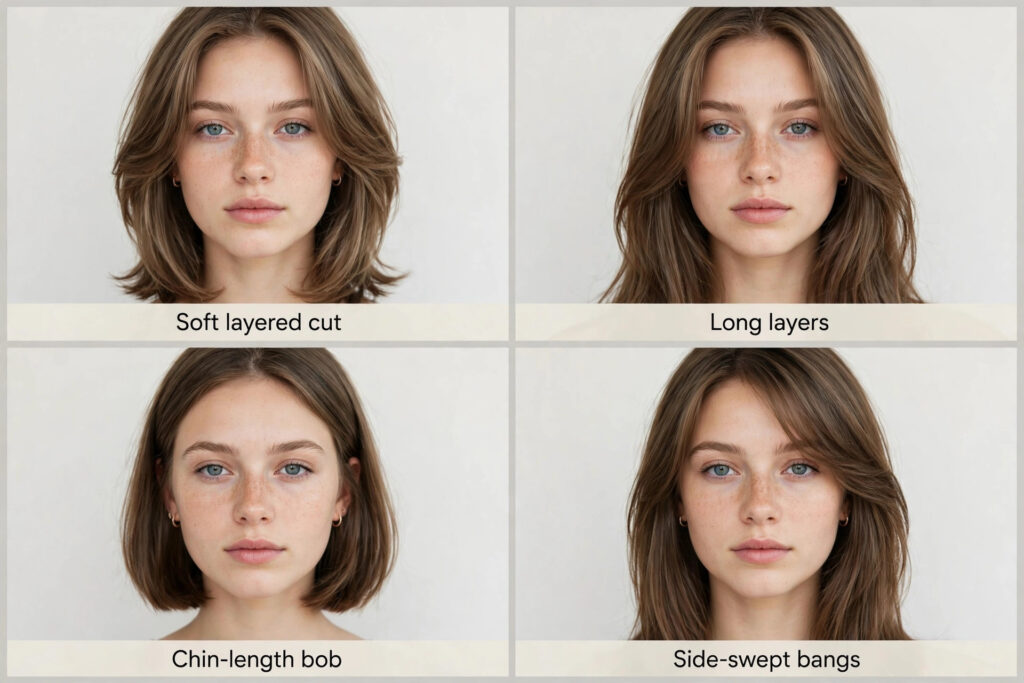
Once you have a shortlist, this prompt helps you judge it more carefully. It shows four styles side by side — soft layered cut, long layers, chin-length bob, and side-swept bangs — so you can notice how each cut changes the outline of your face.
Using an AI image generation tool, create a photorealistic four-panel hairstyle comparison from the uploaded reference photo of me.
Show the same person, with the same face, facial features, skin tone, and face shape as in the reference photo, in four large panels side by side on a plain light background. The four hairstyles are: soft layered cut, long layers, chin-length bob, and side-swept bangs. Add a small clear label under each panel.
Keep the face identical in every panel and change only the hairstyle. Use natural daylight and a front-facing head-and-shoulders view in each panel, so the shape of each cut against the face is easy to compare. Do not change the person’s age, face shape, or features. Do not use any celebrity’s face, any brand logo, or any watermark. Use only the uploaded photo of me as the reference.
Compare the outline, not just the hair. Look at where each cut ends against your jaw, your cheekbones, and your neck. The best panel is usually the one where your face still looks like your face, only framed a little better.
Prompt 3: Short vs Long, and a Festive Shortlist
The hardest decision is rarely between two similar styles. It is between keeping your length and cutting it off. This prompt shows your current long hair, a medium layered cut, and a short festive bob with soft waves, as a clear shortlist — ideal if you want a celebration-ready look without committing blind to a drastic change.
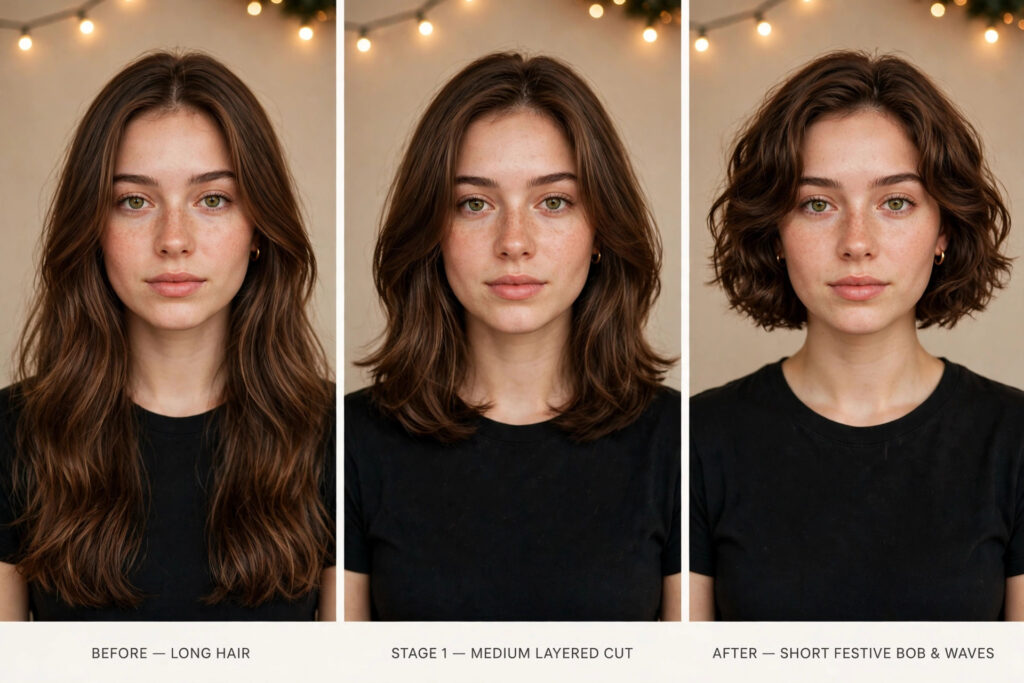
Using an AI image generation tool, create a photorealistic three-panel hairstyle shortlist from the uploaded reference photo of me.
Show the same person, with the same face, facial features, skin tone, and face shape as in the reference photo, in three panels side by side. Panel 1: long hair, as in the reference photo. Panel 2: medium layered cut. Panel 3: short festive bob with soft waves, suitable for a celebration.
Keep the face identical in every panel and change only the hairstyle and length. Use warm, natural lighting, a front-facing head-and-shoulders view in each panel, and small clear labels under each panel. Do not change the person’s age, face shape, or features. Do not use any celebrity’s face, any brand logo, or any watermark. Use only the uploaded photo of me as the reference.
Keep the medium option in the conversation. If you show your stylist only the long and short panels, the discussion becomes all or nothing. Showing the medium panel as well gives you a safe middle ground, and it often turns out to be the cut people actually enjoy living with day to day.
How to Use These Prompts, Step by Step
Open any image generation tool that accepts a reference photo. The prompts work across the usual options; see this Google Flow guide for one example. Upload your photo first, before pasting any prompt.
Copy Prompt 1 exactly as written and paste it in. View the grid on a large screen if you can: phone screens hide small differences in length and volume. Save it, mark your two or three favourite panels, then run Prompt 2 with your shortlist in mind, and Prompt 3 if you are deciding on length. With an ai hairstyle grid, you are comparing versions of yourself, not guessing from a stranger’s photo.
Finally, take your saved images to the salon. Show the stylist the exact panel you liked, and talk through what you liked about it. A good stylist will also tell you honestly if your hair type or texture will change how that cut behaves in real life. Listen to that advice. The preview starts the conversation; it does not replace it.
Tips That Make the Preview More Honest
Use the same photo for every prompt, and regenerate if the face looks wrong. Changing the photo between prompts makes the face drift, and a panel that changes your eye shape, nose, or jaw cannot be judged fairly. A preview is only useful when the face is recognisably yours.
Think about your daily routine and hair texture. A style that needs thirty minutes every morning may look wonderful in a grid and feel exhausting by the second week. AI previews also tend to show smooth hair, so if yours is curly, fine, thick, or prone to frizz, ask your stylist how the cut will behave with your texture. And do not chase a celebrity look: use the grid to find your version, not someone else’s.
How This Is Different From a Character Sheet
Readers may remember the AI Frame Photo post, about making a character sheet once and reusing it across many images. This post differs in one clear way: a hairstyle grid is a one-time comparison to help you choose a real salon cut, not a reusable identity sheet. One helps you decide a haircut; the other helps you stay consistent across creations.
Frequently Asked Questions
Do I need a paid tool to try this?
No. Start with a free tier, check whether the face stays consistent, and only consider paying if you like the quality.
Will the preview look exactly like the real haircut?
No. A preview shows shape, length, and framing, but not your exact texture, growth pattern, or how the cut falls after washing. Treat it as a strong guide, and let your stylist make the final judgement.
What if none of the styles looks right?
That is still useful. It usually means you want a smaller change, like layers or bangs. Try Prompt 2 with the closest options, or ask your stylist.
Can I use a photo of someone else?
Only with their clear permission. These prompts are written for your own photo.
Should I show the grid to my barber or stylist?
Yes — that is its best use. It shows your stylist exactly what you mean, and lets them explain what will work with your hair type before cutting starts.
Final Words
A haircut is a small decision with a long shadow. Spending ten minutes on a preview before you book makes for a much calmer appointment. Try the ai hairstyle grid before you book, shortlist honestly, and take the result to a real stylist for the final call.
For more ideas, browse the trending collection. And save your grid for the next time you are tempted by a sudden change.
About Pinky Chouhan
Hey, my name is Pinky Chouhan, and I live in India. I am passionate about discovering new AI trends, AI video tools, and social media content ideas. I also have experience in video and photo editing using tools like CapCut, Adobe, InShot, and VN. Over time, I have worked on many editing projects and enjoy experimenting with new creative techniques and AI-powered tools. I regularly share the latest AI trends, video prompts, and creative ideas on The Prompt Master. My goal is to provide simple and practical prompts that anyone can use to create engaging AI videos. Most of the prompts published on this website are designed to be easy to use. You can simply copy a prompt, paste it into Google Flow or a compatible AI video tool, and start creating your video. I will continue sharing new AI trends, useful prompts, editing tips, and creative ideas to help creators make better content and stay updated with the fast-changing world of AI.