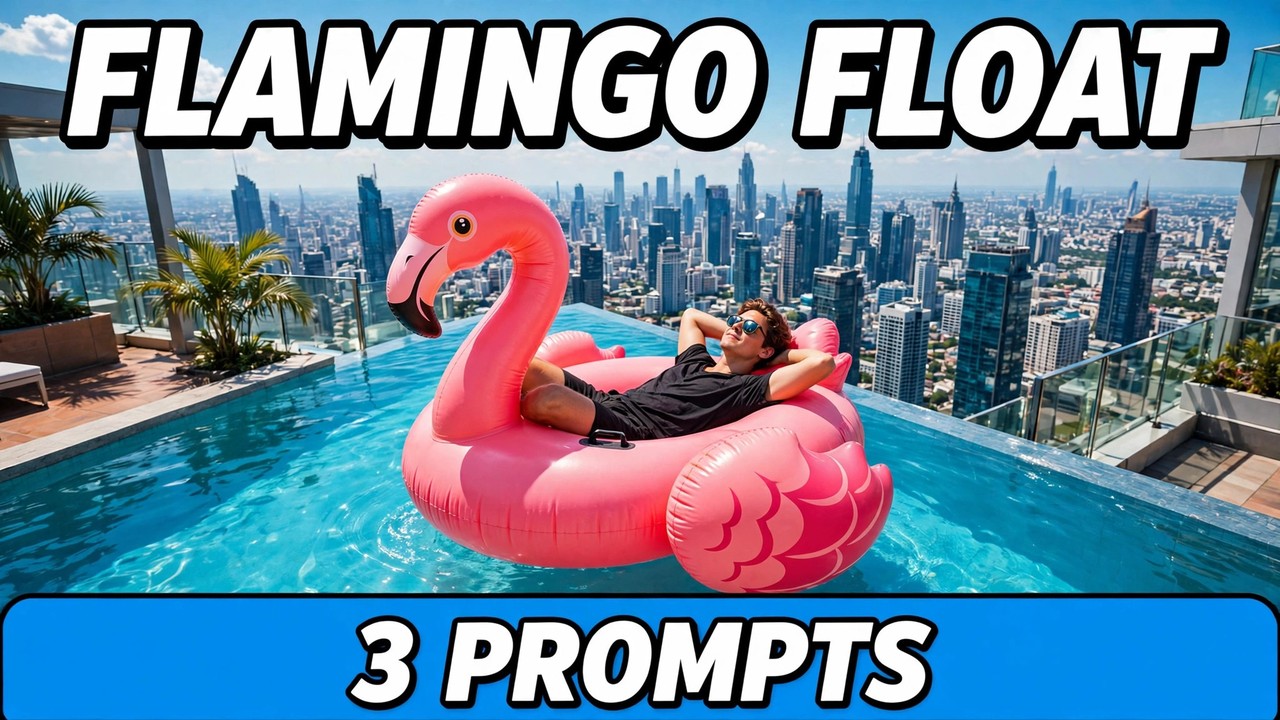
Picture a rooftop infinity pool, high above a city. The water meets the sky, the skyline stretches out below, and in the middle of it all a person lies back on a giant pink flamingo float, completely relaxed, sunglasses on, hands behind their head. Then the float starts to move. Slowly, almost gently, it drifts toward the edge of the pool — toward the drop. Just before it gets there, a hand reaches into the frame and pushes it back to safety. The person never even opens their eyes.
That scare, followed by the calm rescue, is the whole joke behind the flamingo float ai video trend. Tracker figures put the original clips at around 24.2M TikTok views with 1.8M likes, read on 5 November 2026, with a how-to reel following on 4 November. It works because it plays on a feeling everyone recognises: that split second when something relaxing suddenly looks risky, and then turns out to be fine. The calm is what makes it funny.
One thing must be said clearly before the prompts: this is an AI recreation only. A real rooftop pool edge is genuinely dangerous, and nobody should try to float to one in real life. Everything here is made from a photo, by an AI video tool — no real person, no real pet, no real edge. Make it on a screen, from your own photo.
Below are three original prompts that recreate the effect — a solo drift and rescue, a pet version, and a slower sunset variant. Each comes with a demo video first, so you can see what the prompt produces before you use it. The demos are AI-generated approximations, not true reference-photo output, and they are silent and visual only.
What Is This Format?
The format is a short, silent visual gag built on three beats. First, the calm: a person — or a pet — lying back on a giant pink flamingo float in a rooftop infinity pool, city skyline all around, nothing happening at all. Second, the drift: the float moves slowly toward the edge of the pool, and the viewer starts to worry, because the edge is also the edge of the building. Third, the rescue: a hand reaches in from off camera and pushes the float back, and the person stays relaxed, as if nothing had happened.
The flamingo matters. A plain inflatable ring would not read the same way. The bright pink bird makes the scene playful instead of frightening, and tells the viewer that this is a joke, not a real emergency. It needs no dialogue and no song, so it travels across languages exactly as it is — calm, drift, rescue.
Prompt 1: The Rooftop Drift and the Rescue Push
The classic version, and the one to make first. You lie back on the flamingo float in a rooftop infinity pool above a city skyline, drifting slowly toward the edge, until a hand reaches in and pushes you back to safety. You stay calm through all of it, and the rescue is the punchline.
Using AI video generation, create a photorealistic cinematic vertical video (9:16) of a rooftop pool float scene, based on the uploaded reference photo.
The scene: a rooftop infinity pool high above a city skyline in bright daylight, turquoise water, glass edge, tall buildings below. The person from the reference photo lies back relaxed on a giant pink flamingo float in the pool, wearing everyday swimwear and sunglasses, hands behind their head. Keep their face, hairstyle, and outfit exactly as in the reference photo.
The moment: the float drifts slowly toward the pool edge over the drop below. Then a hand reaches into the frame and gently pushes the float back toward the middle of the pool. The person stays calm and relaxed throughout, never opening their eyes in alarm.
Style: photorealistic, bright daylight, smooth steady camera work. Vertical 9:16. Silent and visual only — no dialogue, no music, no song. No text overlays, no watermarks, no logos.
Keep the drift slow. If the float rushes to the edge, the video looks like a fall, and the joke turns into a scare. A slow drift gives the viewer time to worry a little — and that worry is what makes the rescue funny.
Prompt 2: The Pet on the Float
The softer version. A golden retriever lies on the same giant pink flamingo float in the same rooftop pool, drifting toward the edge in exactly the same way, until the same hand pushes the float back. The dog does not panic. It barely notices — the calmest creature in the most dramatic setting.
Using AI video generation, create a photorealistic cinematic vertical video (9:16) of a pet on a rooftop pool float, based on the uploaded reference photo of a dog.
The scene: a rooftop infinity pool high above a city skyline in bright daylight, turquoise water, glass edge, tall buildings below. A golden retriever lies back relaxed on a giant pink flamingo float in the pool. Keep the dog’s breed, coat, face, and markings exactly as in the reference photo.
The moment: the float drifts slowly toward the pool edge over the drop below. Then a hand reaches into the frame and gently pushes the float back toward the middle of the pool. The dog stays calm and relaxed throughout, looking out over the skyline.
Style: photorealistic, bright daylight, smooth steady camera work. Vertical 9:16. Silent and visual only — no dialogue, no music, no song. No text overlays, no watermarks, no logos.
Let the dog stay calm. The comedy is the contrast between the dramatic setting and an animal that could not care less. If the dog looks frightened or alert, the clip reads as a real animal in danger. One relaxed dog, one slow drift, one gentle push — that is the balance.
Prompt 3: The Sunset Skyline Drift
The cinematic version. The same float, the same rooftop pool, but now at sunset, with warm orange and pink light and the city glowing below. The drift is even slower here — less like a joke, more like a short film, until the hand comes in and the rescue lands the same punchline.
Using AI video generation, create a photorealistic cinematic vertical video (9:16) of a sunset rooftop pool float scene, based on the uploaded reference photo.
The scene: a rooftop infinity pool high above a glowing city skyline at sunset, warm orange and pink light, turquoise water, glass edge, city lights below. The person from the reference photo lies back relaxed on a giant pink flamingo float in the pool, wearing everyday swimwear and sunglasses, hands behind their head. Keep their face, hairstyle, and outfit exactly as in the reference photo.
The moment: the float drifts very slowly toward the pool edge over the drop below, slower than in daylight. Then a hand reaches into the frame and gently pushes the float back toward the middle of the pool. The person stays calm and relaxed throughout, never opening their eyes in alarm.
Style: photorealistic, warm sunset light, smooth slow steady camera work. Vertical 9:16. Silent and visual only — no dialogue, no music, no song. No text overlays, no watermarks, no logos.
Do not rush the sunset. The whole point of this version is the slow, golden mood. If the camera moves fast or the drift speeds up, it stops being the sunset version and becomes a repeat of the first prompt. Slow camera, slow drift, warm light — and let the rescue arrive gently.
How to Make It
Start with one clear photo of yourself, or of your own pet for the second prompt. A front-facing photo in good daylight works best, because the tool needs a clean face, coat, and markings to keep you recognisable. A blurry photo will make the result worse.
Next, open any image-to-video AI tool. The prompts are tool-agnostic and work with Google Flow, Runway, Kling, Luma, Pika, and similar tools. Upload your photo before pasting the prompt, or the person on the float will not look like you. Then copy one prompt exactly as written. The lines about keeping your face and outfit, and the lines saying silent and visual only, stop the tool from turning your float scene into a generic holiday video or adding a song.
Generate two or three versions and post the strongest one. The first try sometimes makes the float wobble, the pool edge look wrong, or the rescue hand appear too early. Once you have a steady pool, a clear slow drift, and a person who still looks like you, you have the clip. If you want to try the flamingo float ai video format yourself, pick a prompt above and upload your own photo.
One rule matters: use your own photo only. Putting someone else on a rooftop float without their permission is a problem, even when the video is just a joke. Your photo, your float, your video.
Safety Note — AI Only, Never a Real Rooftop Edge
Read this before anything else. A rooftop infinity pool edge is a real drop, and a real float drifting toward one is genuinely dangerous. Do not try to recreate this scene in real life, do not lie on a float near a rooftop pool edge, and do not ask anyone else to do it for a video. The safest way to make one is with AI, from a photo, with no real person, no real pet, and no real edge involved. The same applies to pets: never place a real dog or cat on a float in a pool, let alone a rooftop pool. Make the joke with AI, from a photo, and keep your real pet on solid ground.
Tips That Actually Help
Keep the skyline in the frame. A rooftop pool without a visible city below it looks like any pool. The skyline is what makes the height feel real, and the height is what makes the drift feel risky.
Do not add a song. Some versions run to a well-known track, but you do not need it, and a copyrighted song can get a post muted or removed. The clips are built to work silently; a short caption does the same job, with none of the risk.
Post the three as a series. Solo drift, pet version, sunset drift — three videos, three days. The sunset version makes a strong final post.
Frequently Asked Questions
What is this trend, exactly?
It is a short, silent video where a person — or a pet — lies back on a giant pink flamingo float in a rooftop infinity pool, drifts slowly toward the edge, and is pushed back to safety by a hand reaching into the frame.
Which AI tool makes these videos?
Any image-to-video tool works — Google Flow, Runway, Kling, Luma, Pika, and similar tools. Start on a free tier.
Do I need to add music to make it work?
No. These clips are designed to work silently, and the prompts say so. A caption is enough; a copyrighted track only risks a mute or a takedown.
Is it safe to try this at a real rooftop pool?
No — do not try it. Make the video with AI from a photo, and keep yourself and your pet far away from any real edge.
Final Words
The formula is simple: one rooftop pool, one pink flamingo, one slow drift, one gentle push. If you want to try the flamingo float ai video trend yourself, pick a prompt above, upload your own photo, and make it — silently, safely, with AI only, never near a real edge.
For more formats, browse the trending collection. For more on AI video tools, this Google Flow guide is useful.
About Pinky Chouhan
Hey, my name is Pinky Chouhan, and I live in India. I am passionate about discovering new AI trends, AI video tools, and social media content ideas. I also have experience in video and photo editing using tools like CapCut, Adobe, InShot, and VN. Over time, I have worked on many editing projects and enjoy experimenting with new creative techniques and AI-powered tools. I regularly share the latest AI trends, video prompts, and creative ideas on The Prompt Master. My goal is to provide simple and practical prompts that anyone can use to create engaging AI videos. Most of the prompts published on this website are designed to be easy to use. You can simply copy a prompt, paste it into Google Flow or a compatible AI video tool, and start creating your video. I will continue sharing new AI trends, useful prompts, editing tips, and creative ideas to help creators make better content and stay updated with the fast-changing world of AI.