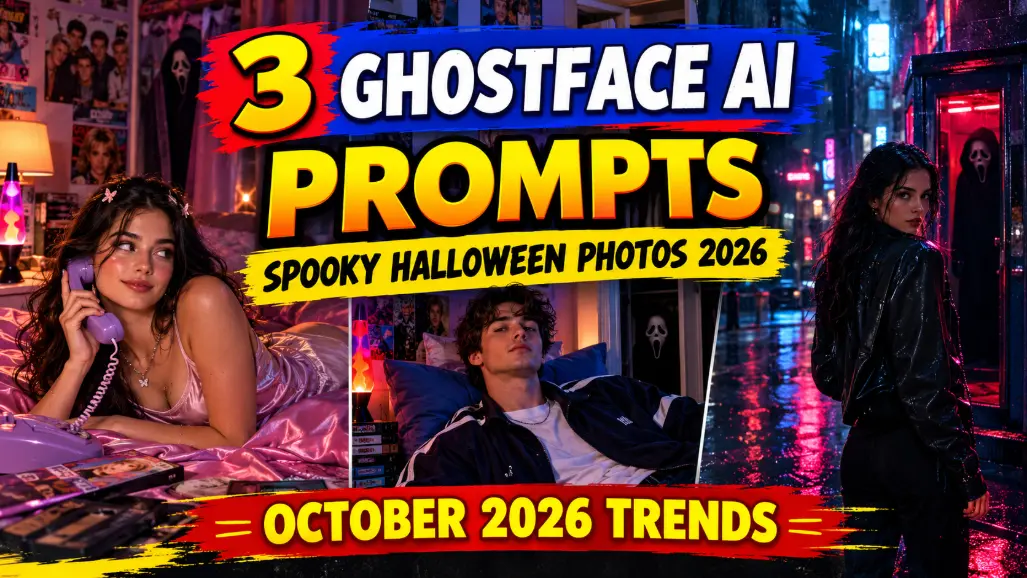
October is here, and my feed just turned into a 90s horror movie — in the best way possible. Girls on pink satin bedding holding purple corded phones. Guys leaning against pillows under lava-lamp glow. And in every single photo, half-hidden in the shadows behind them… Ghostface, watching.
This is the Ghostface AI photo trend — the viral Halloween challenge where you upload your own photo and AI reimagines you inside a dreamy 90s bedroom scene, with the iconic Scream mask lurking in the background. It is spooky, it is aesthetic, and it is absolutely everywhere right now.
The best part? You need zero photography skills. No costume, no set, no camera tricks — just your selfie and a good prompt. I wrote 3 original copy-paste prompts for the Ghostface AI photo trend below, in three totally different moods, each with the result image first so you see exactly what the prompt creates.
What Is the Ghostface AI Photo Trend?
The format is simple and genius. You take a normal photo of yourself and ask an AI image tool — Gemini, ChatGPT, or any photo editor with AI generation — to transform it into a cinematic 90s-inspired portrait: vintage bedroom, retro phone, moody lighting, film grain… and somewhere in the frame, Ghostface hiding in the shadows like a horror photobomb.
Why is it blowing up? Three reasons. Timing — Halloween season makes everyone hungry for spooky content. Nostalgia — the 90s bedroom aesthetic (satin bedding, corded phones, boy-band posters) hits millennials and Gen Z alike. And shareability — the lurking Ghostface gives every photo a “wait, did you see that?” double-take moment that stops thumbs mid-scroll. For more background on how this format took over feeds, see Perfect Corp’s guide to the Gemini Ghostface AI photo trend.
People are posting them as Instagram posts, Reels covers, Stories, even Halloween profile pictures. The three prompts below cover the trend’s three most viral moods — pick your vibe and generate.
How to Use These Ghostface AI Prompts
Step 1: Pick a clear, well-lit photo of yourself — front-facing works best so the AI keeps your face recognisable.
Step 2: Open an AI image tool (Gemini, ChatGPT image generation, or any AI photo editor).
Step 3: Upload your photo and paste one of the prompts below. Always tell the AI to preserve your facial identity — that’s the line that stops it from generating a random stranger.
Step 4: If the first result looks off (AI sometimes fumbles faces), regenerate once or twice — and try adding the exact lighting words from the prompt, which noticeably improves the cinematic feel.
Prompt 1: Dreamy 90s Bedroom Spook
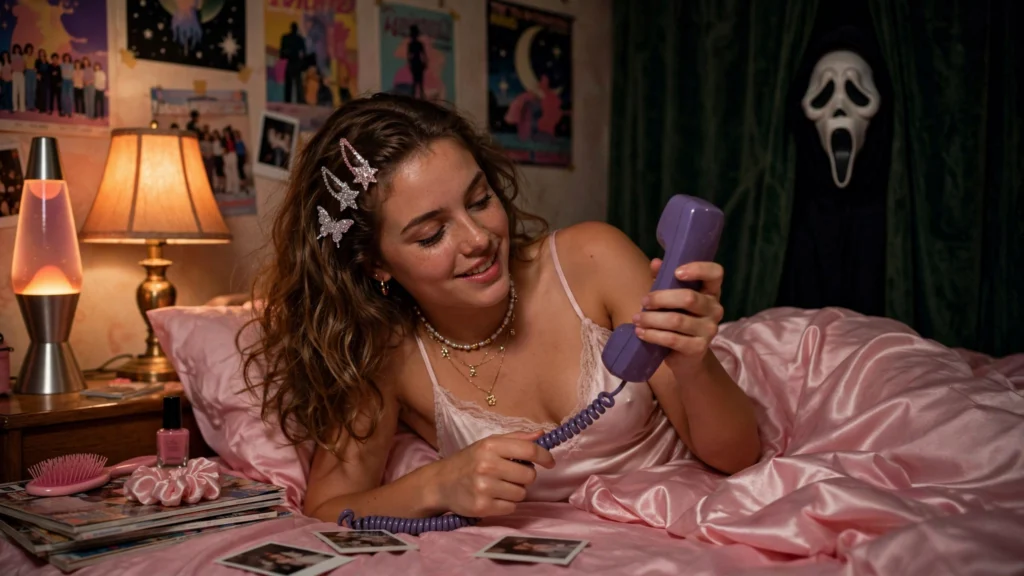
The trend’s signature look — soft, dreamy, pink-satin girl-core with a chill down your spine. This prompt puts you on pink satin bedding with a purple corded phone, playful expression, glittery 90s details all around… while Ghostface peeks from behind the curtain, half-hidden. Cute meets creepy — that’s the whole aesthetic, and it’s the version getting the most saves.
Use my uploaded photo as the base and preserve my exact facial identity, features, skin tone and expression style — the person must clearly remain me.

Transform it into a dreamy 90s-inspired portrait: I am lying across pink satin bedding, playfully twirling the cord of a purple 90s telephone, with a soft mischievous smile. My hair falls in loose waves with small glittery clips. I wear a satin camisole top and layered thin necklaces, glossy natural makeup.

The bedroom glows warm and nostalgic — 90s pop posters on the walls, a lava lamp on the nightstand, scattered magazines. Half-hidden behind the curtain in the background, the Ghostface mask from Scream lurks in soft shadow, barely visible but unmistakable — a subtle horror photobomb.

Style: cinematic still from a 90s teen horror film, warm lamp glow mixed with cool window light, soft VHS film grain, gentle depth of field, ultra-detailed, vertical 4:5 portrait. No text, no watermark.
My tip: The Ghostface placement makes or breaks this one — “half-hidden” and “barely visible” keep it classy. If he comes out too front-and-center, regenerate with the words “subtle” and “background shadow” added.
Prompt 2: Moody Boy-Band Horror
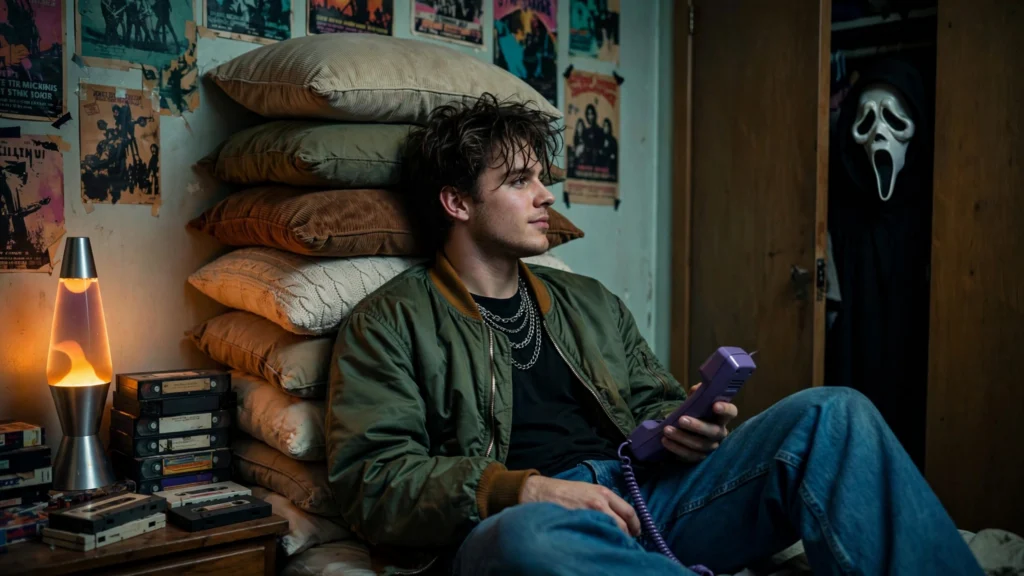
The moodier, cooler sibling of Prompt 1. This one is all lava-lamp glow, vintage bomber jacket, 90s heartthrob hair — leaning back against a stack of pillows like a boy-band poster come to life. And in the closet doorway behind you, Ghostface peers out of the darkness. Works brilliantly for guys, but honestly the vibe suits anyone.
Use my uploaded photo as the base and preserve my exact facial identity, features, skin tone and expression style — the person must clearly remain me.

Transform it into a moody Y2K-style portrait: I am leaning back against a tall stack of pillows, holding a purple 90s corded phone loosely in one hand, relaxed confident expression. My hair is tousled with strands falling across my forehead. I wear a vintage bomber jacket over a plain tee, baggy jeans, and thin silver chain necklaces.

The room glows with a lava lamp, 90s band posters, and a shelf of VHS tapes. In the background, the Ghostface mask from Scream peers from the dark gap of a half-open closet door, face half in shadow.

Style: cinematic 90s horror-movie still, dim lamp glow with deep shadows, teal-and-amber color grade, visible film grain, shallow depth of field, ultra-detailed, vertical 4:5 portrait. No text, no watermark.
My tip: This prompt loves specific lighting words — “dim lamp glow”, “deep shadows”, “teal-and-amber” — because vague lighting is the #1 reason AI portraits come out looking flat. Keep those lines in.
Prompt 3: Cinematic Slasher Night
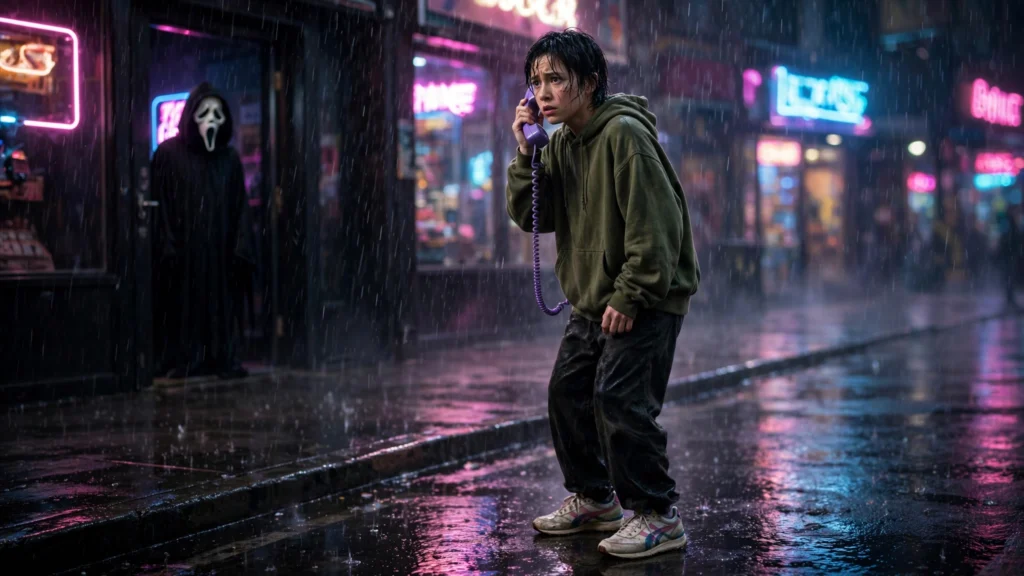
For those who want full horror, no dreaminess. This prompt drops the cozy bedroom and puts you in a dark neon-lit street at night — hoodie up, retro sneakers, holding the corded phone like you just got the call. Behind you, Ghostface stands in a dark doorway, shadows stretching across the wet pavement. This is the most cinematic of the three, and it makes a killer Reels cover.
Use my uploaded photo as the base and preserve my exact facial identity, features, skin tone and expression style — the person must clearly remain me.

Transform it into a cinematic horror portrait: I stand on a dark rain-slicked street at night, wearing a loose vintage hoodie and retro sneakers, holding a purple 90s corded phone to my ear with a tense, alert expression, as if I just received a disturbing call. Neon pink and blue signs glow in the blurred background.

Behind me, the Ghostface mask from Scream stands motionless in a dark shop doorway, white mask catching a sliver of neon light, long shadows stretching across the wet pavement toward me.

Style: still from a modern slasher film, dramatic neon-noir lighting, rain reflections, heavy cinematic grain, anamorphic feel, ultra-detailed, vertical 4:5 portrait. No text, no watermark.
My tip: Post this one as a Reel with a horror audio and a slow zoom — the format is practically begging for motion, and Reels push Halloween content hard in October.
5 Tips to Nail the Ghostface AI Photo Trend
1. Always lock your face first. Every prompt above starts with a facial-identity line for a reason — without it, AI happily invents a stranger. If your face still drifts, regenerate rather than accepting a “close enough” stranger.
2. Name your lighting. “VHS grain, dim lamp glow” beats “spooky lighting” every time. Specific lighting words are the difference between a cinematic still and a flat filter look.
3. Keep Ghostface in the background. The trend’s magic is the lurking — half-hidden, photobomb-style. A front-and-center Ghostface turns aesthetic into costume party. Subtle wins.
4. Match your caption to the mood. “On the phone with Ghostface… should I answer?” for Prompt 1, something moodier for Prompt 2. Captions with the trend hashtags (#GeminiGhostFaceTrend, #HalloweenAITrend, #SpookySeason) genuinely help discovery.
5. Make it move. Run your finished photo through any image-to-video tool for a 3-second slow zoom — motion versions of this trend outperform stills on Reels and TikTok. My October reels trends post has more on what the algorithm is pushing right now.
FAQs About the Ghostface AI Photo Trend
What is the Ghostface AI photo trend?
It’s a viral Halloween AI trend where you upload your photo and AI reimagines you in a dreamy 90s-style scene — vintage bedroom, retro phone, cinematic lighting — with the Ghostface mask from Scream lurking in the background. The Ghostface AI photo trend prompts in this post recreate the three most popular versions.
Which app do I need for the Ghostface trend?
Gemini and ChatGPT’s image generation both work — just upload your selfie and paste a prompt. If one tool refuses or messes up your face, try another AI photo editor; the prompts above are tool-agnostic.
Why does the AI change my face?
Generative AI sometimes “reinterprets” faces instead of preserving them. The fix is the identity-lock line at the start of each prompt (“preserve my exact facial identity”). If it still drifts, regenerate — and avoid over-beautifying words in your own edits.
Is the Ghostface trend free to try?
Yes — the basic versions of Gemini and ChatGPT image generation are free to use, and you only need one selfie. No costume, no photoshoot, no paid app required.
Final Words: Answer the Call
The Ghostface AI photo trend is that rare trend that’s both genuinely fun and genuinely easy — one selfie, one prompt, and you’re the star of your own 90s slasher still. With Halloween weeks away, this is the perfect moment to post yours while the trend is still climbing.
Generate all three moods and post your favorite tonight. Want more seasonal AI formats? My October 2026 reels trends and Storm AI dance trend posts are full of them — and the trending collection keeps you ahead of whatever blows up next.
About Pinky Chouhan
Hey, my name is Pinky Chouhan, and I live in India. I am passionate about discovering new AI trends, AI video tools, and social media content ideas. I also have experience in video and photo editing using tools like CapCut, Adobe, InShot, and VN. Over time, I have worked on many editing projects and enjoy experimenting with new creative techniques and AI-powered tools. I regularly share the latest AI trends, video prompts, and creative ideas on The Prompt Master. My goal is to provide simple and practical prompts that anyone can use to create engaging AI videos. Most of the prompts published on this website are designed to be easy to use. You can simply copy a prompt, paste it into Google Flow or a compatible AI video tool, and start creating your video. I will continue sharing new AI trends, useful prompts, editing tips, and creative ideas to help creators make better content and stay updated with the fast-changing world of AI.